B2B landing pages for paid traffic: how to build them with AI, by offer and funnel stage
A B2B landing page for paid traffic is built for one ad and one offer, and this guide shows what each offer's page needs, how AI drafts it and how to judge it on pipeline.
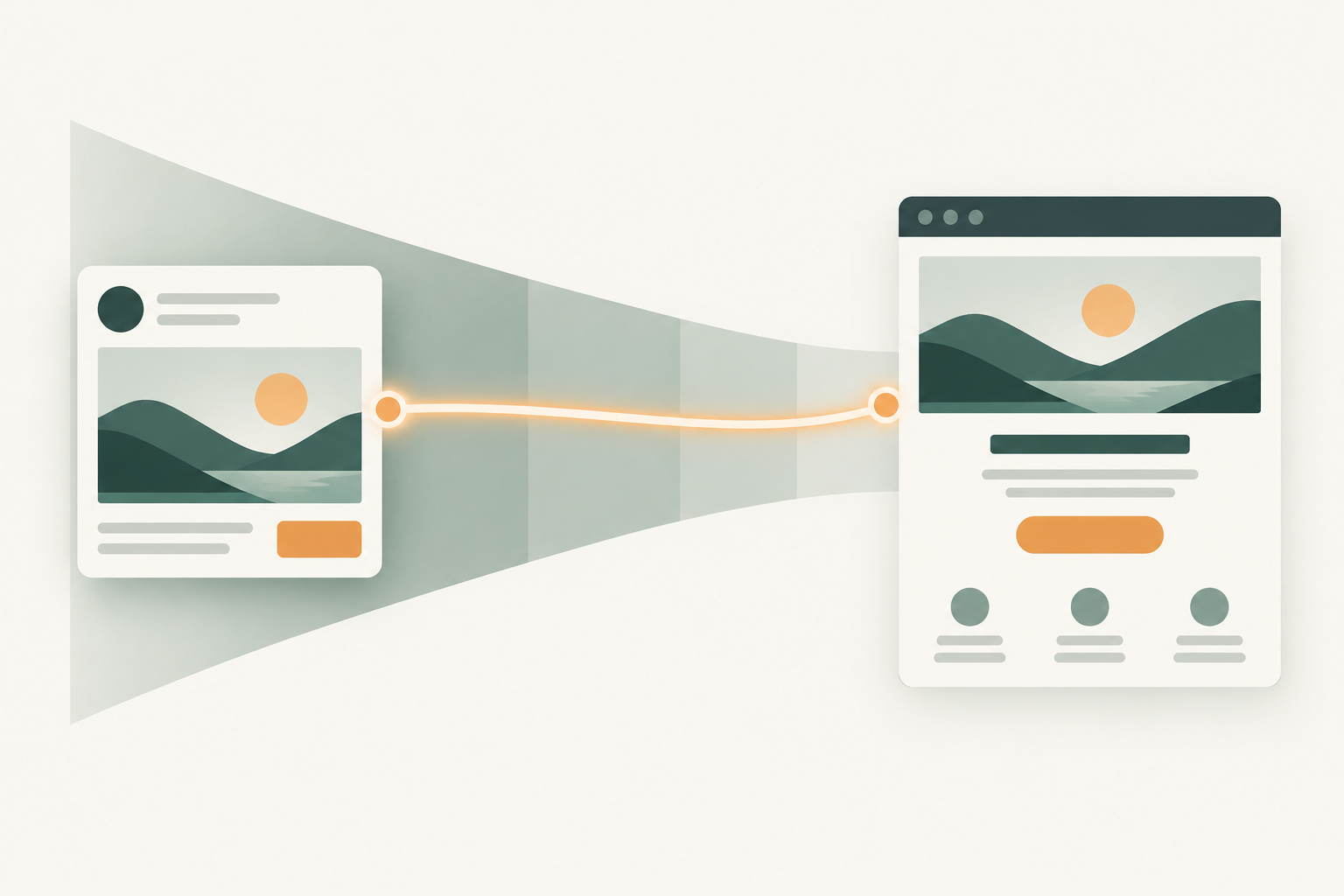
A B2B landing page for paid traffic is one page built for one ad and one offer, such as a demo, trial, report or webinar. It repeats the ad's promise, asks only for what the offer needs and passes the campaign to your CRM, so you can judge it on pipeline. AI can draft it from the ad and offer.
You've probably seen the other version. A new LinkedIn campaign goes live on Tuesday, the page isn't ready, so the ads point at the homepage "for now". Three weeks later sales asks why the demo requests are all students, and nobody can say which ad sent them.
This guide is for the head of paid media or the PPC lead who has to ship pages at the pace campaigns launch. It covers which page each offer needs, when LinkedIn's own form beats a page, what Google checks, a prompt that drafts the page, four live pages taken apart, and how to tell a page is working. Testing pages once they exist is a separate job, covered in our guide to AI for B2B conversion rate optimization.
The offer and the funnel stage decide what the page needs
The offer decides the page, because a person booking a demo and a person downloading a report want different things from the next 30 seconds. Pick the offer from the funnel stage the ad speaks to, then build the page around it.
| Funnel stage | Offer | What the page must do | Form | Conversion that counts |
|---|---|---|---|---|
| Decision | Demo | Say what happens on the call and who it suits | Work email, company, role, one qualifying question | Meeting held, then opportunity |
| Decision | Free trial | Show what you can do on day one | Work email first, the rest step by step | Activated account, then opportunity |
| Decision | Pricing | Show the plan logic and the route to sales | None on the page, a sales link beside the plans | Sales conversation from the page |
| Consideration | Webinar | Give date, time zone, speakers and three things you'll learn | Name, work email, company | Attendee who later opens an opportunity |
| Awareness | Report download | Show what's inside and why it's credible | Short, or ungated | Account engagement, then opportunity |
| Any, named accounts | ABM page | Speak to one industry or account cluster | Prefilled or none | Opportunity on a target account |
The last column is the one most teams skip. Say a report page converts at 20% and a demo page at 2%: the two can't be compared on form fills, so every page needs a pipeline outcome written next to it before it goes live.
A matched page can go live in the same week as the campaign when AI drafts it from the ad and the offer and a person signs off the claims, and Scalewell helps demand gen and paid teams work at that pace.
On LinkedIn, decide between a Lead Gen Form and a landing page first
A LinkedIn Lead Gen Form is a form that opens inside LinkedIn and fills in the member's details from their profile, so for many offers you don't need a page at all. LinkedIn's Lead Gen Forms help page says the forms work by "automatically populating contact and profile information when a member clicks the call-to-action button on your ad", and its specifications page lists single image, carousel, video, event, message, document and conversation ads as formats they attach to.
As of November 2026, LinkedIn's Lead Gen Form fields page allows up to 12 informational fields and up to three custom questions, which count toward the 12. The hidden fields page allows up to 20 hidden fields per form, with dynamic values such as CAMPAIGN_NAME, AD_SET_NAME and AD_NAME, which is how you get the ad into your CRM without a UTM. You build the form in Campaign Manager under Content & Assets, then Lead generation forms, then Create form, according to LinkedIn's setup page.
Is the form better than a page? LinkedIn's own blog post on Lead Gen Forms, published in August 2025, says "our data shows that the average LinkedIn Lead Gen Form conversion rate is 13%" and sets that against a 4.02% landing page average from an Unbounce study. That compares LinkedIn's internal data with another company's pages, gives no sample or date range, and counts form fills rather than opportunities, so it doesn't settle the question for a team judged on pipeline. LinkedIn's best practices page also suggests putting a landing page URL in the copy of single image ads that use a form, and notes that on desktop a click on the intro text goes to the landing page while on mobile it opens the form. For those ads, the page is worth building even when you run the form.
Here's how we'd decide, in a hypothetical. Company A sells a $15,000-a-year tool and gives away an industry report: the form wins, because the goal is account engagement and a prefilled form costs the reader one tap. Company B asks for a demo of a $90,000 platform: we'd send that to a page, because the buyer wants to know who the call is with and what they'll see before they give up 30 minutes. Then compare the two on cost per opportunity in your CRM, not cost per lead.
Google grades the page on relevance, original content and ease of use
Landing page experience is one of the three parts of Google Ads Quality Score, which Google's Quality Score page defines as "How relevant and useful your landing page is to people who click your ad". The other two are expected clickthrough rate and ad relevance. Google also states that "Quality Score is not an input in the ad auction", so treat it as a diagnostic that tells you whether to fix the ad, the keyword grouping or the page.
Google's own advice on optimizing ads and landing pages is short and worth following: "Try to provide useful, original information on your landing page about whatever you're advertising", make the action quick, and "Don't make people hunt around for information they might need." To see how your pages do on phones, go to Campaigns, then Insights & reports, then Landing pages. Google's landing pages report shows a mobile-friendly click rate, and anything under 100% means some clicks landed on a page Google's test did not judge mobile-friendly.
One more Google detail changes which page gets the click. With AI Max for Search and Final URL expansion switched on, Google can send a click to a different page on your domain than the one you chose. Our guide to AI Max for Google Ads covers the URL exclusions that keep it away from careers, login and blog pages.
Build each page type with the parts its offer needs
Every page shares a core: a headline that repeats the ad, one action, proof the buyer's committee would accept, and a line on what happens next. Beyond that, each offer needs its own parts.
A demo page says what the call will be like
A demo page has to answer "what will this call be like" before the buyer fills the form. Say how long the call is, who runs it and what they'll see. Tas Bober, a B2B landing page specialist quoted in Exit Five's guide to B2B landing pages, suggests setting expectations near the form with a line such as "Someone will contact you within 24 hours." Add one qualifying question, such as team size or current tool, so sales and your AI lead scoring model have something to work with.
A trial page sells the first day of use
A trial page sells the first day of use, so show the first thing the buyer will do once they're in. Ask for the work email first and collect the rest one step at a time, and say plainly whether a credit card is needed.
A pricing page puts the plan logic beside a sales route
A pricing page gets brand and competitor clicks from buyers already near a decision, so it needs the plan logic and a sales route side by side. If your prices aren't public, we'd still explain what drives the quote, so a buyer comparing vendors has something to take to the committee besides "contact us".
A webinar page puts the date, speakers and agenda above the form
A webinar page needs the date, the time with its time zone, the speakers and three things the viewer will learn, all above the form. Offer the recording to people who can't attend live, so registrations from other time zones aren't wasted.
A report page proves the report is worth an email
A report page has to prove the report is worth an email address. Show the table of contents, the sample behind the data and one finding. If the report is meant to warm up accounts for later, consider leaving it ungated and measuring account engagement instead.
An ABM page speaks to one cluster of named accounts
An ABM page speaks to one industry or one cluster of named accounts, with their problem in the headline and proof from companies like them. Our guide to AI for ABM advertising explains why most clusters need at least 300 matched LinkedIn members to get their own ads, which also sets how many ABM pages you need.
AI drafts the page, and a person checks four things
AI is good at the first draft of a landing page because the inputs already exist: the ad, the offer, the proof you've approved and the page you're replacing. The model's job is to turn those into a page that matches the ad. Your job is to check what a model can't see. Much of what gets sold as AI landing page optimization comes down to this drafting step done well. If you already write ads with a proof list and slot plan, the page reuses the same approved claims.
Give the model these inputs, every time:
- The ad copy and, for search, the keywords and converting search terms in that ad group.
- The offer, in one sentence, with what happens after the form.
- The ICP and the role the ad targets, such as "VP Finance at companies with 200 to 2,000 staff".
- An approved proof list: customer names, quotes and figures legal has signed off, and nothing else.
- The form fields the offer needs, from the table above.
Then run a prompt like this one, once per ad group or ad set.
You are drafting one landing page for paid traffic.

INPUTS
Ad copy (headline, intro text, description): [paste]
Keywords or audience: [paste]
Offer and what happens after the form: [one sentence]
Target role and company size: [paste]
Approved proof (use only these claims, quote them exactly): [numbered list]
Form fields: [list]
Banned claims and words: [list]

WRITE
1. Headline: repeat the ad's main promise in the buyer's words, max 12 words.
2. Subhead: who this is for and what they get, max 25 words.
3. Three short sections, each answering one question this buyer has
   before acting. Name each question.
4. One proof block built only from the approved list.
5. A "what happens next" line beside the form.
6. One call to action, with button text that names the action.

RULES
- Use no claim, number or customer name that is not in the approved list.
- Write at a plain reading level and keep the body between 250 and 725 words.
- After the draft, list every sentence that makes a claim and the proof
  item it relies on.

THEN
Write two variant headlines for [segment 1] and [segment 2], keeping the
same offer and proof.
The 250 to 725 word range in that prompt comes from Unbounce's SaaS conversion benchmark, which found SaaS pages in that range converted best and pages written at a 5th to 7th grade reading level converted at 12.9%, against 2.1% for professional-level copy. That is a correlation in one vendor's data, so read it as a reason to cut jargon, not as a rule. AI is fast at the cut: ask it to rewrite any sentence a finance buyer would need to read twice.
Once the draft exists, a person checks four things the model can't:
| Check | What the person does | Why AI can't |
|---|---|---|
| Claims | Matches every claim to the approved proof list | The model will write a plausible number if it's allowed to |
| Message match | Opens the ad and the page side by side on a phone | Only a person sees what the buyer sees first |
| Form and routing | Submits a test lead and finds it in the CRM with the campaign attached | The model can't see your CRM |
| Offer promise | Confirms sales can deliver what the page says, such as a call within 24 hours | Only sales knows its own capacity |
Four live B2B landing pages show the parts in practice
These four pages were live when we opened them on November 14, 2026. We describe only what's on each page and make no claim about how it performs.
Gong demo page (gong.io/demo). The headline reads "Turn pipeline into revenue with Gong" and the subhead starts "Book a demo to see how the Gong platform transforms insights into action". The header carries only the logo, with no main menu, and the proof block stacks customer count, analyst and review ratings under "Trusted by 5,000+ customers". It's a clean example of one action and a short page. What we'd add for paid traffic is a line on how long the call takes and who runs it, which the page doesn't state.
Zendesk free trial (zendesk.com/register). The page opens with "Start your free 14-day trial" and "100% free. No credit card required.", answering the two questions every trial visitor has. The form runs one question at a time, marked "Step 1 of 9", and starts with the work email before asking for name, phone, company location, company, job title and company size, then a subdomain and a password. That order gets the one field you need most before the buyer meets the longer questions.
HubSpot State of Marketing report (hubspot.com/state-of-marketing). The page names the report's three themes, shows headline survey figures (such as 61% of marketers believing marketing is in its biggest disruption in 20 years because of AI) and puts the form under "Access Now". It shows what's inside before asking for anything. The page doesn't state the survey sample, which is the detail we'd add for a skeptical B2B reader.
Slack pricing (slack.com/pricing). The US page lays out four plans side by side: a free plan, Pro and Business+ with monthly and annual prices in US dollars, and Enterprise+ marked "Contact sales for pricing". Below them sit a "Compare all features" table and a frequently asked questions section. Both "Get started" and "Talk to sales" sit at the top, so a self-serve buyer and an enterprise buyer each have a route. Slack serves other markets a local version, so check the page from the market you advertise in.
A page is working when it produces opportunities you can trace to the ad
A landing page has worked when it creates qualified opportunities at a cost per opportunity you'd pay again, and you can trace each one to the ad that sent it. Form fills are the early signal, and pipeline is the verdict.
That needs the campaign to reach the CRM. On LinkedIn, hidden fields carry the campaign, ad set and ad name. On Google, keep auto-tagging on and pass UTM parameters into hidden form fields so the CRM record keeps them. Then build one report: page, ad source, form fills, opportunities, cost per opportunity.
Benchmarks only help with the first step. Unbounce's 2024 Conversion Benchmark Report, built on more than 41,000 landing pages and 57 million conversions, gives SaaS pages a median conversion rate of 3.8%, and its SaaS breakdown shows paid traffic converting well below email: a median of 16.9% for email, 4.1% for paid search and 2.9% for paid social.
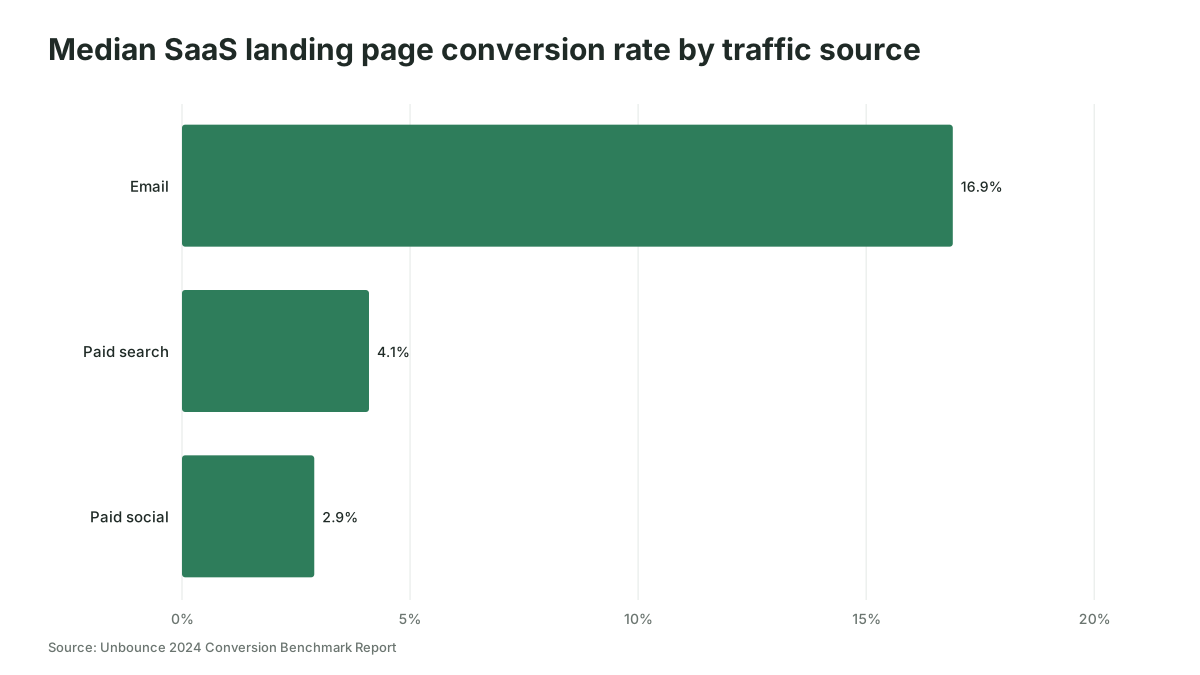
So a paid social page converting at 3% is in line with that benchmark, and it still proves nothing until the opportunities show up, which in B2B can take one or two sales cycles. Most B2B pages won't get enough traffic for a clean A/B test either, which is why we cover sample sizes and low-traffic testing in the conversion rate optimization guide rather than here.
B2B landing page best practices fail in four predictable ways
The advice in most best-practice lists is sound, and it still goes wrong in the same four places.
The page goes live before the CRM fields exist. Leads arrive with no campaign attached, and a month later nobody can say which ad worked. Submit a test lead before launch, every time.
AI writes proof you don't have. A model asked for "social proof" will produce a convincing customer quote. Give it the approved list and make it name the source of every claim, as the prompt above does.
One page serves every ad. It's cheaper to build, and it breaks the match between ad and page that makes paid traffic convert. If AI writes the variants, a page per distinct promise costs little more than the time it takes to review it.
The form asks for everything. Sales wants twelve fields, and the buyer wants three. LinkedIn's best practices page for Lead Gen Forms recommends three to four fields and says "including fewer than the maximum of 12 fields will likely improve conversion rates." Ask for what routing and scoring need, and enrich the rest later.
Where to start
Pick the campaign with the most spend that still points at your homepage, draft its page with the prompt above, and submit a test lead to confirm the campaign lands in your CRM. For help making that the way every launch works, Scalewell sets it up with paid teams in the tools they already use.
Frequently asked questions
Should a B2B landing page have navigation?
We'd remove the main site menu from most paid landing pages, because each link is a way to leave before the form. Keep the logo, a privacy link and anything legal requires. A pricing page is the exception: buyers there often compare plans and features, so links to product pages can help them decide.
How many landing pages do you need for paid campaigns?
You need one page per distinct promise, which usually means one per offer and audience segment rather than one per ad. A team running a demo offer to three industries would build three demo pages, then reuse each across the ads that make the same promise.
Should a B2B landing page be gated?
Gate content when you'll follow up with each lead and the buyer expects to trade an email for it, such as a demo or a detailed benchmark. Leave it open when the goal is reaching a buying committee early. Ungated pages still feed retargeting and account engagement data you can tie to pipeline later.
How long should a B2B landing page be?
Page length should follow the size of the decision. A webinar page can be short, while a demo page for a six-figure platform needs enough detail for a skeptical buyer. Put everything the buyer needs before acting above the form, and treat the word range in the prompt above as a starting point.