Offline conversion tracking for B2B: a daily AI job that sends pipeline stages to Google, Microsoft and LinkedIn
A setup guide for sending SQLs and opportunities from your CRM to Google Ads, Microsoft Advertising and LinkedIn, with the upload windows, native CRM routes and a daily AI job that checks every send.

Offline conversion tracking sends what happens after the form fill, such as an opportunity, from your CRM back to the ad platform that bought the click. In B2B it's the only way Google Ads, Microsoft Advertising and LinkedIn learn which campaigns produce pipeline rather than form fills, and a daily AI job can run the upload and check it.
Most teams set it up once and never look at it again. Six months later someone in the budget review asks why Smart Bidding keeps buying cheap whitepaper leads, and the answer is that the upload broke in March when someone renamed a CRM field. The ad platforms did exactly what they were told. They just stopped being told anything useful.
This guide is for the head of paid media or demand gen who owns that loop: what the CRM record needs, which stages to send, where each platform's setup lives as of November 2026, and how to hand the daily job to AI while a person signs off on conversion action changes. The scoring model behind the stages is in our guide to AI lead scoring for demand gen.
Bidding that learns from the deals sales actually created, without anyone chasing broken uploads, is the outcome Scalewell works toward when it puts AI on this loop for a paid team.
Offline conversion tracking starts with a click ID saved on the CRM record
Every offline conversion has to be matched back to an ad interaction, most reliably through the click ID the platform added to the landing page URL. Google adds a gclid (and sometimes gbraid or wbraid), Microsoft adds an msclkid, and LinkedIn adds an li_fat_id once enhanced conversion tracking is turned on for your Insight Tag. If the ID never reaches the CRM, no amount of AI downstream will fix it.
Google's GCLID setup guide is direct about the work: "You will need to modify each form submission page to add a hidden form field for the GCLID." LinkedIn's page on enabling click IDs and Microsoft's offline conversions help page describe the same pattern. Here is the short version for your web team:
- Add hidden fields to every paid landing page form:
gclid,gbraid,wbraid,msclkid,li_fat_id, plusutm_source,utm_mediumandutm_campaign. - Store each parameter from the URL in a first-party cookie, so a visitor who browses before converting still carries the ID. Google's sample script uses a 90-day expiry; LinkedIn's own
li_fat_idcookie lasts 30 days from the most recent ad click. - On submit, copy the stored values into the hidden fields.
- Map the fields to matching CRM contact properties, store click IDs exactly as received, and never let a CRM workflow overwrite a first-touch click ID with a later one.
// Runs on every page: store click IDs and UTMs for 90 days, then fill hidden fields on any form
const KEYS = ["gclid","gbraid","wbraid","msclkid","li_fat_id","utm_source","utm_medium","utm_campaign"];
const params = new URLSearchParams(window.location.search);
KEYS.forEach(k => {
  const v = params.get(k);
  if (v) document.cookie = `${k}=${encodeURIComponent(v)}; max-age=${90*24*60*60}; path=/; SameSite=Lax`;
});
const read = k => (document.cookie.match(new RegExp("(?:^|; )" + k + "=([^;]*)")) || [])[1];
document.querySelectorAll("form").forEach(f => KEYS.forEach(k => {
  const input = f.querySelector(`input[name="${k}"]`);
  if (input && read(k)) input.value = decodeURIComponent(read(k));
}));
The UTM values join spend to deals by campaign name in your own reporting, the method in our HubSpot MCP guide, while the platforms match on click IDs. Our guide to B2B landing pages covers the page side.
Send the stages that land before each platform stops accepting them
Each ad platform accepts an offline conversion only for a limited time after the click, and in B2B the stage you care about most often arrives after that window has closed. Dreamdata's 2026 LinkedIn Ads Benchmarks Report puts the full B2B buyer journey at 272 days, across 3.5 million customer journeys.
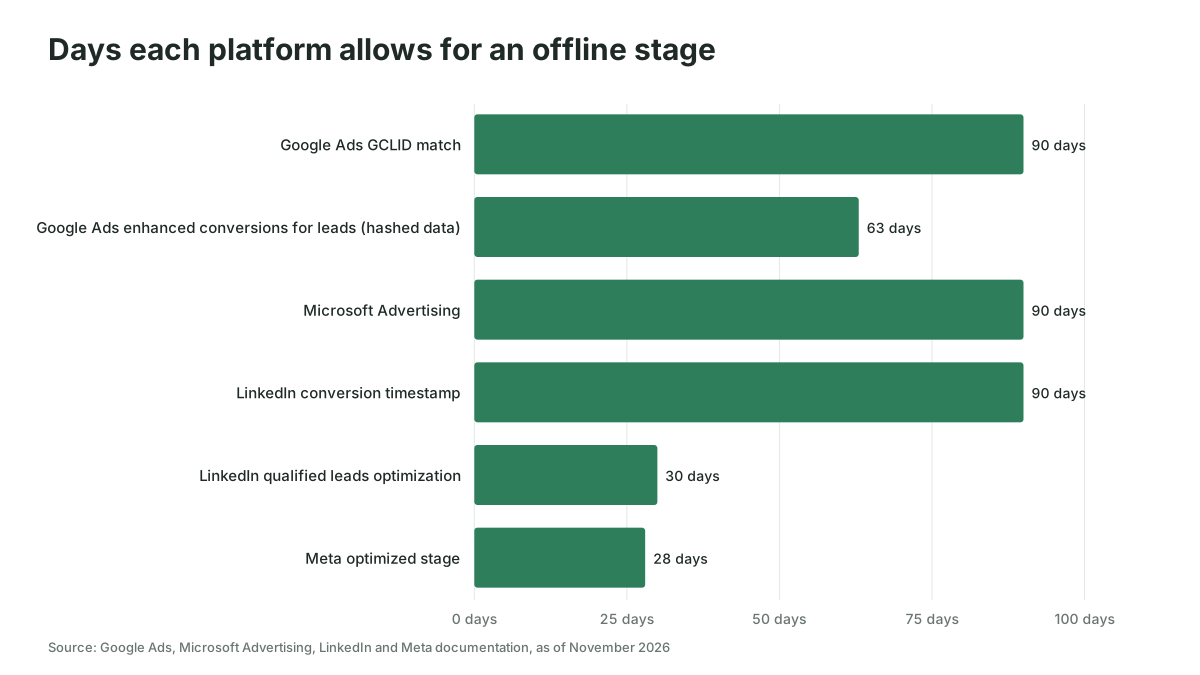
So a sensible rule is simple: send every stage the platform will still accept, and bid on the earliest stage that sales agrees is real pipeline. As of November 2026, the documented windows are these:
- Google Ads: a conversion matched on GCLID can be uploaded up to 90 days after the click, and one uploaded with hashed personal data for enhanced conversions for leads up to 63 days, according to Google's offline conversion imports FAQ.
- Microsoft Advertising: "If a conversion is uploaded more than 90 days after the last click, it will not be imported," per Microsoft's help page.
- LinkedIn: most conversion types can be attributed for up to 180 days in total (a 90-day conversion timestamp plus a 90-day attribution lookback), according to LinkedIn's Conversions API FAQ, but qualified leads must be shared within 30 days to count toward the qualified leads optimization goal.
- Meta: the stage you optimize for must happen within 28 days of the lead, per Meta's Conversion Leads guide.
Here is a suggested mapping, assuming you've agreed the stage definitions with sales in writing. The conversion types are the platforms' own names, but the pairing of stage to type is a starting point, not a platform rule:
| CRM stage | Send it? | Google Ads conversion action | Microsoft Ads offline goal | LinkedIn conversion type | Value |
|---|---|---|---|---|---|
| MQL | Yes, as a secondary action | Qualified lead category, secondary | Separate goal | MARKETING_QUALIFIED_LEAD (API version 202608 onward) | Small fixed value |
| SQL or sales accepted | Yes, usually the bidding stage | Qualified lead, primary | Separate goal, included in conversions | QUALIFIED_LEAD if you use the qualified leads goal, otherwise SALES_QUALIFIED_LEAD | Larger fixed value |
| Opportunity created | Yes, while inside the window | Converted lead | Separate goal | A separate rule for reporting | Expected deal value |
| Closed won | Only if it often closes inside the window | Converted lead, secondary | Separate goal | A separate rule, with value | Actual deal value |
| Disqualified | Don't send as a conversion | None | None | None | None |
Values follow the same ladder everywhere. Google's Target ROAS page notes that for Demand Gen campaigns, conversions must have a value greater than 0 to count as eligible. Microsoft falls back to the goal's default value when a row has none, and LinkedIn takes a value per event. Which bidding strategy uses those values is covered in our guide to AI bidding.
Google Ads offline conversions now go through Data Manager
Google Ads offline conversions are imported through Google Ads Data Manager or the Data Manager API as of November 2026. Google's About offline conversion imports page says these uploads "will be migrated to the Data Manager API and blocked in the Google Ads API" from June 15, 2026, so if a vendor's connector still uses the old upload call, ask when it moves.
In the interface, create the conversion action under Goals, then Summary, then "+ Create conversion action," then Conversions offline, with Qualified lead or Converted lead as the goal category, and connect the CRM under Tools, then Data manager. Google's FAQ says to "Upload conversions at least daily." For an agent, the Data Manager API ingest method takes up to 2,000 events per request and has a validateOnly flag that checks a request without running it, so the job can test the day's file before anything reaches the account.
Enhanced conversions for leads match on hashed email when the click ID is missing
Enhanced conversions for leads, which Google calls "an upgraded version of offline conversion import," matches on hashed lead data such as an email address alongside the GCLID. The Google tag captures the hashed email at form submission and collects GCLIDs automatically; when the lead converts in your CRM, you import the same hashed data and Google matches it to the ad click, per About enhanced conversions for leads.
It matters in B2B because click IDs go missing. A prospect clicks a search ad on their phone and fills in the form a week later on a work laptop, with no GCLID in sight. A hashed work email can still match that lead to a signed-in Google user who engaged with the ad, where a GCLID-only import would drop it.
Keep sending GCLIDs anyway, because Google says they keep conversions attributed to specific clicks. Accept the customer data terms and turn on enhanced conversions in your conversion settings. After the first week, open Goals, then Summary, then the Diagnostics tab, where the enhanced conversions card rates each action from Excellent to Urgent and raises alerts such as "No user-provided data matches."
Microsoft Ads offline conversions need the MSCLKID and a two-hour wait
Microsoft Advertising imports offline conversions against the Microsoft Click ID (MSCLKID), and it also accepts a hashed email or phone for enhanced conversions. Microsoft Advertising has no native lead form, so every lead comes through your own landing page and its hidden fields.
The setup, per Microsoft's help page: hover over Conversions in the left navigation, select Conversion goals, then Create conversion goal, and choose the Offline conversions type. Name it exactly as the stage, with a revenue value and a window of up to 90 days. Auto-tagging of MSCLKID switches on when you create your first offline goal. Then wait: "After you create a new conversion goal, you must wait 2 hours before uploading conversions for that conversion goal."
Under Conversions, then Offline conversions, the Schedules tab pulls a file from an HTTPS, SFTP or FTP location on a timetable, and the API takes rows through ApplyOfflineConversions. Microsoft recommends "uploading offline conversions daily. Otherwise, auto-bidding performance might be impacted detrimentally."
Two details catch people: the conversion name in each row must match the goal name exactly, or the API reference says the data "will not be applied." And API conversion times must be in UTC, while the web upload accepts other time zones, so a job that moves from file to API without converting times shifts every conversion.
The LinkedIn Conversions API takes the hashed email and li_fat_id
The LinkedIn Conversions API streams conversion events from your server or CRM to LinkedIn, and LinkedIn matches them to members using identifiers you send. LinkedIn's FAQ says "We recommend sending both SHA256 EMAIL and LINKEDIN_FIRST_PARTY_ADS_TRACKING_UUID for the best matching," that emails should be lowercased before hashing, and that conversions should be sent "in real time as soon as they occur, or ideally within a day."
The li_fat_id keeps working as a match key after its 30-day browser cookie expires, because LinkedIn stores the mapping from that ID to a member profile for 365 days.
You create each LinkedIn conversion rule in Campaign Manager: click Measure on the left menu, then Conversion tracking, then Create conversion, and select Conversions API. The next step asks you to name the conversion rule, a name only visible in Campaign Manager, so use the CRM stage name the daily job checks against. If you want LinkedIn's qualified leads optimization goal, the conversion rule must be of type QUALIFIED_LEAD, the leads must arrive within 30 days, and LinkedIn's use cases page recommends five or more qualified leads in the first two weeks to shorten the learning phase. In Campaign Manager, a "Low Match Rate" label under Active on the conversion rule tells you the identifiers you're sending aren't matching members well.
Native CRM conversion tracking covers HubSpot and Salesforce without code
Native CRM connections can do most of this job for a B2B team on HubSpot or Salesforce, as long as you accept their limits. As of November 2026, three matter.
- HubSpot to Google Ads, LinkedIn and Microsoft. HubSpot's ads tool syncs lifecycle stage changes as conversion events: Google through enhanced conversions, LinkedIn through the Conversions API, and Microsoft Advertising through a separate HubSpot sync. Create them under Marketing, then Ads, then Create, then Conversion event. HubSpot's Google Ads article allows 5 events on Starter, 50 on Professional and 100 on Enterprise, gives lifecycle events a fixed value now that "Use the Deal amount" is gone, and counts only stage changes made after the event exists.
- HubSpot and Salesforce to Google through Data Manager. Google's Data Manager connects directly to both. For Salesforce, Google's upgrade FAQ says the legacy integration ended on May 31, 2025, that you must map the GCLID field, and that Expected Revenue carries over for opportunities but not for leads.
- HubSpot and Salesforce to LinkedIn through CRM Sync. LinkedIn Business Manager connects to Salesforce under Settings, then Connect, and to HubSpot through the LinkedIn CRM Sync app, which needs a HubSpot Sales Hub Pro or Enterprise license. LinkedIn's HubSpot page says it powers the Revenue Attribution Report and auto-created conversions, only for ad accounts your business owns.
Neither Salesforce nor Microsoft documents a native connection between Salesforce and Microsoft Advertising, so Salesforce teams usually run Microsoft on a scheduled file or an API job. And none of the native routes puts last week's accepted count next to last week's CRM count, which is where the AI job comes in.
Meta's Conversions API is a short job for B2B lead ads
Meta's route for CRM stages is the Conversions API with the Conversion Leads optimization goal, which works only with Meta Lead Ads (Instant Forms) and, per its Conversion Leads guide, at least 200 leads a month. Few B2B accounts clear that, so check before you build.
A daily AI job checks the data, sends it and asks before changing anything
The daily job that keeps offline conversion tracking working pulls yesterday's stage changes from the CRM, checks them, sends them, and reports what each platform accepted. AI suits it because most of the work is reading messy records and explaining anomalies in plain English.
It can run as a scheduled script with a model reviewing the output, or as a scheduled agent with access to the CRM and the three upload APIs.
Here is an instruction set for the job, written so you can paste it into whatever runs it:
Daily offline conversion job. Run at 06:00 in the CRM's time zone.

1. Pull every contact or deal whose stage changed to MQL, SQL, Opportunity or Closed won in the last 24 hours.
2. For each record, check:
   - Click IDs present: gclid or gbraid/wbraid, msclkid, li_fat_id (by original source).
   - Email present, then lowercase, trim and SHA-256 hash it.
   - Days since click: flag Google rows over 90 days (63 if matched on hashed data only),
     Microsoft over 90, LinkedIn qualified leads over 30.
   - Stage name matches the conversion action or goal name exactly.
3. Build one file per platform. Run Google through the Data Manager API with validateOnly=true first.
4. If validation passes and the row count is within 30% of the 28-day daily average, send.
   Otherwise send nothing and alert the paid media lead with the reason.
5. Read back what each platform accepted: Google offline data diagnostics, Microsoft upload results,
   LinkedIn conversion rule status and match rate.
6. Post a summary: rows sent, rows accepted, rows rejected with reasons,
   paid leads missing click IDs by form and campaign.
7. Never create, rename, delete or change the primary/secondary setting of a conversion action.
   Propose the change with the reason, and wait for a named person to approve it.
Step 7 is the line to hold, because a renamed action or a stage flipped to primary changes what bidding optimizes toward overnight. It's the kind of decision our guide on where humans stay in the loop on ad spend argues a person should keep signing.
Imagine a hypothetical week with 30 paid search SQLs: 26 had a GCLID, Google accepted 25, and the four without one all came from one webinar form. That's a form fix found in a Monday message, before bidding spends another month learning from part of the truth.
The usual failures happen quietly in the CRM
Offline conversion tracking usually breaks inside the CRM, and silently, because the platforms simply receive fewer rows, so check these three first.
- Click IDs overwritten. A "latest source" workflow replaces the paid click's GCLID with an empty value from an organic visit. Keep first-touch click IDs in fields nothing else writes to.
- Stages skipped. Sales moves a deal straight from new to opportunity, so the SQL event never fires and the bidding stage under-reports. Treat a jump to opportunity as reaching SQL too, and send both events.
- Two sources counting one event. If the Insight Tag and the Conversions API both report the same form fill, deduplicate with a shared event ID, or LinkedIn counts it twice.
Who should wait? If paid produces fewer than a handful of SQLs a month, the platforms have too little to learn from at that stage. Fix the click ID capture now, send MQLs as the bidding stage, and add the deeper stages when volume grows.
You can tell offline conversion tracking works when platform numbers match the CRM
Offline conversion tracking is working when each platform's reported stage count is close to the CRM's count for the same period, and when CRM cost per SQL and cost per opportunity start to move. Check the first in week one and the second after a full sales cycle.
For the match, compare 28 days of CRM SQLs from each platform with that platform's accepted conversions, allowing up to 72 hours of delay on LinkedIn. No platform publishes a target match rate, so set your own investigation line from the gap you see in the first month: a hypothetical team whose gap usually runs near 5% might look into any week above 15%. For the outcome, give bidding one to two conversion cycles, as Google advises, and judge it on CRM cost per opportunity. Cost per lead often rises when the platforms stop buying the cheap ones, which is the point. If you want to know whether the extra pipeline was caused by the ads at all, that's a lift question, and incrementality testing explains how to answer it with a holdout.
How Scalewell gets the pipeline signal flowing back to the ad platforms
Ad platforms that learn from pipeline every day, with nobody exporting a file, are where Scalewell aims to get a paid team. The first step is a free 30-minute call. An audit of the team's week follows, mapping recurring work such as offline conversion uploads and scoring the job AI should take first, which becomes a ranked roadmap.
In the build sprint, those first jobs go into tools the team already runs, over roughly 8 to 12 weeks, sometimes more. B2B paid media practitioners do it, weighing each job on hours saved and pipeline. The team finishes with AI handling real work, the next jobs mapped out, and people trained to change what was built on their own.
Where to start with offline conversion tracking
Open your CRM today, filter last month's paid leads, and count how many carry a GCLID, MSCLKID or li_fat_id; that one number tells you whether to fix capture or uploads first. From there, Scalewell can help turn the loop into a daily AI job your team trusts, with people still signing off on anything that changes bidding.
Frequently asked questions
What is the difference between offline conversion import and enhanced conversions for leads?
Offline conversion import matches a CRM conversion to an ad click using the GCLID alone. Enhanced conversions for leads adds hashed user data captured by the Google tag, so conversions can still match without a GCLID, but within 63 days rather than 90. As of November 2026, Google recommends it to advertisers who have not yet set up offline conversion import.
How long does it take for offline conversions to show up in reports?
Microsoft says reports can take up to six hours after upload. LinkedIn says Conversions API data takes up to 24 hours to ingest and another 48 to report, so up to 72 hours. HubSpot data synced to LinkedIn through CRM Sync can take up to 72 hours plus 24 to 48 more.
Can I upload offline conversions to Google Ads with a spreadsheet?
Yes. Google Ads Data Manager can connect to a Google Sheet as a source and import it, and Microsoft Advertising can pull a published Google Sheet as a scheduled offline conversion file.
Is offline conversion tracking allowed under privacy rules?
The platforms require consent and hash personal data, but they leave compliance to you. Microsoft's help page says you must give users a transparency notice and obtain consent as required by law, and Google asks you to accept its customer data terms before enhanced conversions.