LinkedIn thought leader ads with AI: finding, scoring and judging employee posts on pipeline
AI can shortlist the employee posts worth sponsoring, draft role versions the author rewrites, and read thought leader ads against account pipeline instead of flattering clicks.

LinkedIn thought leader ads let a company pay to show a member's post, usually an employee's, to an audience it chooses, once the author approves. AI helps with three jobs around them: finding and scoring the posts worth sponsoring, drafting versions for each buying committee role that the author rewrites, and judging the ads on account pipeline rather than clicks.
You've probably seen the usual version. The founder writes a post that gets 400 reactions, someone in marketing asks to "put money behind it," and a month later the report shows a click-through rate nobody has ever seen on a company ad. It's easy to picture the quarterly review that follows: the CFO asks what the founder's posts did for pipeline, and the head of demand gen answers with the follower count.
This guide is for the head of paid media or demand gen who wants thought leader ads to be a repeatable program instead of a favor to the CEO. It covers the rules as of November 2026, what LinkedIn's own results do and don't show, a scoring rubric for posts with a filled-in hypothetical, the prompts for each step, and an ad set structure that lets you read the results against your CRM.
LinkedIn thought leader ads run an approved member's post exactly as it was written
A LinkedIn thought leader ad is the author's organic post, sponsored by your company without changes, and that one fact shapes everything AI can and can't do with the format. You can't add a headline or intro text, and only event thought leader ads carry a call to action button. LinkedIn's thought leader ads specs page says "edits to the post must come from the original author of the post," and that a URL the author put in the post stays live when you sponsor it.
Here is what LinkedIn's help center and product pages say as of November 2026.
| Rule | What LinkedIn says | Source |
|---|---|---|
| Whose posts | Employees, creators and other members, each with the author's approval; 1st and 2nd degree connections are searchable in Campaign Manager, 3rd degree and beyond only through Creator Marketplace | Thought leader ads help page |
| Eligible posts | Public posts from a profile that displays the member's full name; text, single image, video, document, article and newsletter posts | Same page |
| Not eligible | Reposts (sponsor the original instead), celebrations, polls and multi-image posts | Same page |
| Objectives | Brand awareness, engagement, and video views (video only) | Same page |
| Formats | Single image, video, document, event (attendee posts from your Page's LinkedIn Live event, with a call to action button), article and newsletter | Same page |
| Who can set it up | Super admin, content admin or Sponsored Content poster on the Page, plus creative manager access or higher on the ad account | Create thought leader ads help page |
| Approval | The author gets an email and can approve, decline, or turn on auto-approval; you track requests as Approved, Declined or Pending | Same page |
| Revoking | Revoking approval stops the ads running for that advertiser, and they're canceled in the ad account | Sponsorship permissions help page |
| Extra metrics | "Member follows" and "Clicks to member profile" | Thought leader ads help page |
| Limits | No limit on requests per author; a thought leader ad can't be duplicated | Same page |
One inconsistency is worth knowing before you plan around documents. The specs page still says "it is not possible to promote a thought leader's post that includes multiple images, polls, or a document," while both help center pages list document posts as eligible. Trust what Campaign Manager offers you when you build the ad set.
To build one in Campaign Manager, create an ad set with a brand awareness, engagement or video views objective and a matching format. On the "Ads in this ad set" page, click "Browse existing content," open the Content Library, select "LinkedIn members," and use the Posts tab to search by member name or post URL. Send the request, then watch the Requests tab.
Notice what's missing from the objectives list: website conversions and lead generation. A thought leader ad never gets a Lead Gen Form, and LinkedIn's delivery system will optimize it for impressions, engagement or views. So the job of tying these ads to pipeline falls entirely to you, which is where AI earns its place. The wider picture of Campaign Manager's own AI is in our guide to AI for LinkedIn Ads.
LinkedIn's published results measure clicks, and those clicks include profile visits
LinkedIn's product page claims that "Thought Leader Ads drive a 252% increase in CTR compared to conventional single image ads," citing its own 2025 data, with no sample or method given (LinkedIn). The same page says they "deliver 4.2x more bottom-of-funnel conversions per company, on average," and its footnote explains the comparison: "compared with advertisers running Thought Leader Ads without full-funnel investment." That second figure compares two ways of running thought leader ads. It says nothing about thought leader ads against your other formats.
An outside benchmark shows why the click figure flatters the format. ZenABM, a vendor of LinkedIn ABM software, published 2026 data covering 2,828 ads across 211 companies that puts the median thought leader ad CTR at 2.68% against 0.42% for single image ads, and its text gives a median click-through to a landing page of 0.29% (ZenABM).
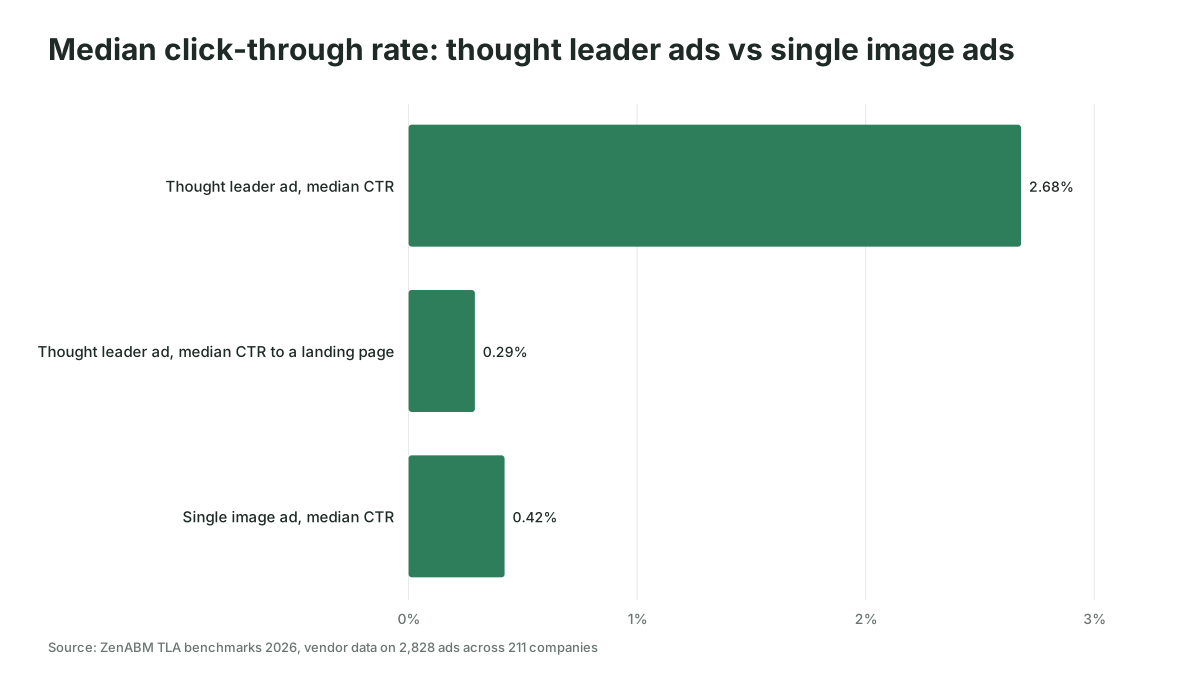
Read together, the numbers say thought leader ads are good at getting a post read and an author noticed, which is useful at the top of a long B2B journey. The headline CTR counts much more than visits to your site: ZenABM's landing page rate is about a ninth of its overall rate, and it names profile clicks, post expansions and reactions among the other clicks without saying how they split. So a CTR comparison against your single image ads is the wrong test, and an AI that writes your weekly commentary will praise these ads every week unless you tell it what to judge them on.
The gain worth having is a short list of posts worth sponsoring every week, without anyone scrolling feeds, and a monthly read of what the sponsored ones did for pipeline. Getting AI to deliver both every week is work Scalewell takes on with demand gen teams, so the team's own hours go into working with the authors.
AI finds candidate posts faster than anyone scrolling the feed
The first job for AI is turning a pile of recent posts into a ranked shortlist, before anyone sends an approval request. Start with a named author list: the executives, subject experts and customer-facing people whose posts your buyers would read, plus any creators already associated with your Page. Campaign Manager search covers employees and 1st and 2nd degree connections. Anyone further out has to come through Creator Marketplace, whose new Creator Discovery filters were in beta in September 2026, with LinkedIn quoted as expecting "general availability anticipated in early 2027" (Social Media Today).
Collect each author's posts from the last 60 to 90 days into one sheet: the post URL, the full text, the format, the date, and the names and titles of people who commented. Ask authors to share the text, or copy it by hand. Then give the sheet to an AI assistant with your ICP, your target account list and the rubric below.
LinkedIn's own advice on choosing posts points the same way: "Posts with a clear point of view, a specific insight, or a genuine story tend to outperform generic updates" (LinkedIn). The rubric turns that into points.
The rubric scores LinkedIn thought leadership ads on fit before popularity
A scoring rubric for thought leadership ads in B2B rates each post on whether the right buyers would care, then on whether it can legally and technically run. Organic reactions count for little, because a post that delighted your industry peers may have reached none of your buyers.
| Criterion | Points | Scores high when | Checked by |
|---|---|---|---|
| ICP problem | 25 | The post is about a problem your ICP pays to solve | AI, against your ICP description |
| Buying committee role | 15 | One role (finance, IT, operations, the economic buyer) would recognize itself | AI |
| Point of view | 15 | It makes a specific claim or tells a real story a competitor couldn't copy | AI drafts, marketer confirms |
| Author credibility | 15 | The author has done the job the post talks about | Marketer |
| Who engaged | 15 | Named commenters include people at target accounts or in target titles | AI, against your account list |
| Shelf life | 15 | Still true in three months, with no dated news hook | AI |
| Eligibility | Pass or fail | Public, full name shown, an eligible type, not a repost, poll, celebration or multi-image post | AI flags, marketer confirms |
| Claims | Pass or fail | Every number, customer name and result has support you could show | Marketer, with legal where needed |
The claims gate comes from LinkedIn's advertising policies, which say "Any claims in your ad must have factual support." A founder can say anything on their own profile. Once your company pays to show it, the post is your ad. A workable bar for this rubric is to sponsor posts scoring 70 or more with both gates passed, and treat 55 to 69 as material for a new post.
Here's the rubric filled in for a hypothetical procurement software company. Every figure is invented to show the method.
| Post | ICP problem | Role | Point of view | Credibility | Who engaged | Shelf life | Gates | Total | Decision |
|---|---|---|---|---|---|---|---|---|---|
| CFO: "What our month-end close taught me about approval chains" | 23 | 14 | 13 | 15 | 11 | 13 | Pass | 89 | Sponsor |
| Head of engineering: why we rebuilt our ERP integration | 18 | 12 | 12 | 14 | 6 | 10 | Pass | 72 | Sponsor, IT audience only |
| CEO: funding announcement | 5 | 3 | 4 | 10 | 9 | 2 | Pass | 33 | Leave organic |
| Sales lead: "Cut purchase approval time by 40%" | 22 | 13 | 10 | 8 | 5 | 12 | Fails claims | 70 | Fix the claim first |
The last row is the one that saves you trouble. Its score clears the bar, but nobody can source the 40%, so it waits until the author either sources the figure or rewrites the line.
The prompt below runs the scoring. Paste it with the sheet of posts, your ICP and your account list attached.
You are scoring LinkedIn posts by our employees and partners as candidates for LinkedIn thought leader ads. Our buyers are B2B; a sale takes months and involves a buying committee.

Inputs attached: (1) a sheet of posts with URL, author, date, format, full text and named commenters with titles and companies; (2) our ICP description; (3) our target account list.

For each post:
1. Score ICP problem (0-25), buying committee role (0-15), point of view (0-15), who engaged (0-15) and shelf life (0-15). Leave author credibility blank for a person to score.
2. Name the one buying committee role the post speaks to, or "none".
3. Eligibility: mark FAIL if the post is a repost, poll, celebration or multi-image post. Otherwise PASS.
4. Claims: list every number, customer name, result or comparison in the post, word for word. Do not judge whether they are true.
5. For "who engaged", count commenters whose company is on the target account list, and name them.
6. Give one sentence of reasoning per score, quoting the post.

Return a table sorted by total. Do not invent commenters, companies or numbers. If the text is cut off, say so and score only what you can read.
AI drafts a version for each buying committee role, and the author rewrites and posts it
A version of a thought leader ad for a different buying committee role is a new post on the author's profile, because the sponsored post can't be edited in Campaign Manager. That changes how you use AI. The drafts go to the author, the author rewrites them in their own words and publishes, and only then can you request permission to sponsor them.
This is also where author consent and voice matter most. Originality.ai, which sells an AI text detector, says its tool classed 81.2% of 5,000 public LinkedIn posts of at least 100 words from July 2026 as "Likely AI" (Originality.ai). Whatever the exact share, the reason to sponsor a person instead of your Page is that buyers hear a human, and a post that reads like the rest of a machine-written feed throws that away.
So keep a clear split. AI turns one strong post into a brief and a rough draft for each role, the author decides what they actually believe and writes it, and the marketer checks the claims. It's sensible to hold each author to roughly one new sponsored post a week, because everything you sponsor stays on their public profile under their name.
Here is a LinkedIn post by [author name, title] that scored well with our buyers. Draft a rough version for each of these buying committee roles: [for example CFO, head of IT, operations lead].

Rules:
- Keep the author's main claim and story. Change only the example, the consequence and the vocabulary each role would use.
- Use only facts that appear in the original post or in the notes I attach. If a role needs a fact you don't have, write [AUTHOR TO ADD] instead.
- Write in the first person, in plain sentences, under 200 words, with no hashtags, no emoji and no closing question.
- Under each draft, list the one thing the author should check or put in their own words.

These are drafts for the author to rewrite. They will not be posted as written.
Auto-approval deserves a conversation with each author before anyone switches it on. It saves both sides time, but it means the author stops seeing each request, so agree in writing which kinds of posts you'll sponsor and for how long. If an author revokes approval, or leaves the company, the ads on their posts stop, so never let one person carry an always-on program alone. For the claims and brand checks themselves, the review checklist in our guide to AI generated ads for B2B works for sponsored posts too.
Judge thought leader ads on account pipeline, with one author or theme per ad set
The pipeline view of thought leader ads comes from LinkedIn's account and revenue reports, and those reports only separate results by campaign or ad set. LinkedIn's Revenue Attribution Report shows "revenue won, return on ad spend, and pipeline amount" once Salesforce, Dynamics 365 or HubSpot is connected in Business Manager, with lookbacks of 30, 60, 90, 180 or 365 days and drill-downs "by campaign or ad set." The help page describes no drill-down by individual ad. If five authors share one ad set, you'll never know which of them moved an account.
Build the structure so the report can answer the question:
- One ad set per author, or per theme if several authors write on one topic. Name it clearly, for example "TLA, CFO, approval chains."
- Target the same named account list you use for your other LinkedIn campaigns, so you can compare accounts reached against accounts not reached. Check the matched audience first, because LinkedIn needs at least 300 matched members to serve. The same limits are covered in our guide to AI for ABM advertising.
- Set the Revenue Attribution Report lookback to 365 days for these ad sets. Dreamdata's 2026 LinkedIn Ads benchmarks put the average time from a first LinkedIn ad impression to closed revenue at 281 days (Dreamdata), so a 30-day read of an awareness format measures almost nothing.
- Export the Companies hub monthly. In Campaign Manager, click Plan in the left menu, then Companies. LinkedIn's Companies hub "provides company engagement and revenue data in a central location," including CRM data once it's connected.
- Give the AI three files each month: the Companies hub export, spend by ad set, and CRM opportunities by account with their created dates. Ask it to write one paragraph per ad set covering the target accounts it reached, which of them opened an opportunity afterward, and how that rate compares with target accounts the ad sets didn't reach.
Decide what "working" means before launch, and write it down. A sensible bar for a hypothetical team would be this: after two full quarters, target accounts engaged by an ad set open opportunities at a higher rate than unreached accounts in the same tier, by a margin agreed in advance, and the spend per engaged target account stays under a ceiling set from your average deal size. If the engaged accounts were already in late-stage conversations, the comparison flatters the ads, so ask the AI to separate accounts with an open opportunity at the time of first impression. A cleaner read needs a holdout, which our guide to incrementality testing sizes for small audiences.
Pulling these reports by hand each month is slow, and it's the obvious job to hand to an AI client connected to the ad account. LinkedIn's own MCP server, which reads and writes ad accounts, is in beta and already in use as of November 2026, but not yet publicly documented. The public routes are compared in our guide to connecting Claude or ChatGPT to LinkedIn Ads.
Thought leader ads go wrong when the author becomes a logo with a face
These are the patterns to watch, and most of them are choices made before any money moves:
- Sponsoring announcements. Funding rounds, awards and new hires score badly on the rubric for good reason. Your buyers aren't the audience for them, and a paid announcement on a person's profile reads as a company ad with a borrowed face.
- Judging on follows and CTR. "Member follows" grows the author's audience, which has value, but it's the author's asset and it measures nothing about your pipeline. Report it as context and keep the decision metrics on accounts.
- Running one post for months to a small list. A target list of a few thousand people sees the same post again and again. Rotate posts on a schedule and watch frequency, as our guide to ad fatigue in small B2B audiences explains.
- Burying authors in requests. LinkedIn sets no limit on requests per author. Your colleagues have their own limit, and you'll find it the week they stop answering.
Thought leader ads also suit some teams badly. If your target list is too small to clear 300 matched members per ad set, or nobody inside the company has a view buyers would pay attention to, spend the budget on formats you control fully.
Where to start
Pick three authors, score their last 60 days of posts with the rubric, and launch the top two posts in separate ad sets aimed at your tier-one account list, with a written definition of what "working" means after two quarters. Scalewell can help make AI part of that routine, from the weekly shortlist to the monthly pipeline read.
Frequently asked questions
Can you use Lead Gen Forms with LinkedIn thought leader ads?
Thought leader ads can't carry a Lead Gen Form. LinkedIn's help center lists brand awareness, engagement and video views as the only objectives for thought leader ads, and none of them offers one. Teams that want leads run a separate conversion campaign aimed at the same account list, and judge both together at account level in the CRM.
Can you sponsor posts from people who don't work at your company?
You can, as long as each author approves. LinkedIn lets you sponsor posts from employees, creators and other members. Campaign Manager can search 1st and 2nd degree connections; for 3rd degree connections and beyond, you find the post through Creator Marketplace. Every sponsorship needs the author to approve, and they can revoke it later, which stops the ads.
How much do LinkedIn thought leader ads cost?
LinkedIn publishes no price, because thought leader ads run in the same auction as other Sponsored Content. ZenABM's 2026 benchmark, which is a vendor's own data, puts the median CPC at $2.29 and median CPM at $49.37, against $13.23 and $59.15 for single image ads. ZenABM notes that some of those clicks are profile clicks, post expansions or reactions rather than visits to your site.
Can you edit a thought leader ad after it goes live?
You can't edit it in Campaign Manager. LinkedIn says edits must come from the post's original author, and you can't add a headline or intro text. Agree with each author that a sponsored post stays as approved unless they tell you first, and recheck the claims after any change.
What does the author see when their post is sponsored?
LinkedIn's help center says authors see aggregated impressions and reach, organic and paid together, on their own post, and that these totals leave out LinkedIn Audience Network activity. Campaign Manager shows the paid side separately, so expect the author's numbers and yours to differ.