AI for LinkedIn Ads: what Campaign Manager's AI does and what a B2B team adds on top
Campaign Manager's AI now builds audiences, bids and drafts ads inside ordinary campaigns, often by default, so a B2B team's own AI should audit those settings, propose budget moves and report LinkedIn in pipeline.

AI for LinkedIn Ads now comes in two layers. Campaign Manager's own AI builds audiences, widens them, bids, and drafts ad variants, and several of those features switch on by default. Your team's AI, connected to the ad account and the CRM, checks those settings, proposes budget moves and reports LinkedIn in pipeline.
Picture what happens when only the first layer is running, in a hypothetical but familiar case. A lead gen campaign launches on a Tuesday, cost per lead drops nicely by week three, and the professional demographics report shows a quarter of the clicks came from job functions nobody on the buying committee holds. Nobody chose that. A checkbox in the audience section chose it for you, and it was ticked before you opened the page.
This guide is for the head of paid media or demand gen running LinkedIn for a B2B company. Part one maps what Campaign Manager's AI decides as of November 2026, checked against LinkedIn's help center, with predictive audiences in their own section. Part two sets out the three weekly jobs your own AI should run on top, with the prompts written out.
Campaign Manager's AI makes most of its decisions before you notice them
Campaign Manager's AI now sits inside ordinary Classic campaigns rather than in a separate campaign type, so the automation arrives one setting at a time across the audience, placement, bidding and ad steps. Spending Monday acting on a LinkedIn readout in pipeline, rather than clicking through ad sets to find out what was decided for you, is the shift Scalewell guides B2B paid teams through as they put AI to work.
The table below maps LinkedIn Ads AI as it stands in Campaign Manager. Every row was checked on LinkedIn's help center or marketing blog on November 15, 2026.
| Campaign Manager feature | What LinkedIn's AI decides | Default | Where you control it | What it can't see |
|---|---|---|---|---|
| Audience expansion | Adds members "with similar attributes to your target audience" | On wherever available | Advertise, ad set, Audience section, "Enable Audience Expansion" checkbox | Whether the extra people sit on a buying committee |
| LinkedIn Audience Network | Delivers ads on third-party apps and sites | On for new single image, carousel, document and video ad sets | Ad set, Placements section, Audience Network checkbox | Whether off-LinkedIn clicks ever become opportunities |
| Auto-Targeting | Builds the whole audience from your URL, your settings, optional signals and your account's past ad sets | Offered beside "build your own audience" | Ad set, Audience section | Which past results were pipeline and which were noise |
| Predictive audiences | Builds a custom audience predicted to act like your source data | Off until you create one | Plan, Audiences, Create audience | Anything about the seed except what you put in it |
| Buyer groups | Targets the people who "collectively make product purchasing decisions" for a product category | Off until you add it | Ad set, Audience section, Add buyer groups | Your named account list, unless you narrow by it |
| Maximum delivery bidding | Bids automatically to spend the full budget on the chosen goal | Recommended option | Ad set, Bidding section | Cost per opportunity |
| Draft with AI, AI ad variants, Brand Kit, flexible ad creation | Writes copy, suggests images, generates variants, mixes assets and shifts delivery to the best performers | Optional buttons in ad creation | Ads in this ad set, Create ad | Which claims are true and which ads produced pipeline |
Sources: LinkedIn help pages on audience expansion, Audience Network, Auto-Targeting, predictive audiences, buyer groups and bidding strategies; LinkedIn's marketing blog, July 1, 2026.
Two rows deserve a second look because they cost money while nobody is watching. LinkedIn's audience expansion help page says "Audience expansion is automatically enabled on ad sets where it's available," and its Audience Network page says the network "is automatically enabled for new single image, carousel, document, and video ad sets." Both spend part of a premium-priced budget somewhere looser than the audience you defined.
LinkedIn Accelerate is gone as a campaign type, and its parts are not
LinkedIn Accelerate, LinkedIn's AI-built campaign type, stopped being a standalone campaign type in August 2026, according to trade press. Its building blocks, such as Auto-Targeting and Draft with AI, now appear as options inside Classic campaigns.
LinkedIn predictive audiences start from your seed, and one 2024 test shows how far they can drift
LinkedIn predictive audiences use "your first-party or third-party data combined with LinkedIn's AI to auto-generate a custom audience that is predicted to perform actions similar to those within your source data," according to LinkedIn's help page. They're LinkedIn's replacement for lookalikes, and they're the feature where your own data has the most say over what the platform's AI does.
The rules on LinkedIn's page, checked November 15, 2026, are specific. You pick one source type: a Lead Gen Form, a contact or company list, a conversion, or a retargeting audience. A contact or company list needs between 300 and 300,000 rows, and the other sources need more than 300 member accounts. Each ad account can hold 200 predictive audiences. The audience refreshes daily and can take up to five days after it shows Ready to reach full size. Audience expansion is switched off on ad sets that use one. You'll find the builder in Campaign Manager under Plan, then Audiences, then Create audience, then Predictive audience, where a slider sets the size.
What LinkedIn's page doesn't say is how far the result strays from the seed. The best public measurement available is one practitioner test from July 2024, so treat it as a single data point and not as a description of how the feature behaves today. AJ Wilcox of the LinkedIn ads agency B2Linked, on The LinkedIn Ads Show, seeded predictive audiences of 200,000 and 500,000 people with the customer list of a SaaS client that targets HR at companies of 11 to 1,000 staff, then compared them with the seed in LinkedIn's audience insights. In his words, "the predictive audiences went way outside of this distribution."
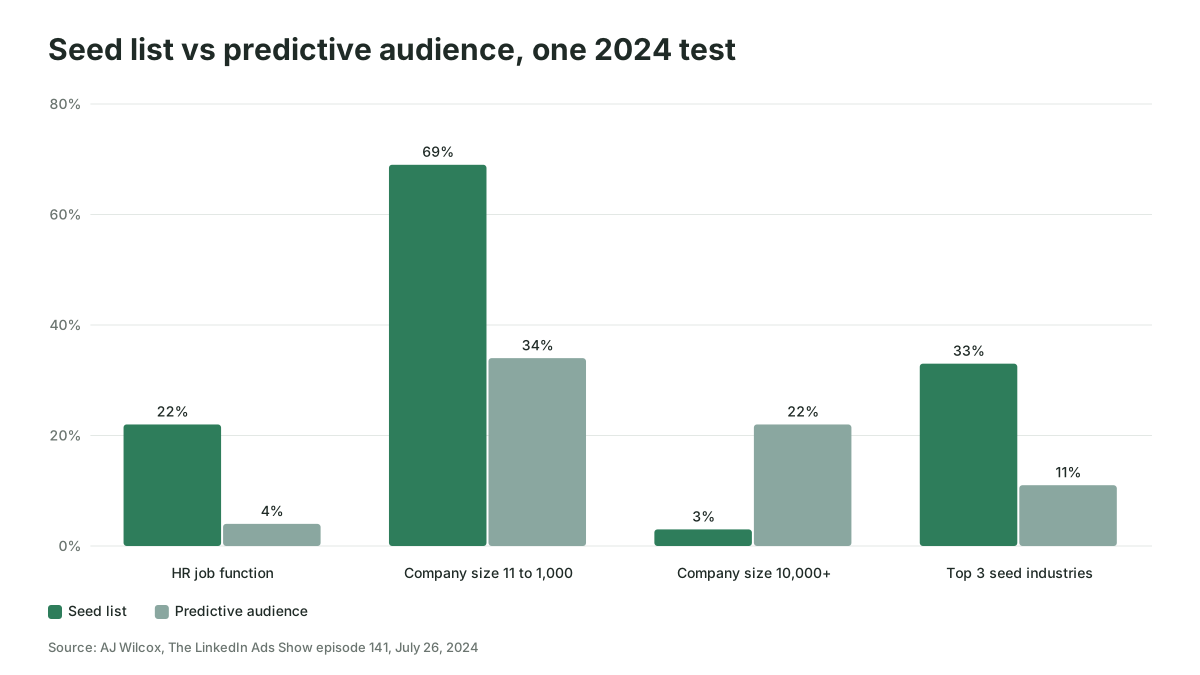
Wilcox also reported click-through and conversion rates well above his usual audiences, so the drift isn't automatically bad; his guess was that LinkedIn leans on intent signals more than on profile fields. But a team selling to HR at mid-sized companies would still want to know that, in his test, more than a fifth of the predictive audience worked at companies of 10,000 or more. His advice was to "put some guardrails on it," meaning basic targeting layered on top, and to start "with as clean of a list as you can possibly get, without noise."
That's the job for your own AI. Build the seed from accounts that became opportunities, not from every form fill, and check that it clears LinkedIn's 300 floor after matching. Then layer guardrails by job function or company size and read the professional demographics report after the first two weeks. Our guide to AI audience segmentation for B2B paid media walks through building that seed from CRM data.
LinkedIn's creative AI produces more variants, and it judges them on clicks
Campaign Manager's creative AI is a set of tools that write and multiply ads inside the ad creation window. LinkedIn's July 1, 2026 announcement describes five: Brand Kit stores your colors, fonts, logo, tone of voice and key messages; Draft with AI writes a first ad from a URL, your campaign goals and any context you add; AI ad variants generate new headlines and introductory text from an existing ad; flexible ad creation mixes the images, videos and copy you upload; and Ads Personalization inserts profile details such as job title, company and industry.
Flexible ad creation is the one that changes delivery as well as production. LinkedIn's December 2025 post says you upload "up to four images, four videos, and four copy variations" and the system "shifts budget towards the best-performing variants." LinkedIn's July post adds that, "based on internal analysis, advertisers who run five or more ad variants see over 20% higher click-through rates" than those running one ad.
Read that figure for what it measures. It's LinkedIn's own analysis with no method published, and click-through rate is the metric a vague, curiosity-bait headline wins easily. When LinkedIn shifts budget to the best performer, it's shifting toward clicks or leads, because those are the results it can see. In a small B2B audience, five variants also split the impressions five ways, which can leave each one too thin to judge and wear the audience out faster. Our guide to ad fatigue in small B2B audiences covers that side. LinkedIn thought leader ads sit outside these tools altogether, because the sponsored post stays the author's own words.
LinkedIn ads optimization stops at the qualified lead unless you send pipeline back
LinkedIn ads optimization runs on the result you choose, and LinkedIn can only aim at results it can see. LinkedIn's bidding help page lists three strategies: maximum delivery, which "uses machine learning to automatically bid for you" with no bid or cost cap; cost cap, where you set a cost per key result that Campaign Manager treats as a benchmark for bids; and manual bidding.
The setting that moves LinkedIn closest to pipeline is the qualified leads optimization goal. LinkedIn's lead generation help page says that if you have a Conversions API integration, a lead generation ad set "automatically selects qualified leads as the recommended optimization goal," using "qualified lead data shared from your LinkedIn Conversions API, through direct build or a third-party partner, or by manually uploading information." Maximum delivery is the only bidding strategy available with it.
Without that signal, LinkedIn optimizes toward form fills, which its forms produce easily. LinkedIn's marketing blog says its "data shows that the average LinkedIn Lead Gen Form conversion rate is 13%," against a 4.02% Unbounce average for landing pages. That figure counts form fills, not pipeline, and LinkedIn gives no sample or period for it. A form that converts at three times the rate can also let in far more casual interest.
The same gap shows up in reporting. LinkedIn's Companies Hub help page says revenue metrics only appear once you "connect your CRM through your Business Manager account using CRM Sync." Our guide to offline conversion tracking for B2B covers sending CRM stages back to LinkedIn, Google and Microsoft. It's the slowest piece of this whole set-up, and the piece every other step depends on.
Your own AI runs three weekly jobs Campaign Manager can't
Your team's AI should take the jobs that need data LinkedIn doesn't hold or a judgment LinkedIn won't make for you: which defaults you meant to keep, where budget should move, and what LinkedIn produced in pipeline. If a job needs only LinkedIn's data and a click-based goal, let Campaign Manager's AI do it. If it needs your CRM, your account list or a person's approval, it's yours.
The connection comes first. LinkedIn's own MCP server, which reads and writes ad accounts, is in beta and already in use as of November 2026, but not yet publicly documented. LinkedIn also lists a read-only beta LinkedIn Ads plugin inside ChatGPT, which OpenAI's listing says gives "read-only access to ad set performance." The other routes are third-party servers and connector services built on the LinkedIn Marketing API, covered in our LinkedIn Ads MCP guide. For the audit and the readout, a read-only connection is enough, and signing in as a member with the VIEWER role on the ad account keeps it that way.
Job 1: the Monday settings audit
The settings audit lists every live ad set and flags each AI default that's on where your team said it should be off. It's the LinkedIn ads automation to start with, because it catches money spent on decisions nobody made. Paste this into Claude or ChatGPT once the account is connected, and check that your connection returns settings as well as performance, since a performance-only connection can't answer items 2 to 5:
For every active ad set in LinkedIn ad account [ID], list:
1. Campaign, ad set name, objective, daily or lifetime budget.
2. Audience type: built, Auto-Targeting, predictive audience, buyer groups.
3. Audience expansion on or off. LinkedIn Audience Network on or off.
4. Bidding strategy and optimization goal.
5. Exclusions attached, and the last update date of each list.
6. Last 14 days: spend, impressions, frequency, leads.

Then flag any ad set where:
- the audience is a named account list and expansion or Audience Network is on;
- a predictive audience has no job function or company size guardrail;
- no customer or open-opportunity exclusion is attached;
- frequency is above [your own threshold, set from your history] over 14 days.

Show the raw rows behind every flag. Do not change anything.
Consider two hypothetical teams with the same $40,000 a month on LinkedIn. Company A checks settings when a campaign launches and never again, so an ad set built in August for an ABM list still has the Audience Network ticked in November. Company B runs the prompt every Monday, and the flag comes up the first week. Neither team is smarter about LinkedIn. One of them simply looks.
Job 2: budget shifts a person approves
Budget proposals are where your AI reads what LinkedIn's bidding can't, then hands the decision to a person. The AI compares ad sets on cost per opportunity from the CRM, so it needs a CRM connection beside the LinkedIn one; our HubSpot MCP guide covers that route for HubSpot. It then proposes a move and writes one paragraph explaining it. Someone with budget authority accepts or rejects it in Campaign Manager or through a write-enabled connection with confirmation.
Using LinkedIn spend by ad set for the last 90 days and CRM opportunities
whose original source is that ad set, rank ad sets by cost per opportunity.
Propose at most two budget moves of no more than 20% each.
For each, give the evidence, the number of opportunities behind it,
and the reason it might be wrong. Flag any ad set with fewer than
[5] opportunities as too thin to judge.
The minimum opportunity count matters more than the percentage. A move based on two opportunities is a coin toss with a spreadsheet attached.
Job 3: the pipeline readout
The pipeline readout is the one table LinkedIn's reporting won't build: spend joined to what sales did with the leads. Ask for it weekly, in the same columns every time, so the trend is readable:
| Column | Where the AI gets it |
|---|---|
| Campaign and ad set | LinkedIn ad account |
| Spend, impressions, leads | LinkedIn ad account |
| Share of impressions in ICP job functions | LinkedIn professional demographics |
| Leads reaching your qualified stage | CRM |
| Opportunities created, pipeline value | CRM, matched on campaign or ad ID |
| Cost per opportunity | Calculated |
| Accounts from the target list that engaged | Companies Hub export or CRM |
This only works if the campaign and ad IDs travel with the lead into the CRM, through Lead Gen Form hidden fields or UTM parameters. Check that before you ask any AI to fill the table, because a confident readout built on leads that were never matched is an easy failure to miss.
Where AI on LinkedIn goes wrong for B2B teams
The most expensive mistake is judging LinkedIn's AI on the metrics LinkedIn reports. A predictive audience with double the click-through rate can still be reaching the wrong companies, as Wilcox's 2024 test suggested, and a variant pool tuned for clicks can lift engagement while the opportunity count stays flat.
Three other failures come up often enough to plan for:
- Expansion on a named account list. An ABM ad set with audience expansion or the Audience Network left on is spending outside the list it exists to reach. LinkedIn's company list rules already demand 300 matched members per ad set, and expansion quietly dilutes even that.
- Auto-Targeting on a thin account. LinkedIn's help page says Auto-Targeting uses "historical data from your account's previous ad sets." A new account has little history to draw on, so the audience leans on your URL and LinkedIn's general model.
- Trusting the AI's arithmetic. An AI client can misread a date range or join on the wrong ID. Ask for the raw rows behind any number that goes into a budget decision.
A falling cost per opportunity shows the set-up is working
The test for AI on LinkedIn is whether cost per opportunity from LinkedIn falls over at least one full sales qualification cycle, measured in your CRM. Cost per lead may rise while that happens, which can be a sign that the qualified leads goal has stopped chasing cheap forms.
Check three things each month. First, the share of impressions landing in your ICP job functions in the professional demographics report should hold steady or rise. Second, the share of LinkedIn leads reaching your qualified stage should rise. Third, no audit flag should survive more than a week. For revenue, be patient: Dreamdata's 2026 LinkedIn Ads Benchmarks Report puts the average time from a first LinkedIn ad impression to revenue at 281 days, so a quarter is too short to judge closed revenue and long enough to judge opportunities.
Where to start
Start with the Monday settings audit on a read-only connection, and turn off any default your team never chose before you change anything else. Scalewell can build that audit and the pipeline readout into the systems your team already runs, so the weekly LinkedIn work becomes deciding rather than collecting.
Frequently asked questions
Is LinkedIn Accelerate still available?
Not as a separate campaign type. Accelerate stopped being a standalone campaign type in August 2026, according to trade press. Its AI features, such as Auto-Targeting and Draft with AI, now appear as options inside Classic campaigns, so the decisions it used to make in one go are now separate settings you can check.
Can ChatGPT or Claude manage LinkedIn ads?
They can read and, through some routes, change a LinkedIn ad account. LinkedIn's own ChatGPT plugin is read-only and in beta. LinkedIn's MCP server reads and writes but isn't publicly documented yet, and third-party MCP servers vary from read-only to full write access. Keep a person approving every budget or status change.
Does LinkedIn have an AI ad generator?
Yes. Campaign Manager's Draft with AI, which LinkedIn documents for single image ads, writes introductory text and a headline and suggests an image from your landing page URL and campaign goals, and AI ad variants rewrite an existing ad several ways. Brand Kit keeps the output to your colors, fonts, logo and tone. Review every claim before launch, since the tool can't check facts.
Should B2B advertisers turn off the LinkedIn Audience Network?
Turn it off by default on named account and ABM ad sets, and test it separately elsewhere. The network shows your ads on third-party apps and sites using your targeting, and it's switched on for new single image, carousel, document and video ad sets. Judge it on its own cost per opportunity, not blended into on-LinkedIn results.