ChatGPT prompts for Google Ads and Meta Ads: a prompt library for paid media teams
A free prompt library for paid media teams where every prompt comes with the report to paste in, the platform rule it must respect and the checks to run before anything touches the account.

ChatGPT prompts for Google Ads work when each prompt names the export you paste in, carries the platform rule the answer has to respect, and ends with a check you run before anything touches the account. This library covers Google Ads and Meta Ads prompts for search terms, ad copy, audiences, reporting and pacing, all free to copy.
Picture a Monday morning in the account. The search terms report has 2,000 rows since you last looked, the Meta account needs three new primary texts before the creative review at 11, and someone from finance wants to know by lunch whether the month will land on budget. Each of those jobs takes an hour done by hand. Each of them can take ten minutes with a model, as long as you give it the right data and don't believe everything it says back.
We read seven of the pages that rank for this search in November 2026. Most list AI prompts for PPC with bracketed placeholders, few say which report to export, and almost none say what to check in the answer. This article fixes that: every prompt here comes as a unit of three parts, the export to paste, the prompt itself, and the checks to run. It is written for the person who runs the accounts, and it borrows one rule from the research, which is to use the model as a sounding board rather than a ghostwriter.
Every prompt pairs an export with a check list
A prompt without its input and its checks is a sentence, and a sentence rarely saves an hour. The format below gives the model the same thing a new team member would get: the data, the constraints and the definition of done.
| Job | Export to paste | Rule the prompt carries | Check before you act |
|---|---|---|---|
| Search terms review | Search terms report, last 30 days, with cost, clicks, conversions | Negative match types and close variants | Every proposed negative against converting terms |
| Ad copy | Current ad assets plus landing page text | Character limits and policy | Counts, claims and offers |
| Audiences | Keyword list or segment breakdown | Hypotheses only | Does the segment exist in the platform |
| Reporting narrative | Period-over-period campaign table | Numbers must come from the table | Recompute every figure quoted |
| Pacing | Spend to date by campaign, budgets, days left | Platform overspend rules | The arithmetic |
The third column matters more than it looks. ChatGPT does not know your account, and its memory of how Google Ads or Meta Ads works is a mix of old help pages and other people's blog posts. Putting the rule in the prompt replaces that memory with the current one.
The fourth column is where the saved hour gets protected. A model that suggests a negative keyword which would have blocked your best converting query has cost you more than the hour it saved, and nobody will notice until the month-end review. Your team gets more from prompts like these once they live in a shared library with the exports and checks you already use, which Scalewell builds with paid teams.

Turn off model training before you paste account data
As of November 2026, OpenAI says it may use content from the individual ChatGPT plans (Free, Plus and Pro) to train its models unless you opt out, and that it does not use inputs or outputs from ChatGPT Business, Enterprise, Edu or the API to improve its models by default. The opt-out for an individual plan sits under Settings, then Data controls, where you turn off "Improve the model for everyone". Temporary chats are also excluded while they stay temporary, according to OpenAI's help page on how data is used. Anthropic's consumer Claude plans have the same shape: a "Model Improvement" setting in Privacy Settings, and incognito chats are not used to improve the model.
So before the first paste, do three things. Check the setting on the account you'll use, or move the work to a business workspace. Strip anything you'd be unhappy to see outside the company, such as client names in campaign labels if you work at an agency. And keep to aggregated performance data: search terms, ad copy and campaign tables are fine, lead lists and customer records never belong in a chat window.
None of this is dramatic, and it takes five minutes once. It is also the question your head of legal will ask the first time they hear the team is pasting account data into a chatbot, so it pays to have the answer ready.
A context block at the top of every chat stops the generic answers
The reason most ChatGPT ad copy reads like every other ad is that most people never tell it who they are. Paste this block at the start of every new chat, filled in once and saved somewhere the whole team can copy it.
CONTEXT FOR THIS CHAT
Company: [name], selling [product] to [buyer role] at [company type and size].
Price point and sales motion: [e.g. $18k ACV, sales-led, 45-day cycle].
What we are not: [the two or three things people confuse us with].
Proof we are allowed to use: [named customers, numbers, awards we can cite publicly].
Claims we must never make: [e.g. "guaranteed", "number one", pricing we don't publish].
Tone: plain, specific, no exclamation marks, no superlatives.
Platform: [Google Ads search / Meta Ads feed], [market], [language].
Goal metric: [e.g. cost per qualified opportunity, not cost per lead].
Rules: Work only from the data I paste. If something is missing, ask. Never invent a number, a customer or a feature. Flag anything you are unsure about.
Two of those lines do most of the work. "Claims we must never make" stops the model volunteering a free trial you don't offer, which is a policy problem as much as a brand one. "Work only from the data I paste" is the line that turns a ghostwriter into a sounding board.
Keyword research prompts expand a seed list and leave the volumes to Keyword Planner
A keyword expansion prompt turns a seed list or a landing page into candidate keywords grouped by intent and tagged with a Google Ads match type, and it must never report search volume, because the model cannot see Google's data. Paste five to ten seed terms and the landing page text, and ask for structure rather than numbers.
Here are my seed keywords: [paste 5 to 10].
Landing page text: [paste the headline, subhead and first 300 words].
Market and language: [e.g. US, English].

Expand these into up to 60 candidate keywords a buyer would type, grouped as: problem (describing the pain), category (naming the solution type), comparison (vs, alternative, review) and brand or product (us or a named rival). For each candidate give the keyword, its group, the match type to start with in Google Ads syntax (plain text for broad, "quotes" for phrase, [brackets] for exact), and one line on why it belongs. Default to phrase match, use exact only for terms with buying intent, and use broad only where I confirm Smart Bidding is on. Mark any keyword whose meaning the landing page does not support. Do not estimate search volume, competition or cost per click; I will take the list into Keyword Planner for those.
Platform rules in this prompt confirmed: November 2026.
Two checks before the list goes anywhere. First, hold the match types against Google's page About keyword matching options, which states as of November 2026 that broad match "is the default match type that all your keywords are assigned", that phrase match is written in quotes and exact match in square brackets, that phrase match shows ads on "searches that include the meaning of your keyword" and exact match on searches "that have the same meaning or same intent as the keyword", and that "It's critical to use Smart Bidding with broad match". Second, run the whole list through Keyword Planner, which Google says gives estimates of the searches a keyword gets each month and the average cost for your ad to show on them, and which can also take a website URL and suggest keywords from its content. Drop every candidate that shows no searches, since a model produces plausible keywords easily and plausible and searched are different things. The other direction, pruning what the account has already matched, is the search terms prompt below.
Search terms review prompts find negative keywords without blocking buyers
Export the search terms report for the last 30 days with cost, clicks, conversions and the keyword that triggered each term, then paste it or upload it as a file. Expect the model to be good at reading intent and poor at knowing your business, which is why the context block matters here most of all.
Here is my Google Ads search terms report for the last 30 days (columns: search term, matched keyword, campaign, cost, clicks, conversions).

Classify every term into one of four groups:
1. Keep: clearly our buyer.
2. Add as negative: clearly not our buyer (wrong product, job seekers, free or DIY intent, other countries, informational research with no buying signal).
3. Watch: ambiguous, say why in five words.
4. Promote: converting terms that are not yet keywords.

For every "Add as negative", give the negative keyword text, the match type you suggest, the level (campaign or shared list), and the cost it would have saved in the period. Sort by cost saved. Do not propose a negative that contains a word appearing in any converting term unless you explain the conflict.
Rule to apply: Google negative keywords do not match close variants, so list singular and plural forms separately.
Platform rules in this prompt confirmed: November 2026.
The second prompt reads the words rather than the rows, and it is what you reach for when the report has 5,000 lines.
Using the same report, break every search term into single words and two-word phrases. For each word or phrase that appears in at least 20 terms, total the cost, clicks and conversions across those terms. Show the 30 highest-cost words with zero conversions, and the 20 highest-converting words. Then propose up to 15 phrase-match negatives from the first list, with the cost each would have saved.
Three checks before anything goes into the account. First, the default match type for a negative keyword in Google Ads is broad, and Google's help page on negative keyword match types states that negative keywords won't match to close variants or other expansions, so a negative for "running shoe" does not block "running shoes" and the model usually assumes it does. Second, the report is incomplete by design: Google's search terms report page says that some search terms without enough query activity are omitted, so a clean report does not mean a clean account. Third, read every negative against your converting terms yourself, because the prompt asks the model to do this and it is the step it most often skips.
If you want this to run every week with the same export and the same checks, the method is in using AI to review search terms and find negative keywords every week.
Google Ads copy prompts work inside the limits and the policies
The limits are the first thing to put in the prompt and the first thing to count in the answer. Google's responsive search ads help page states that you need at least 3 headlines and can enter up to 15, at least 2 descriptions and up to 4, that headlines take up to 30 characters, descriptions up to 90 and each path field up to 15, and that an ad shows up to 3 headlines at once. It also says pinning isn't recommended for most advertisers and can affect Ad Strength, which Google's Ad Strength page defines as a measure of the relevance, quality and diversity of your ad assets, rated Poor, Average, Good or Excellent.
Write assets for one Google responsive search ad for the ad group "[ad group name]", whose keywords are: [paste keywords].
Landing page text: [paste the page's headline, subhead and first 200 words].

Produce 15 headlines of 30 characters or fewer and 4 descriptions of 90 characters or fewer. Show the character count after each line. Requirements:
- At least 5 headlines include one of the keywords verbatim.
- At least 3 headlines name a specific proof point from the context block.
- At least 2 headlines state the call to action.
- No two headlines say the same thing in different words; each must survive being shown alone or next to any other two.
- No claims, offers or prices that are not in the context block or on the landing page.
- No exclamation marks, no words in all capitals, no symbols used for emphasis.
Then list the three headlines you would pin to position 1 if I insisted on pinning, and say what pinning costs.
Platform rules in this prompt confirmed: November 2026.
Count the characters yourself, because models miscount at the edges and a 31-character headline will not upload. Then read the set for policy problems. Google's editorial policy disallows punctuation or symbols that aren't used correctly or for their intended purpose, capitalization that isn't used for its intended purpose, and gimmicky or unnecessary repetition of words. Its misrepresentation policy disallows promising products, services or promotional offers that are unavailable, and claims that entice the user with an improbable result. A model fed a thin brief will invent exactly those: a free trial, a "number one" and a result nobody measured.
The second copy prompt is the one the research supports. In a 2024 study in Management Science, Zenan Chen and Jason Chan had experts and non-experts write ad copy with a large language model either as a ghostwriter or as a sounding board that gave feedback on their own drafts, and measured the clicks the ads earned on social platforms. Using the model as a sounding board "enhances the quality of the resultant ad copies for nonexperts", while using it as a ghostwriter "did not provide significant benefits and is, in fact, detrimental to expert users". If you have written search ads for years, that is a finding about you.
Here are the 15 headlines and 4 descriptions I wrote for the ad group "[name]" (keywords: [list]). Landing page text: [paste].

Act as a reviewer, not a writer. For each asset, tell me: whether it duplicates another asset in meaning, whether the character count is within 30 for headlines and 90 for descriptions, whether it makes a claim I have not supported in the context block, and whether a searcher using [top keyword] would see their words in it. Then name the three weakest assets and explain why, without rewriting them. Finally, tell me what the set is missing: an angle, a proof type or an objection nobody answers.
The small public evidence on fully generated copy points the same way. In a test published on Search Engine Journal in April 2024, Hop Skip Media ran one human-written responsive search ad against one written by an AI copy tool for eight weeks on a $500 budget, and the human ad earned a 4.98% click-through rate against 3.65% for the generated one. Two ads settle nothing, but the author's conclusion is the right habit: "Never rely solely on AI-generated copy."
Meta Ads copy prompts need the placement's text lengths and your customers' words
Meta's own specs give the numbers to put in the prompt. For a Facebook feed image ad, Meta's ads guide recommends primary text of 50 to 150 characters and a headline of 27 characters. For the Instagram feed it recommends primary text of 125 characters and a headline of 40, with a maximum of 30 hashtags. Meta labels those as recommendations rather than hard caps, and in practice they are close to what shows before the text is cut off, which makes them the difference between a hook that is read and a hook that ends at "Tired of".
The second input is the one most prompts leave out: language your buyers actually use. Paste in twenty customer reviews, the objections your sales team hears, or the comments under your current ads. The model is far better at rearranging real sentences than at inventing them.
Here are 20 pieces of real customer language (reviews, sales call notes, ad comments): [paste].
Here is the offer and landing page text: [paste].

Write 6 primary texts for a Facebook and Instagram feed ad. For each one:
- The first 125 characters must work as a complete thought, because the rest may be hidden.
- Open with a sentence a customer above could have said, lightly edited, not a question and not "Tired of".
- Make one specific claim from the offer, with the proof point from the context block.
- Close with a plain call to action.
Also write 6 headlines of 27 characters or fewer and show the count.
Label each primary text with the customer line it came from.
Platform rules in this prompt confirmed: November 2026.
Here is my Meta ad copy and its results for the last 14 days: [paste ad name, primary text, headline, spend, impressions, CTR, cost per result].

Do not write new copy. Tell me which hooks share an angle, which angle has the lowest cost per result, what the losing ads have in common in their first sentence, and which objection from the customer language above none of the ads answers. Give me three creative briefs of five lines each for the next round, each naming the angle, the customer line to open with and the proof point to use.
Check the lengths against the placement you'll actually run, since the Facebook and Instagram figures differ. Then read every line that tells the reader something about themselves rather than about the product. "Struggling with debt" or "for people over 50" addresses the reader by who they are, and that kind of line is the first thing we'd cut in a review pass, so keep the copy about the problem and the outcome. If the brief prompt above is the part you want to industrialize, turning performance data into creative briefs with AI goes deeper on it.
Audience prompts produce hypotheses to test and never segments to trust
A model cannot see your audience data, and anything it says about who your buyers are is a guess dressed as an insight. What it can do well is turn a keyword list or a segment breakdown into a structure you'd otherwise draw on a whiteboard.
Here are the 200 keywords in my Google Ads account with cost, clicks and conversions: [paste].

Group them by buyer intent into: problem-aware (describing a pain), solution-aware (naming a category), product-aware (naming us or a rival), and buying (price, demo, pricing, vendor comparison). Show cost and conversions per group. Then tell me which group is overspent relative to its conversion share, and propose one ad group structure per intent group with a one-line message for each. Do not add keywords I have not pasted.
Here is my Meta ads breakdown by age, gender, placement and country for the last 30 days, with spend, CTR and cost per result: [paste].
Here is the customer language from the Meta copy prompt: [paste it again if this is a new chat].

Give me five audience hypotheses in this form: "People who [situation], reached through [placement], respond to [angle] because [evidence from the table or the customer language]." Rank them by the spend currently going to each. For each, name one existing campaign element that already tests it and one that would.
The check here is a simple one. If the model names a Meta interest, a Google audience segment or a placement, open the platform and confirm it exists under that name before you build anything on it, because models produce plausible segment names the way they produce plausible citations.
Competitor analysis AI prompts read the ad libraries and label every guess
A competitor analysis AI prompt turns the ads and pages you copy from the public ad libraries into a table of claims, offers and personas, and it has to be told up front that the libraries show no spend, keywords or results for ordinary US ads. In B2B that table is worth having, because you compete with a handful of rivals for the same buying committee, and their ads tell you which member of it they think signs the contract. Using ChatGPT for Google Ads competitor work means accepting that it reads the message in the ads and nothing about the budget behind them. The full method, with a fixed tagging scheme, a monthly change log and why run length misleads on LinkedIn, is in AI competitor analysis for paid ads. The four prompts below are the daily versions.
Input: the text of every [rival] search ad the Google Ads Transparency Center shows for [region] over the last 90 days, plus the ads I saw on live searches for [5 of my keywords].
Group the ads by main claim, offer and named proof, with a count and one quoted headline per group. Then list which of my keywords showed no rival ad in my searches. Do not estimate keywords, bids, spend or results.
Check the answer against what Google's Ads Transparency Center page says it holds: the advertiser's name and location, the payer and the ads served over a time period, with targeting and recipient counts only for ads served in certain regions. Keywords, bids and spend appear nowhere on it, so a line saying a rival "bids on" a term was invented.
Input: one row per ad for [rival] from the LinkedIn Ad Library and the Meta Ad Library: platform, format, ad text, first and last seen dates, and for EU-delivered copies the impression range or reach and the targeting shown.
Tag each ad with persona (decision maker, practitioner, finance, IT or security, mixed), offer (demo, free trial, report, webinar, calculator, pricing page, event, none) and proof. Report counts by persona and offer, then three observations labeled OBSERVED or INFERRED, with the evidence for each inference. Treat EU targeting as a hint about how they think, never as their US targeting.
This read needs two checks. LinkedIn's help page says its library holds ads that ran after June 1, 2023, keeps them for one year after their last impression, and adds impressions, targeting and run dates only for EU-targeted ads. Meta's archived ad fields list reach only for ads delivered to the EU, age, gender and location targeting only for ads delivered to the UK and EU, and spend and impressions only for political and issue ads. Any spend figure next to a rival's commercial ad came from the model.
Input: the URL each rival ad points to and that page's text (headline, subhead, form fields, proof section), copied on [date].
For each page give the headline promise, the offer, the number of form fields, the proof used, and whether the page repeats the ad's main claim. Quote the page; do not paraphrase. Flag any page whose promise differs from the ad that sends traffic to it.
Date every paste, since a rival may be testing pages and you saw one version on one day. Then hold each quote against the page.
Input: the answers to the three prompts above, plus my context block.
Build a table with each claim, the rivals that make it and the platform. List the claims no rival makes that the proof in my context block supports. Propose two tests for my account, each naming the claim, persona, offer and metric (cost per qualified opportunity). Do not suggest copying any rival's ad.
Read the gaps against the closed-lost notes from sales before you test one, because a claim nobody makes is sometimes a claim no buyer cares about. Of all the AI prompts for B2B marketing in this library, this is the one most likely to be over-trusted, since its answer sounds like strategy. If you'd rather a tool collected the ads than paste them yourself, the options are sorted in AI tools for B2B paid media.
Reporting narrative prompts turn a table into the paragraph your stakeholders read
Export the campaign table for this period and the comparison period with spend, impressions, clicks, conversions, cost per conversion and, if you have it, pipeline or qualified opportunities from the CRM. The model's job is the sentences, and your job is the numbers.
Here is my Google Ads (or Meta Ads) campaign table for [period] and [comparison period]: [paste].
Here are the three things that changed in the account this period: [e.g. new negatives on 4 Nov, budget cut on brand, landing page swap].

Write a weekly narrative of no more than 180 words for a head of marketing. Lead with the metric that matters most to them ([goal metric]), then the one change that explains most of the movement, then the one risk for next week. Use only numbers from the table, round to one decimal, and put each number's row name in brackets so I can check it. Do not speculate about causes beyond the three changes I listed; where the data does not explain a movement, say so.
In the same table, cost per conversion on [campaign] rose from [x] to [y]. List every possible arithmetic explanation using only the columns present (spend up with conversions flat, conversions down with spend flat, mix shift between campaigns, and so on), say which one the numbers support, and tell me what one extra report would confirm it.
Recompute every figure the narrative quotes, which is why the prompt asks for row names in brackets. Models are fluent and approximate, and "spend rose 12%" when the table says 8% is the kind of error that gets forwarded to a CFO with your name on it. The prompt also forbids invented causes, because the natural failure mode of a reporting prompt is a confident story about seasonality that nobody asked for. The weekly version of this, with the export automated and the narrative landing in Slack, is in automating weekly PPC reporting with AI.
Pacing prompts check spend against the month with the platform's rules written in
Pacing is arithmetic, and models are not reliable at arithmetic, so the prompt tells the model to show its working and you check the sums. It also carries the two platform rules that catch people out.
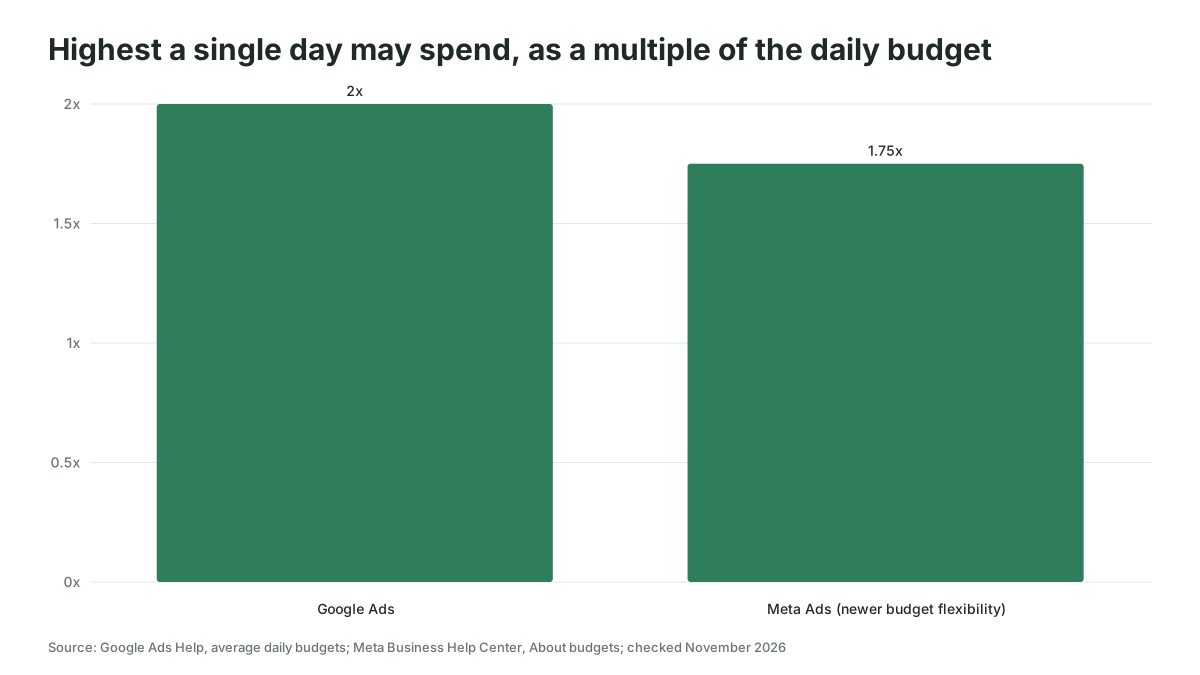
Google's page on average daily budgets says that on a given day a campaign might spend up to twice your average daily budget, and that at the end of the month you will have spent no more than 30.4 times it. Meta's page on budgets says daily budgets are not a hard cap. On accounts with Meta's newer budget flexibility, spend may go up to 75% above your daily budget on some days; the Marketing API budgets page still says 25%, so if your account has not been moved to the new behavior, write 1.25x into the prompt instead of 1.75x. You won't spend more than seven times your daily budget in a calendar week running Sunday to Saturday, and lifetime budgets are a hard cap. A pacing check that treats a Tuesday overspend as a problem does not know this.
Today is [date]. The month has [n] days.
Here is spend to date by campaign with each campaign's daily budget and monthly target: [paste].

For each campaign, show: spend to date, the straight-line expected spend for today, the variance in money and percent, and the projected month-end spend at the current 7-day run rate. Show the formula for each number. Rules: on Google Ads a single day may reach 2x the daily budget and the month caps at 30.4x; on Meta a single day may reach 1.75x and a Sunday-to-Saturday week caps at 7x. Flag a campaign only if its 7-day run rate, not a single day, puts it more than 10% off its monthly target. Then tell me the daily budget each flagged campaign would need from tomorrow to land on target, and list the assumptions you made.
Platform rules in this prompt confirmed: November 2026.
Check the formulas before you read the conclusions. If one is wrong, every number after it is wrong, and the model will not have noticed. The fully automated version of this check, where the exports arrive on their own and the model only writes the message, is covered in automating PPC budget pacing checks with AI.
Where these prompts go wrong, and who should skip them
Four failures account for most of the bad answers these prompts produce, and each one has a check.
Invented numbers are the first. Ask for a summary of a table and you will sometimes get a percentage that appears nowhere in it, delivered in the same tone as the correct ones. The bracketed row names in the reporting prompt exist for this reason, and so does the rule to recompute.
Stale platform knowledge is the second. A model trained on old help pages will tell you that negatives block close variants, that a Meta daily budget is a cap, or that a headline has 25 characters. Writing the current rule into the prompt is the fix, and it means somebody on the team owns keeping those lines current when Google or Meta changes them.
Homogenized copy is the third, and it is the one that erodes performance slowly. Generated ads converge on the same rhythms and the same hooks, which is partly why the Chen and Chan study found experts did worse when the model wrote for them. Keep the writing with the people who are good at it and give them the model as a critic.
Oversized pastes are the fourth. A 20,000-row search terms report in a chat window produces a model that reads the first part carefully and skims the rest. Filter to terms with cost above a floor, or use the word-level prompt, or move to a connected account when the exports outgrow the chat.
Two kinds of team should skip prompts altogether. If your account is small enough that the search terms report fits on one screen, the prompts cost more time than they save. And if your copy is regulated, in financial services or healthcare for example, the model's habit of volunteering claims makes it a liability in the drafting seat; use it only as the reviewer.
Prompts are the first step, and a connected account is the second
Everything above assumes copy and paste, and copy and paste has a ceiling. The exports are snapshots, the checks are manual, and the context block has to be re-pasted into every chat. As of November 2026 Meta documents an official ads MCP server in its Business Help Center for connecting an AI agent to an ad account, with the caveat on the same page that not every account has access yet, and connector services such as Coupler.io and Windsor.ai describe routes for Google Ads and Meta Ads, which turns "paste the search terms report" into "read the search terms report for the last 30 days". The prompts don't change much when you make that move, but the checks do, because a connected client can act as well as read, and the rules about what it may touch have to live in the platform rather than in your head. The routes for each platform, what they can read and write and what they cost, are surveyed in Google Ads MCP: how to connect Claude or ChatGPT to your Google Ads account and Meta Ads MCP: connecting an AI client to your Meta ad account.
We'd start with the prompts, run them for a month, and keep a note of which ones the team actually reuses. The two or three that survive are the ones worth automating, and the checks you ran by hand are the specification for the automation.
Where to start this week
Pick the one job from the table that eats the most of your Monday, run its prompt with a real export, and keep the checks beside you while you read the answer. If you'd like help turning the prompts your team keeps using into a method that runs on its own, Scalewell sets that up with paid media teams.
Frequently asked questions
Should I paste the whole account into ChatGPT or one campaign at a time?
One campaign or one ad group at a time, with the context block at the top. A whole-account paste gives the model more rows than it reads carefully, mixes intents that need different copy, and makes every check harder for you. Work through the campaigns in order of spend, and start a fresh chat when the subject changes.
Can I paste my search terms report into ChatGPT safely?
Search terms are aggregated performance data rather than personal data, so the main risk is account confidentiality rather than privacy law, though scan the export for anything a person typed about themselves, such as a name or an address. Turn off model training on an individual plan or use a business workspace, where OpenAI says it does not train on inputs by default, and remove client or campaign names that identify customers before pasting.
How many headlines should I ask ChatGPT to write for a responsive search ad?
Ask for the full 15 headlines and 4 descriptions with character counts shown, then cut rather than add. Cutting is easier than coaxing a tired model into a sixteenth idea, and a set of 10 headlines that each say something different serves better than 15 that repeat one message, since only a few show together and the ad is scored on how varied the set is.
Do these prompts work in Claude or Gemini as well as ChatGPT?
Yes, because each prompt carries its own data and rules rather than relying on what a particular model remembers. Check the data-training settings for whichever product you use, since each vendor has its own defaults for individual and business plans, and expect small differences in how strictly the models follow character limits, which you count anyway.