PPC budget pacing: the formula, the daily checks, and how to automate them with AI
A PPC lead's guide to budget pacing that holds two numbers, the plan and the platform ceiling, with seven morning checks, alert thresholds, a copyable AI brief and the Google rule changes that move the ceiling.

PPC budget pacing compares what you have spent so far this month with what the calendar says you should have spent, then projects where the month will land. The formula is simple division. The work is in the second number most pacing sheets leave out: the spending ceiling each ad platform applies, which your own budget edits move.
You probably know the moment. It's the 22nd, finance wants a month-end number by lunch, and the pacing tab says Google Ads is 15 percent ahead because one campaign spent double its daily budget on Saturday. Someone suggests cutting budgets for the rest of the month. Someone else points out you underspent LinkedIn and should move the money across. Both of them are guessing.
This article is for the head of paid media or the PPC lead who wants pacing to run itself. It gives you the formula, seven morning checks with thresholds, three ways to run them with a script or an AI client as of November 2026, and the ways the automation goes wrong. Every platform figure comes from that platform's own documentation, linked where it is used.
Pacing compares month-to-date spend with the spend the calendar expects
Budget pacing has three numbers: expected spend to date, the pace index, and the projected month-end spend. Expected spend to date is the monthly budget multiplied by the days completed and divided by the days in the month. The pace index is month-to-date spend divided by expected spend, so 1.00 is on plan, 1.10 is 10 percent ahead and 0.90 is 10 percent behind. The projection is month-to-date spend plus the average daily spend of the last seven days multiplied by the days remaining.
Use completed days, not today, because today's cost is still arriving. Google's Flexible Budgets script documentation warns that "retrieved reports data such as cost could be delayed by about 3 hours", so a morning check should treat yesterday as the last complete day.
Here is a hypothetical to make it concrete. Imagine a team with a $30,000 Google Ads budget for November, a 30-day month. On the morning of the 13th, twelve days are complete and month-to-date spend is $13,800. Expected spend is $30,000 × 12 / 30, which is $12,000, so the pace index is 1.15. The last seven days averaged $1,250 a day, so the projection is $13,800 + $1,250 × 18, which is $36,300.
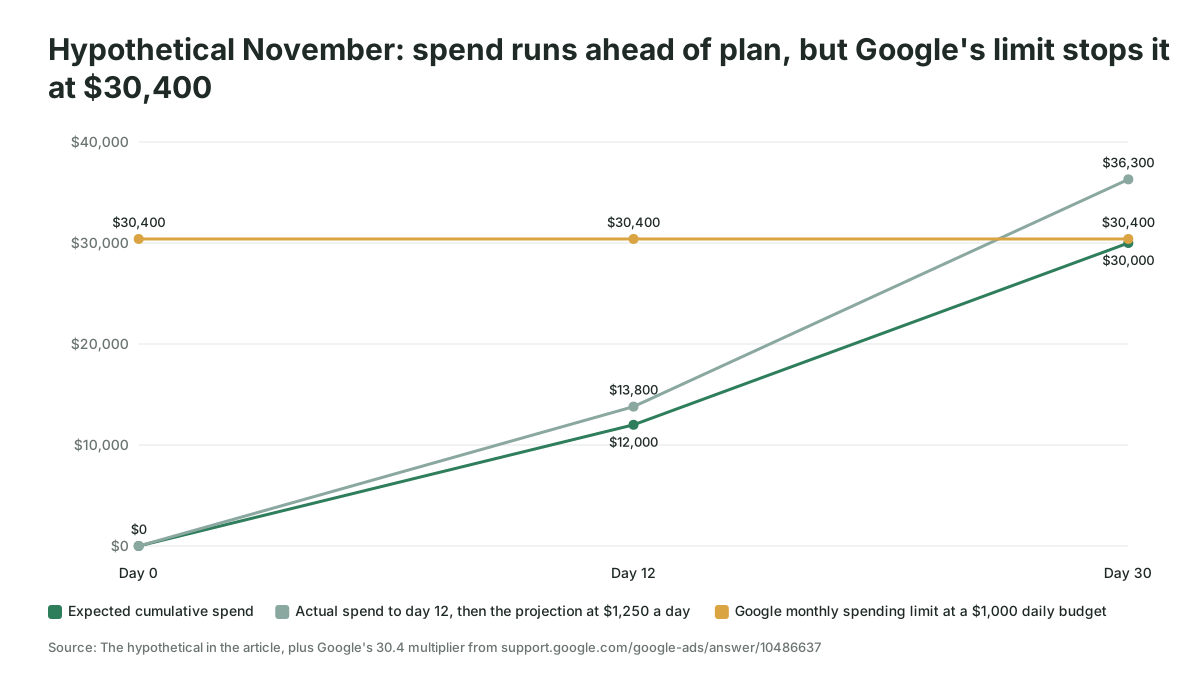
Most pacing articles stop there and tell you to cut budgets. The team in the example would be wrong to, and the reason is a number their sheet doesn't hold.
Google's spending limit is the second number to pace against
Google Ads caps what you pay at two times your average daily budget on any day and 30.4 times your average daily budget in a calendar month, for most campaigns. Both figures are on Google's About spending limits page, which also gives the example: with a $10 average daily budget your daily limit is $20 and your monthly limit is $304, and if served costs reach $310 you're billed $304. Google's overdelivery page adds that served costs "may exceed your daily or monthly spending limits" but "you'll never actually pay more than your spending limits."
So go back to the hypothetical. The team set a daily budget of $1,000 by dividing $30,000 by 30, so their monthly spending limit is 30.4 × $1,000, which is $30,400, and Google will not bill them more than that. The 15 percent overpace is real, but the month cannot end at $36,300. What happens instead is that the campaigns run out of ceiling in the last few days and go quiet.
Two practices follow from that rule. Set the daily budget as the monthly budget divided by 30.4, which is what Google's page on setting an average daily budget tells you to do; dividing by 30 gives Google 1.3 percent more than you planned. And hold the platform ceiling in the pacing sheet as its own column next to the plan, so the sheet can tell "ahead of plan" from "about to be throttled". That sheet becomes a morning routine when AI fills both columns, and Scalewell puts it to work with paid teams so a person only looks at the campaigns that need one.
One exception matters for lead gen accounts: Google says that for Pay for Conversions campaigns "there's no daily spending limit but the campaign stays within the monthly spending limits", so only the monthly check applies to them.
Changing a budget mid-month moves the ceiling, and that's where months go wrong
A budget change resets the monthly spending limit to what you have spent so far plus the new daily budget multiplied by the remaining calendar days. Google's How budget changes take effect page gives the worked example: $270 spent with five days left in September, budget raised from $10 to $50 a day, new monthly limit "$270 USD + ($50 USD/day * 5 remaining days in September) = $520 USD". The same page notes that if you change a budget several times in one day, the daily limit uses the highest budget you set that day, so a $10 budget raised to $50 and cut back to $5 still has a $100 daily limit.
This is the catch-up trap. Imagine the same hypothetical team is behind instead of ahead: $15,000 spent by the morning of the 21st against an expected $20,000. Raising the daily budget to $1,500 for the last ten days sets the ceiling at $15,000 + $1,500 × 10, exactly $30,000, so that is safe. Raising it to $2,000 "to make sure we catch up" sets the ceiling at $35,000 and allows $4,000 days. The budget change made the overspend possible, and a sheet that didn't model the ceiling would only have seen it on the 1st.
The decision rule is one line, and it is worth putting on the sheet: the highest daily budget you can set today is the remaining monthly budget divided by the remaining calendar days including today, because Google counts the day of the edit. Google counts calendar days here, not scheduled days.
Since June 2026, weekday-only schedules no longer lower the monthly ceiling
Google changed how ad schedules interact with daily budgets on June 1, 2026, so a campaign that only runs on some days of the week now paces toward 30.4 times its daily budget rather than toward the daily budget multiplied by the days it is scheduled to run. The live spending limits page now states it as current behavior: "The system will pace to reach this full monthly limit regardless of how many days the campaign is scheduled to be active." The announcement, Changes to Google Ads budget pacing for Ad Scheduling, gives the example of a $100 daily budget scheduled for 20 days a month: before the change it paced toward $2,000, after the change it paces toward $3,040, and to keep spending $2,000 the daily budget should be about $66. Google adds that campaigns still do not serve on days the schedule turns off, and that the change applies to schedules that switch off whole days, not hours.
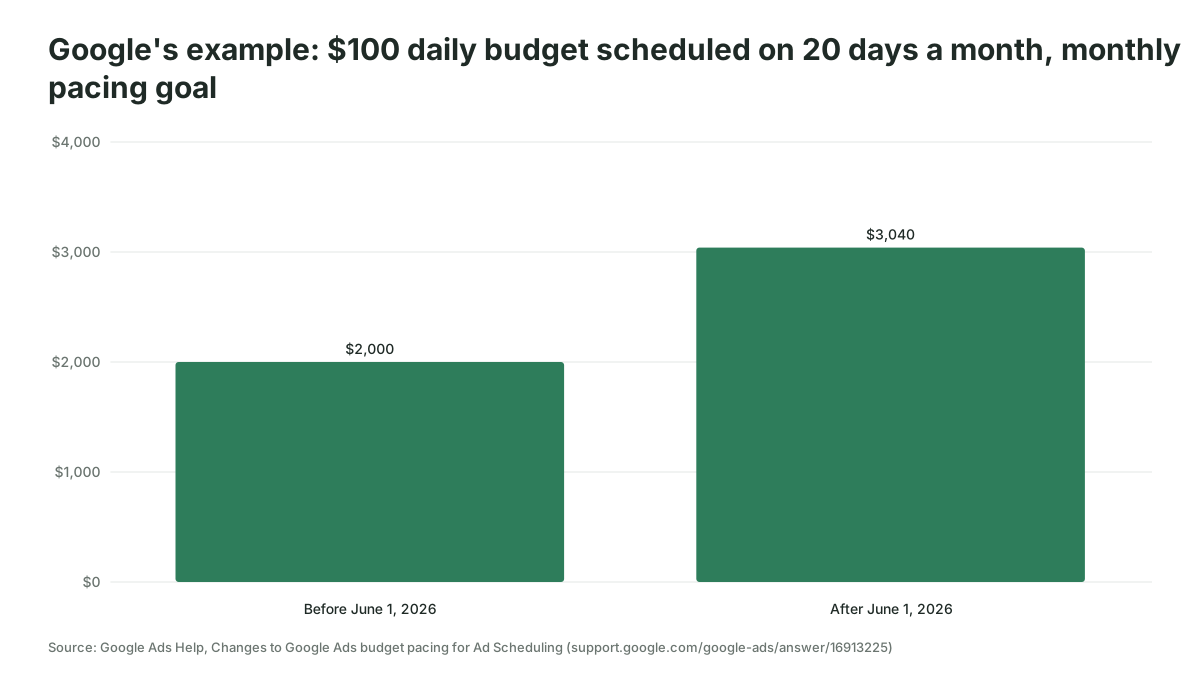
B2B accounts are the ones this bites, because weekday-only schedules are common when sales only picks up the phone Monday to Friday, and shared budgets follow the same rule: Google says "All campaigns in the shared budget, with or without ad schedules, will follow the budget pacing behavior described above." A weekday campaign with a $1,000 daily budget used to settle near $22,000 in a month with 22 working days; under the new rule its pacing goal is $30,400, and on 22 serving days with a $2,000 daily limit it can get there. To keep the month at $22,000 the daily budget should be $22,000 / 30.4, about $724. If scheduled campaigns in your account still carry budgets set before June 2026, that is the first thing to check after reading this.
Meta, LinkedIn and Microsoft each cap spend on a different clock
Every platform lets a campaign beat its daily budget on a good day and caps the total over a longer period, but the multipliers and the period differ, so a pacing sheet needs a row of rules per platform. The table is drawn from each platform's developer documentation as of November 2026.
| Platform | Daily behavior stated in its documentation | Longer-period cap stated in its documentation |
|---|---|---|
| Google Ads | Up to 2 times the average daily budget on a given day (spending limits) | 30.4 times the average daily budget per calendar month |
| Meta | For recurring daily budgets, "your daily spend may be more than your daily budget" (Marketing API ad set reference) | "your weekly spend will not exceed 7 times your daily budget" |
| "LinkedIn can charge you up to 150% of your daily budget" on a single day; the daily budget resets at midnight UTC (Marketing API campaigns guide) | With a daily budget and an end date, total spend is no more than the daily budget multiplied by the days of the flight | |
| Microsoft Advertising | Microsoft "usually keeps overspend to less than 100% above your daily limit" (Campaign object, Campaign Management API) | None stated on that page |
Two details from that table change how you build checks. LinkedIn's day ends at midnight UTC, so a US team reading yesterday's spend over breakfast is reading a day that closed early the previous evening, and the pace calculation should use UTC days for LinkedIn. Meta's cap is weekly, so a Meta daily alert is noise by design and the useful Meta check is the rolling seven-day total against seven times the daily budget.
Before you automate, settle the budget source, the time zone and the owner
Pacing automation needs one table that says what the budget is, because the platforms do not know your monthly plan. Build a budget sheet with one row per campaign or budget group: platform, campaign or shared budget ID, monthly budget, start and end dates, the owner who gets the alert, and the platform ceiling computed from the daily budgets. If you built a media plan from our media plan template, its budget-by-month table is the source for the monthly column.
Settle three more things before writing any code. Time zones: the Google Ads API evaluates date ranges "relative to the serving account's time zone", per its date ranges reference, and LinkedIn runs on UTC, so the sheet should say which clock each row uses. Served versus billed cost: Google's daily costs page explains that served cost covers all the clicks received while billed cost is "the actual amount you're responsible for paying", and the Transactions page lists served and billed cost side by side for each campaign, so a pacing sheet built on reported cost will sometimes run a few dollars above the invoice. And the owner, because an alert nobody is named on is a log file.
Seven checks to run every morning
A good pacing routine runs seven checks against yesterday's complete data and sends one message. The thresholds below are our suggested starting points; move them after a month of seeing what fires.
- Pace index per budget group. Month-to-date spend divided by expected spend to date. Flag outside 0.90 to 1.10 from the sixth day of the month onward; the first five days are too noisy to act on.
- Projected month-end spend. Month-to-date spend plus the seven-day average daily spend multiplied by the days remaining. Flag when the projection misses the monthly budget by more than 5 percent from the 15th, because by then you still have time to fix it.
- Platform ceiling versus plan. For Google, 30.4 times the sum of the active daily budgets in the group, compared with the monthly budget, unless a budget in the group changed this month, in which case the check 5 figure is the ceiling. Flag a mismatch above 2 percent either way: a ceiling below plan guarantees underspend, and one above plan allows overspend.
- Yesterday's spend versus the daily budget. Google permits 2 times, so a day above budget is normal and a day at or near the 2 times limit is only worth a line in the message. The alert condition is the seven-day total above 7 times the daily budget plus 10 percent, the threshold Nils Rooijmans uses in his daily budget overdelivery alerts script, which also uses 20 percent for a single day and 5 percent over four weeks.
- Budget changes since yesterday. Read the change history (the Google query for it is under the API route below) and, for every changed budget, recompute the ceiling as spent so far plus the new daily budget multiplied by the remaining calendar days including the day of the change. Flag any change that pushes the ceiling above the monthly budget, and name who made it, politely.
- Zero-spend and limited-by-budget campaigns. A campaign that spent nothing yesterday, or that Google marks as limited by budget, is a pacing problem waiting for the 28th. Flag both kinds of campaign.
- Remaining allowance per day. Remaining monthly budget divided by remaining calendar days including today, shown as the maximum daily budget anyone may set today. This is the line that stops the catch-up trap, and it belongs at the top of the message.

Three ways to run the checks, as of November 2026
There are three practical routes to automate pacing checks: a Google Ads script inside the account, a scheduled Google Ads API query into a sheet, and an AI client connected to the account through an MCP server. Pick by how many platforms you pace and who maintains it.
A Google Ads script is the right route for a Google-only account with one owner. Google's scripts reference confirms that a campaign's getStatsFor("THIS_MONTH") returns month-to-date stats and that getBudget().getAmount() returns the daily amount, with the catch in the Budget reference that getAmount() "will return 0 if the budget has a total amount rather than a daily amount", so campaign total budgets need getTotalAmount() and a different ceiling. If nobody on the team writes JavaScript, our guide to writing Google Ads scripts with AI covers the brief and the test ladder; Rooijmans' monthly budget target alert is a public example of the simplest version, an hourly script that emails when month-to-date spend passes a fixed target and, as he notes, leaves the pausing to you.
A scheduled API query into a sheet is the right route when you pace more than one platform, because every platform lands in the same sheet and the formulas above do the rest. On Google Ads the query is along these lines, with cost returned in micros of the account currency, so divide by 1,000,000:
SELECT campaign.name, campaign.status,
       campaign_budget.amount_micros, campaign_budget.period,
       metrics.cost_micros
FROM campaign
WHERE segments.date DURING THIS_MONTH
  AND campaign.status = 'ENABLED'
The campaign_budget fields in API version v26 give you amount_micros for daily budgets, total_amount_micros for campaign total budgets and period to tell them apart, and THIS_MONTH is a predefined range in the date ranges reference. Our weekly PPC reporting guide covers the routes that get platform data into a table, and a pacing tab is the natural first consumer of that pipe.
Check 5 has its own query, because budget changes live in a different resource. The Google Ads API's change_event returns, for each change, the old and new values of the fields that changed, the time it was committed and, in Google's words, "which user made the change, assuming that information is also visible in the Change History of the web client". Filter it to budgets and to yesterday:
SELECT change_event.change_date_time, change_event.user_email,
       change_event.client_type, change_event.changed_fields,
       change_event.old_resource, change_event.new_resource,
       campaign.name
FROM change_event
WHERE change_event.change_resource_type = 'CAMPAIGN_BUDGET'
  AND change_event.change_date_time >= '[yesterday]'
  AND change_event.change_date_time <= '[today]'
ORDER BY change_event.change_date_time DESC
LIMIT 1000
Three rules from Google's page shape the check. "The date range must be within the past 30 days", the query "must also include a LIMIT clause restricting results to at most 10,000 rows", and "A change can take up to three minutes to be reflected in the change event results", so a run at 08:00 reading yesterday is safe. Google also warns that "A change event may not include every row from the Change History in the web client", so when the two disagree, the interface's Change history, which covers the past two years and shows the email address of whoever made a change in the interface, wins. Google Ads scripts run the same query through AdsApp.search, and Nils Rooijmans' change history alerts script is a public example that pulls yesterday's change_event rows into a sheet and emails the number of changes. Microsoft Advertising's change history report shows "which user made the changes" with old and new values, about an hour after the change. For Meta and LinkedIn we could not verify a documented equivalent, so keep yesterday's budget column in the sheet and flag any row where today's differs.
An AI client over MCP is the right route when you want the morning message in plain English and want to ask follow-up questions, such as which campaign caused the Saturday spike. The set-up and authentication options are in our guide to connecting Claude or ChatGPT to Google Ads through MCP. Whatever route you pick, keep one rule: the numbers are computed in code or formulas, and the model writes the words around them. A language model asked to divide month-to-date spend by expected spend will usually get it right, and "usually" is no standard for a number finance will quote.
What turns the AI client into a routine is a scheduled task, and both major clients have one. Claude's scheduled tasks are on every paid plan, run hourly, daily, weekly or on weekdays, and in Anthropic's words "run remotely, so they run on their cadence even when your computer is asleep"; each run is its own session and can use the connectors you have set up. The Claude Code version, cloud scheduled tasks, is in research preview, includes all your connected MCP connectors by default and lets the run write through them, and Anthropic's own example task ends by posting a summary to Slack. ChatGPT's scheduled tasks run up to once an hour on eligible paid plans and notify you from Settings > Notifications, with one catch for anything unattended: an action that needs approval pauses the task until you review it.
Anthropic's pages describe no alert when a run finishes, and a ChatGPT notification reaches only you, so the delivery is part of the prompt. Set the task for 08:00 in your time zone, give it the Google Ads MCP server plus a Slack or Gmail connector, and end the brief with where the message goes, which the brief below does. Without a chat product, the API route does the same job from a cron job that posts to a Slack incoming webhook, a URL "specific to a single user and a single channel" that accepts a JSON body with a text field. A Google Ads script can call that same webhook with UrlFetchApp, which Google shows in its third-party APIs guide, email the message with MailApp, which Apps Script limits to 100 recipients a day on a consumer account and 1,500 on Google Workspace, or write it as a row in the pacing sheet with SpreadsheetApp. Pick the one your team already reads before 09:00.
Here is the brief we would give the AI, whether it is writing the script or running the checks itself. Paste it as it stands and fill the brackets.
You are checking budget pacing for [account or platform] every morning.
Budget source: the sheet [name], one row per campaign group with monthly
budget, start date, end date, owner and platform.
Data: yesterday is the last complete day. Use the account time zone for
Google Ads and UTC for LinkedIn. Use served cost as reported.
Compute, in code, for each group: month-to-date spend; expected spend to
date (monthly budget x completed days / days in month); pace index; projected
month-end spend (month-to-date + 7-day average daily spend x days remaining);
Google ceiling (30.4 x sum of active daily budgets, or spent so far + new daily
budget x remaining calendar days if a budget changed this month); remaining allowance per
day ((monthly budget - month-to-date) / remaining calendar days incl. today).
Flag: pace index outside 0.90 to 1.10 from day 6; projection off by more
than 5 percent from day 15; ceiling differing from monthly budget by more
than 2 percent; 7-day spend above 7 x daily budget x 1.10; any budget change
since yesterday that raises the ceiling above the monthly budget; zero-spend
or limited-by-budget campaigns.
Output: one message, flagged items first, each with the number, the
threshold and the one action you suggest. Change nothing in any account.
Deliver: post the message to [Slack channel or email address] by 08:30, and
send it when nothing is flagged too, so a missing message means the run failed.
Pacing automation fails in five predictable ways
The first failure is pacing against the plan and not the ceiling. A sheet that only knows the monthly budget tells you to cut budgets when Google's 30.4 rule was already going to stop the spend, and says nothing when a mid-month edit lifted the ceiling above the plan.
The second is the catch-up budget raise in the last ten days, which check 7 exists to prevent.
The third is reading today's data. Cost arrives late, so a check at 09:00 that includes today shows every campaign underpacing and someone raises budgets.
The fourth is the June 2026 ad-schedule change sitting unnoticed on weekday-only campaigns whose daily budgets were set before it. Recalculate those budgets once, this week.
The fifth is letting the automation change budgets. Google's own Flexible Budgets script, which redistributes a total budget across a date range every day, carries two warnings in its documentation: the total "might be exceeded depending on when the script is scheduled to run", and cost data can lag by about three hours. If Google's own budget-adjusting script needs those caveats, an AI-written one needs a human reading its alerts for at least a month before it is allowed to touch a budget, and then a cap on how much it may change in one run. Where that line sits is the subject of our piece on where humans stay in the loop on ad spend.
One more catch for Performance Max: Google's in-interface budget report, which shows the monthly spending limit, cost to date and a forecast, is only available for campaigns on average daily budgets, and Google states that "Performance Max campaigns are currently not compatible with the budget reports." Your own pacing sheet is the only forecast those campaigns get.
You know it works when the day-15 projection matches the invoice
Pacing automation has worked when the projection on the 15th lands within a few percent of the month-end billed cost three months running, and when no budget change in the last ten days of a month caught the morning message by surprise. Keep a small log with the day-15 projection, the final billed cost from the Transactions page, and the number of alerts sent against the number acted on, because an alert that fires every day and gets ignored is worse than no alert at all. When the log shows the forecast holding, the conversation with finance moves from a surprise on the 1st to a number you gave them on the 15th, which is the point of the exercise.
Where to start this week
Add two columns to your pacing sheet, the platform ceiling and the remaining allowance per day, then run the seven checks by hand for a week before you automate them. If you would like help setting the method up for your team, Scalewell builds this kind of AI-assisted routine around how a paid media team already works.
Frequently asked questions
What is a good budget pacing percentage?
A pace index between 0.90 and 1.10, or 90 to 110 percent of expected spend to date, is a sensible band after the first five days of the month. Inside that band, do nothing. Outside it, look at the projection and the platform ceiling before changing a budget, because the fix is often to leave the budget alone.
How do I work out a Google Ads daily budget from a monthly budget?
Divide the monthly budget by 30.4, which Google describes as the average number of days in a month. A $30,000 monthly budget becomes a $987 average daily budget. Dividing by 30 or 31 instead gives Google a slightly different monthly spending limit from the one you planned, because the limit is always 30.4 times the daily figure.
Why did Google Ads spend twice my daily budget yesterday?
Because Google's spending limits allow it. For most campaigns a single day can cost up to two times the average daily budget, while the month is capped at 30.4 times. Google balances high days against low ones, and you never pay more than the monthly limit, so one double day is normal and only a run of them matters.
Should I use a campaign total budget instead of a daily budget?
A campaign total budget suits a fixed flight with a hard end date, because Google spreads it across the dates and says you will never be charged more than the total. It is available for Performance Max, Search, Shopping, Demand Gen and YouTube campaigns, and the budget type cannot be changed after the campaign is created.
Can AI change my ad budgets automatically to fix pacing?
It can, through a script or an API connection, but we would not let it for the first month. Let it compute the numbers and write the alert, read every alert, and only then allow changes that are capped per run and logged with before and after values. Pacing mistakes made by software happen every day until someone notices.