AI competitor analysis for paid ads: how to research rival ads with AI
A seven-step method for collecting, tagging and tracking competitor ads with AI, built for B2B paid teams and honest about what the ad libraries hide.

AI competitor analysis for paid ads means collecting your rivals' ads from the public ad libraries, having a model tag each one by message, offer, format and audience, and tracking what changes each month. The libraries show you the ads and almost nothing about spend or results, so the AI's real job is to read the message layer at scale.
You'll know this moment: someone senior asks what a competitor is running on LinkedIn, and by Thursday there's a deck with 40 screenshots, a few arrows and a slide titled "key themes." Nobody opens it again, and nothing in your account changes because of it.
This guide is for the paid media lead who has to do the research and wants it to change something. It covers what Meta, Google and LinkedIn actually disclose as of November 2026, a tagging scheme built for B2B ads, the prompts to run it, and an honest list of what you can and can't infer from someone else's ads. For teams that want this as a monthly habit, Scalewell helps set up the competitor list, tagging scheme and change log so the research feeds planning instead of sitting in a folder.
The three free ad libraries show the ad and almost nothing about results
All three platforms publish a searchable library of ads, and none of them shows spend, clicks or conversions for ordinary commercial ads in the US. What you get is the creative, the advertiser and some dates. The useful detail sits in the EU, where transparency law forces extra disclosure.
| Library | What it shows for any ad | Extra for ads delivered in the EU | How far back | Bulk access |
|---|---|---|---|---|
| Meta Ad Library (Facebook, Instagram) | Creative, text, platforms, active or inactive status | Reach, plus age, gender and location targeting | Political and issue ads kept seven years; not stated for other ads | Ad Library API returns commercial ads only if they reached the EU |
| Google Ads Transparency Center (Search, YouTube, Display) | Advertiser name and location, payer, the ads, format, region, when last shown | Targeting information and number of recipients in certain regions | Ads an advertiser served over a time period | API for ads served in the EEA |
| LinkedIn Ad Library | Ad preview, format, advertiser, payer, whether restricted | Impressions, targeting and the dates the ad ran | Ads since June 1, 2023, kept one year after last impression | LinkedIn Help links to an Ad Library API; access terms unconfirmed |
Meta's own developer documentation for the Ad Library API says ads that did not reach any EU location "will only return if they are about social issues, elections or politics." The archived ad fields make the split plain: spend and impressions apply to political and issue ads, while reach and targeting apply to ads delivered in the UK and EU. Jon Loomer, in his detailed guide to the library, puts the commercial view bluntly: "you'll get an overview of the active and inactive ads, but that's pretty much it" (Jon Loomer).
Google launched the Ads Transparency Center on March 29, 2023, covering Search, YouTube and Display ads and showing when each ad last ran, its format and the region it was shown in. Its help page lists the advertiser's name and location, the payer and the ads served over a time period, with targeting and recipient counts added only "for ads served in certain countries or regions." Nothing on that page mentions keywords, bids or spend, so don't expect to see which search terms trigger a rival's ads.
LinkedIn's help page says the library includes ads that ran after June 1, 2023, that ads stay "for one year after their last impression," and that EU-targeted ads add impressions, targeting and run dates. You can search by company, payer, keyword, country and date range.
So here's a move most guides skip. If a US competitor also advertises in Europe, filter the libraries to EU countries. The EU copies of their ads expose targeting and impression ranges that the US copies hide. The EU campaigns may differ from the US ones, so treat this as a strong hint about how they think about audiences, never as a map of their US targeting.
Settle four things before the model sees a single ad
The model is the easy part. Four things decide whether the output is useful.
- A short competitor list. Three to six companies you lose deals to, plus one or two you'd like to be compared with. Pull the names from your CRM's closed-lost reasons if sales logs them, because the companies your buyers mention matter more than the ones your CEO worries about.
- One decision the research should feed. "Should we test a pricing-led offer on LinkedIn?" is a question research can answer. "What are competitors doing?" never ends.
- A fixed tagging scheme. The same fields and allowed values every month, so you can compare. The template follows in the next section.
- Your own ads tagged the same way. A rival's patterns mean little until you can put them next to yours.
B2B competitor analysis needs its own tagging scheme
Generic tagging schemes are built for ecommerce: hook, product shot, discount, UGC. B2B ads need fields for the buying committee, the offer and the proof, because that's where B2B advertisers actually differ. Use these fields and keep the allowed values closed, so the model picks from a list instead of inventing labels.
| Field | Allowed values | Example (hypothetical) |
|---|---|---|
| Platform | Meta, Google Search, YouTube, Display, LinkedIn | |
| Format | Single image, carousel, video, document, text ad, thought leader ad | Document |
| First seen / last seen | Dates from the library | 2026-08-04 / 2026-11-02 |
| Persona | Decision maker, practitioner, finance, IT or security, mixed | Finance |
| Main claim | Short phrase in the ad's own words | "Close the books in 3 days" |
| Pain or outcome | Cost, speed, risk, compliance, growth, consolidation | Speed |
| Offer | Demo, free trial, report, webinar, calculator, pricing page, event, none | Report |
| Proof | Named customer, metric, analyst mention, review score, award, none | Metric |
| Landing page type | Demo form, gated content, product page, pricing, homepage | Gated content |
| Language register | Rational, emotional, mixed | Rational |
| Notes | Anything the model could not classify | Small print unreadable |
Two fields carry most of the value in B2B: offer and persona. If three competitors move from demo offers to reports aimed at finance within a quarter, that tells you more about where the market is heading than any amount of color analysis.
Using AI for competitor analysis takes seven steps from ad library to a monthly change log
Each step ends in something concrete you can hand to the next one.
- Collect the ads. Search each competitor in all three libraries and save every ad as a file, with its first-seen and last-seen dates in a sheet. For Meta's EU and political ads, the Ad Library API returns the ad text, call-to-action titles, platforms and a snapshot link. Be careful with scraping: LinkedIn's User Agreement (section 8.2) prohibits using "software, devices, scripts, robots" to "scrape or copy the Services," and that covers browser add-ons too.
- Give every ad one row. One ad, one row, one image or video file, one ID. The sheet is the memory, and the model is only the reader.
- Tag with a model that can see. Send the images in batches with the prompt below. Anthropic's vision documentation says the API accepts up to 600 images per request (100 on models with a 200k-token context window) and prices a 1000×1000 image at about $1.30 per thousand on Claude Haiku 4.5, so cost is a rounding error. For video ads, Google's Gemini video documentation says the model samples video at 1 frame per second and lets you ask about specific moments by timestamp, which is enough to tag the opening seconds.
- Spot-check before you trust it. Check 15 to 20 rows by hand in the first month, and correct the prompt where the model gets a field wrong. Anthropic's own documentation warns that Claude "might hallucinate or make mistakes when interpreting low-quality, rotated, or very small images under 200 pixels," which describes most ad small print.
- Summarize with observed and inferred kept apart. Run the summary prompt per competitor. Ask for counts first, interpretation second.
- Compare with last month. List what's new, what stopped and what changed offer or persona. A change log beats a snapshot because a single month mostly shows you what a rival happens to be running, while a change shows you a decision someone made.
- Write one decision. End with a test for your own account, a brief or a "no action." If the research changes nothing three months running, cut its scope.
The tagging prompt:
You are tagging competitor ads for a B2B paid media team.
For each image, return one JSON object with these fields:
platform, format, persona, main_claim, pain_or_outcome,
offer, proof, landing_page_type, register, notes.

Rules:
- Use only the allowed values listed below. If none fits, use
  "unclear" and explain in notes.
- main_claim must quote the ad's own words, under 12 words.
- If any text is too small or blurred to read, say so in notes
  and do not guess it.
- Do not infer spend, performance or targeting.

Allowed values:
persona: decision maker | practitioner | finance | IT or security | mixed
pain_or_outcome: cost | speed | risk | compliance | growth | consolidation
offer: demo | free trial | report | webinar | calculator | pricing page | event | none
proof: named customer | metric | analyst mention | review score | award | none
register: rational | emotional | mixed
The summary prompt:
Here are this month's tagged ads for [competitor], plus last
month's. Report in this order:
1. Counts by platform, format, offer and persona, this month
   vs last month.
2. Ads that are new this month, and ads that stopped.
3. Claims or offers that appear for the first time.
4. Three observations. Label each one OBSERVED (directly in
   the data) or INFERRED (your interpretation), and give the
   evidence for each inference.
Do not estimate spend or performance. Do not recommend copying
any ad.
If you run this every month, save it as a reusable skill so the scheme and rules don't drift between people. Our guide to Claude skills for marketing covers how.
Run length is a weak performance signal, and weaker on LinkedIn
The most common shortcut in competitor ad research is to treat a long-running ad as a winner, on the logic that nobody keeps paying for an ad that fails. That logic holds best on Meta, where ads churn fast. It holds much less well on LinkedIn, where ads run long as a matter of course.
AdSpyder's archive, current as of May 2026, shows the gap. On Meta, 29.8% of 4,000 sampled ads reached 30 days and 15.5% reached 90. On LinkedIn, 70.7% of 4,650 ads reached 30 days and 22.3% reached 90 (AdSpyder). AdSpyder calls its figures "a floor estimate," because ads still running count only up to the day they were last seen.
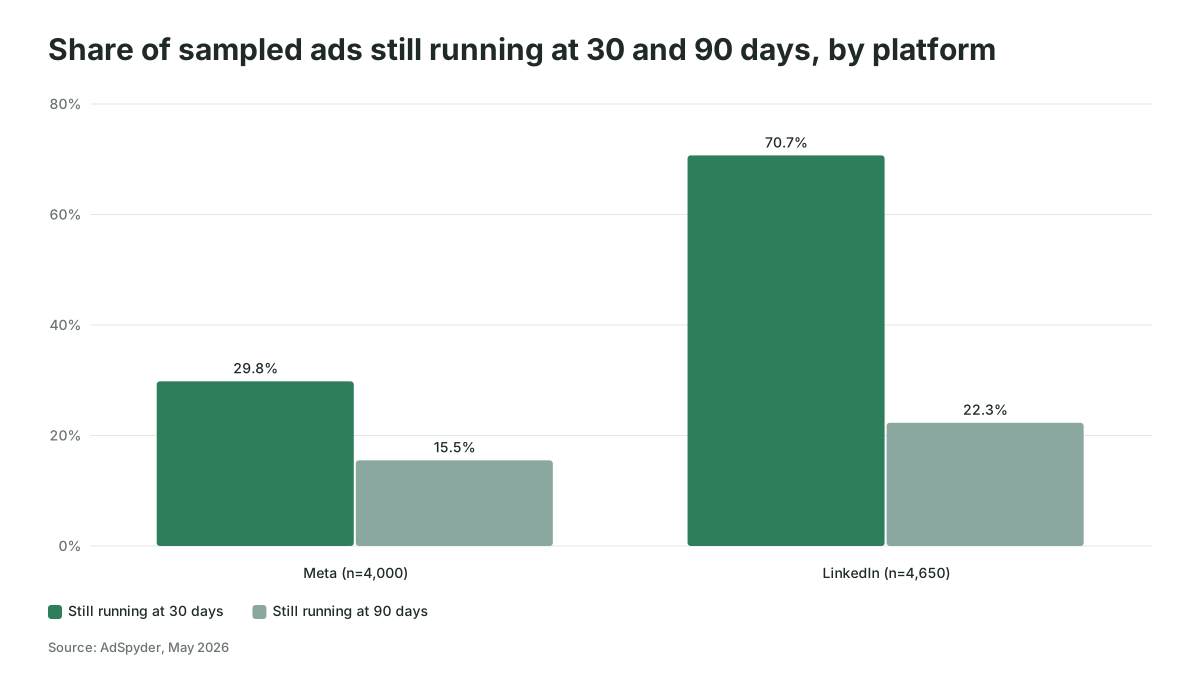
What does that mean for you? An ad that survives 60 days on Meta is unusual and worth a look. An ad that survives 60 days on LinkedIn may simply belong to a team with one designer and a quarterly refresh. In B2B, long runs also come from always-on retargeting, small budgets nobody revisits and ads nobody remembered to switch off.
| Signal you can see | What it might mean | What else explains it | How much weight |
|---|---|---|---|
| Ad running 90 days or more on Meta | It's working well enough to keep | Low-spend retargeting, forgotten ad | Medium |
| Ad running 90 days or more on LinkedIn | Same as above | Normal LinkedIn refresh cycle | Low |
| Many variants of one message launched together | They're testing that message | A new agency or a product launch | Medium |
| Same claim reappears after edits to the creative | The claim survived their tests | Brand guidelines | Medium to high |
| Offer changes across most ads in one month | A strategy decision | New quarter, new campaign calendar | High that something changed, low on why |
| High impression range on EU copies | Real budget behind it in the EU | One large event push | Medium for the EU only |
Spend, results and US targeting stay invisible
You cannot see spend, cost per click, conversion rate, pipeline or targeting for ordinary US ads on any of the three platforms. Justin Rowe, writing on Impactable's blog in August 2026, sums up the LinkedIn library in one line: "No click-through rate, no conversion rate, no leads, no pipeline" (Impactable). The same goes for Google's search keywords and Meta's US targeting.
Third-party tools sell spend and keyword estimates, which they model from their own data collection. They're models of the market, so use them for direction and never put a competitor's "spend" in a board deck as if it were reported. And no published study we could find measures whether AI-tagged competitor research improves a team's own results. That evidence doesn't exist yet, which is a good reason to tie each month's research to one test you can measure in your own CRM.
Where AI competitor research goes wrong
The failures are predictable, and most of them come from treating the output as a finished answer.
- Copying the winner. The research shows a rival's documents doing well on LinkedIn, so you launch documents. Now you look like them, in the same feed, to the same buyers. Use rivals' patterns to find the claim nobody is making, which is where a differentiated test comes from. Our guide on AI generated ads for B2B covers the "everyone looks the same" problem from the creative side.
- Tag drift. Different people or different prompts label the same ad differently, and the month-over-month comparison becomes noise. Fix the allowed values and keep the prompt in one place.
- Reading what isn't there. Models will happily describe small print they can't read. The "do not guess" rule and the spot-check catch most of it.
- Volume mistaken for strategy. A competitor with 200 ads may have 4 messages and 50 sizes. Count distinct claims, not ads.
- Research with no decision attached. If nobody can name what changed in your account because of last month's research, you're producing a newsletter, and a pretty expensive one in team hours.
- US-only blind spots. Ignoring the EU filter throws away the only targeting and impression data the libraries give you.
The research worked if your own tests changed
You'll know the process is working when each month's change log ends in a brief or a test, and some of those tests win in your own data. Feed the strongest observations into an AI creative brief, then read the result with the same discipline you'd use for any creative test: cost per opportunity in the CRM, not click-through rate.
A hypothetical example shows the difference. Company A tags three rivals each month and sees two of them move LinkedIn offers from demo requests to finance-focused reports over a quarter. Company A doesn't copy the reports. It tests a cost calculator aimed at the same finance persona, because no rival offers one, and judges it on opportunities created. Company B builds the same sheet, presents it at the monthly review and changes nothing. Both teams did the research, but only Company A got anything back for it.
Where to start this month
Pick three competitors and one decision, tag last month's ads with the scheme above, and repeat it next month so you have your first change log. If you want the method set up around how your team already works, that's the kind of thing Scalewell does for paid media teams.
Frequently asked questions
Can ChatGPT or Claude find competitor ads on their own?
They can try, but the results are patchy. Both can browse the web, but the ad libraries render in the browser and often block automated fetching, so a chat assistant will usually return a partial or outdated picture. You'll get more reliable results by collecting the ads yourself, saving them as files and giving the model a fixed tagging prompt.
Is it legal to use competitor ads in my research?
Studying public ads in the platforms' own libraries is what those libraries exist for. Copying a rival's wording, images or trademarks into your own ads is a different matter, and scraping can breach platform terms such as LinkedIn's User Agreement. Use the research for patterns, and ask your legal team before reusing anything specific.
How often should a B2B team run competitor ad research?
Monthly suits most B2B teams, because LinkedIn and Google campaigns change slowly and a month gives enough new ads to compare. Run a quick check after a competitor's product launch or funding announcement as well. Weekly scans rarely pay back unless you're in a crowded category with rivals who refresh creative constantly.
Can I see which keywords a competitor bids on with AI?
The Google Ads Transparency Center shows a rival's ads, formats and regions, with no keyword or bid data. Keyword lists come from third-party tools that crawl search results and estimate. A model can help you group those estimated keywords into themes, but the underlying data is still an estimate, so check it against your own search terms report.