Google Ads MCP: how to connect Claude or ChatGPT to your Google Ads account
A dated, verified guide to every public way of connecting an AI client to a Google Ads account, what each one can read and write, what it costs, and a three-question rule for choosing.

A Google Ads MCP server is a small program that sits between an AI client such as Claude or ChatGPT and the Google Ads API, so you can ask about your account in plain language and, with some servers, make changes. As of November 2026 there are three routes: Google's own open-source server, community servers on GitHub, and hosted connector services.
You've probably had the moment that sends people searching for this. A PPC lead pastes a search terms export into a chat window, waits, pastes the next account, and by the fourth paste wonders why the model can't just look at the account itself. It can, but the way you connect it decides who holds your credentials and whether the model can spend your money.
This article is for the person who runs the accounts, written so you can follow the steps on a Monday morning. It's dated throughout, because two things changed in the last two months: Google retired developer tokens in September 2026, and its server grew its first write tools on November 2, 2026. Ryze AI's comparison of 16 servers, last updated September 24, 2026, and Adspirer's guide, updated August 24, 2026, both describe Google's server as read-only and list a developer token among its requirements, which was accurate when they were written. Whatever route you pick, Scalewell helps the team put it to work, so the questions that used to take four pasted exports get answered straight from the account.
An MCP server translates your questions into Google Ads API calls
An MCP server exposes a list of tools that the AI client can call, and for Google Ads those tools are mostly wrappers around the Google Ads API. Model Context Protocol is the open standard that Claude, ChatGPT and Gemini CLI all speak, so one server can serve any of them; Google's documentation shows the same server connected to each. When you ask which campaigns lost impression share last week, the model picks a tool, writes a query, sends it through the server, and reads the rows that come back.
The query language underneath is GAQL, Google Ads Query Language. Google's documentation shows what a minimal one looks like:
SELECT campaign.id, campaign.name, campaign.status
FROM campaign
ORDER BY campaign.id
You will never type that yourself, but every read route in this article works by letting the model write GAQL against your account.
There are three routes, and the choice is about who holds the keys
The three routes differ on where the server runs, whose credentials it uses and what it may write, far more than on what they can read. The table shows what each route's own documentation said on November 8, 2026.
| Route | Reads | Writes | Authentication | Where it runs | Cost (November 2026) |
|---|---|---|---|---|---|
| Google's official server (googleads/google-ads-mcp) | Any GAQL query, account list, resource metadata | Assets and labels only since v0.0.6, behind a propose and confirm step; no bids, budgets, keywords or campaign status | Your own Google Cloud project and OAuth client | Your laptop (stdio) or your Cloud Run instance | Free, Apache 2.0; you pay any Cloud Run usage |
| Community open-source servers (for example cohnen/mcp-google-ads, gomarble-ai) | GAQL, campaign and ad performance, keyword ideas | Varies; the two we checked expose no campaign writes | Your own Cloud project and OAuth client; README files still ask for a developer token | Your laptop | Free, MIT; your engineer's time |
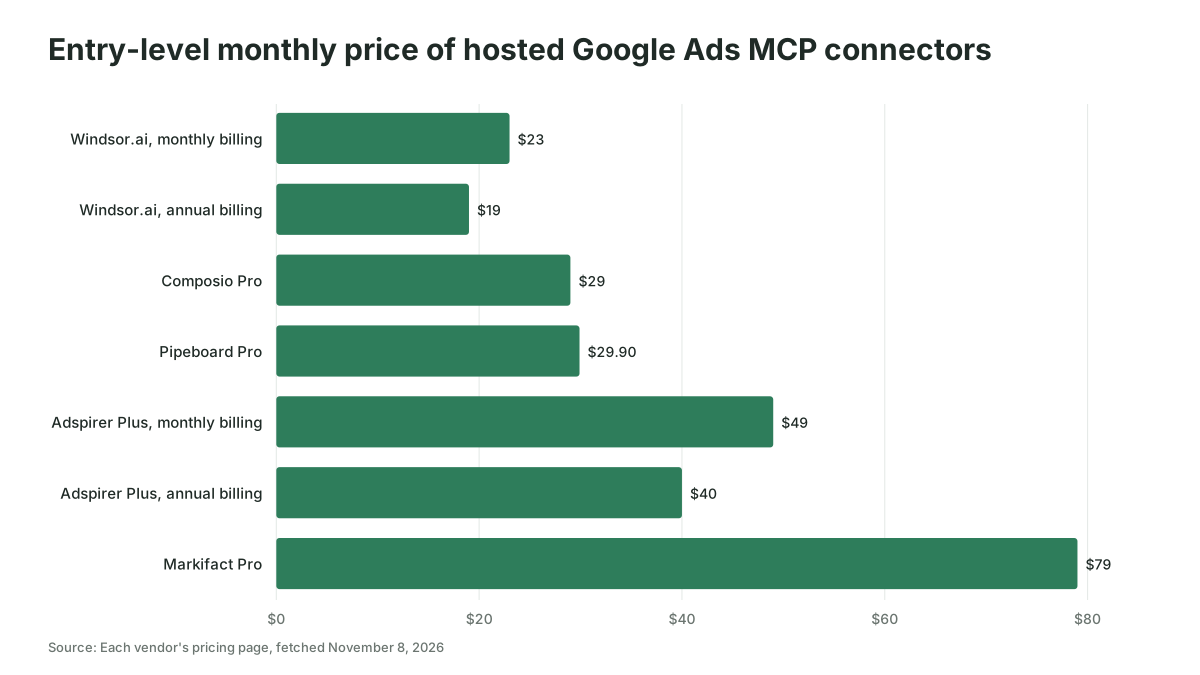
| Hosted connectors (Windsor.ai, Pipeboard, Composio, Adspirer, Markifact, Zapier and others) | Reporting fields the vendor has mapped, often plus raw GAQL | Many offer full writes: pause, budgets, bids, keywords, new campaigns | You sign in to Google through the vendor's OAuth app; the vendor holds the token | The vendor's servers | Free tiers with limits; entry paid plans from about $19 (annual billing) to $79 a month, team plans a few hundred dollars |
Google's official server is free, self-hosted and almost read-only
Google's Google Ads MCP server is an open-source Python project maintained by the Google Ads API team, published on PyPI as google-ads-mcp with its first release on October 22, 2025, and it runs on your own machine or your own Cloud Run instance. It exposes three read tools: list_accessible_customers, search for GAQL queries, and get_resource_metadata, which tells the model what fields a resource such as campaign has.
Google's documentation page now lists the mode as "Read and partial mutate" with a "configurable read-only mode", and says the server "cannot create, modify, pause, or enable campaigns, ad groups, ads, budgets, or bids." Version 0.0.6, released on November 2, 2026, added create_asset, upload_video_asset, manage_labels and manage_label_associations. The README describes a two-step "Propose & Confirm" workflow: the first call validates the change without committing it (a dry run where supported) and returns a checksum bound to the customer ID and parameters, and the change only commits when the same parameters come back with that checksum. For the old behavior, the README says to set labels: false and assets: false in tools_config.yaml.
For most paid teams, reads plus confirmed asset and label writes is the right shape: reporting is where the hours go, and pausing campaigns, changing bids and touching keywords are the things you least want an AI doing unsupervised.
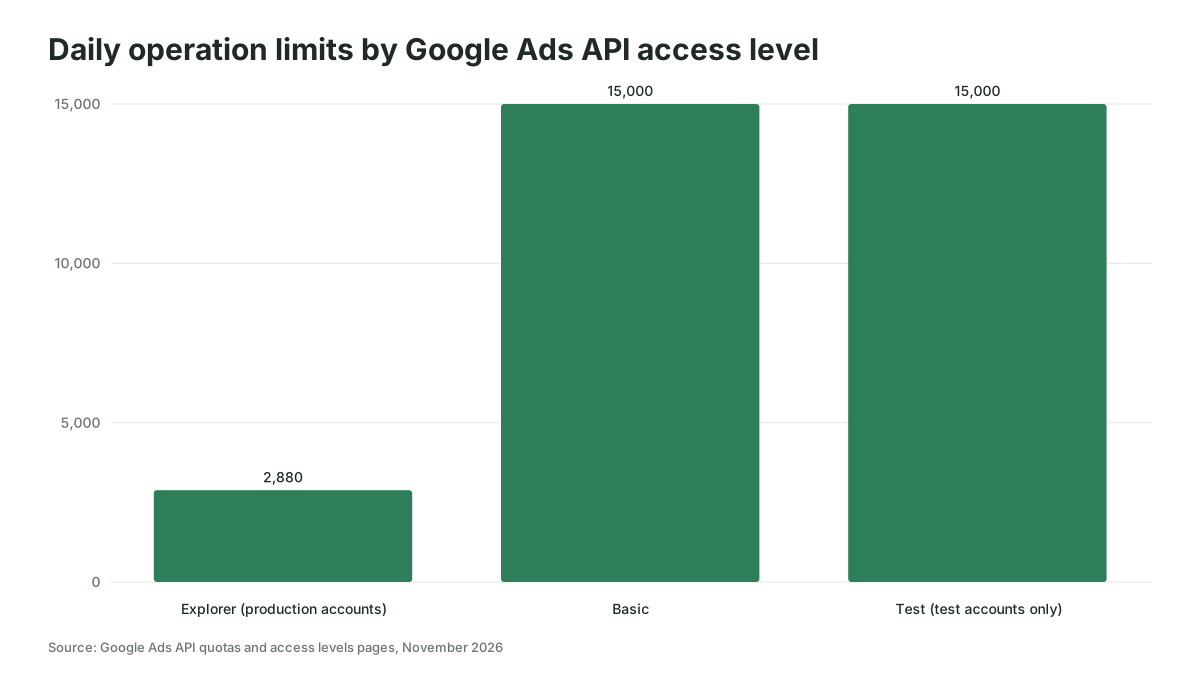
Two other facts matter before you start. Google sunset developer tokens on September 9, 2026. Access is now tied to your Google Cloud project, and Google's documentation says you no longer need a manager account to use the API unless you manage several accounts through it. And the access level of your Cloud project caps how much an AI can do in a day: Explorer access, granted after a mostly automated review, allows 2,880 operations a day against production accounts; Basic allows 15,000 and needs brand verification first; Standard is unlimited and takes a manual audit of about ten business days. Explorer also excludes the planning services, so a keyword ideas tool fails until you reach Basic.
Hosted connectors trade control for a ten-minute setup
A hosted connector gives you a URL to paste into Claude or ChatGPT, asks you to sign in to Google through the vendor's OAuth app, and runs the server on the vendor's infrastructure, so you never touch a Cloud project. The price is that the vendor holds a refresh token to your ad accounts, and the vendor decides what the model may write.
The vendors we checked, with what their own pages said on November 8, 2026:
| Vendor | What it writes | Safety controls described | Price |
|---|---|---|---|
| Windsor.ai | 34 write actions on Google Ads (pause and enable, budgets, bidding, keywords, negatives, ads, Customer Match), counted November 2, 2026 | States each change and waits for confirmation; new campaigns, ad groups and ads created paused | Free plan with one data source; Basic $23 a month, or $19 billed annually |
| Pipeboard | Create, edit and pause campaigns, manage keywords and bids; 35+ tools | Campaigns created in PAUSED status by default | Free: 2 account slots and 30 tool executions a week; Pro $29.90; Premium $99; Agency $199 |
| Composio | 78 tools including Mutate Campaigns, Mutate Ad Group Ads, Upload Click Conversions | No built-in approval step; Composio's FAQ tells you to put one in your prompt | Hobby plan free with up to 20,000 calls a month on Composio-managed apps; Pro $29 a month |
| Adspirer | Read and write on Google Ads, Meta, Amazon, LinkedIn, TikTok and ChatGPT Ads | New campaigns created paused; deletes gated behind a confirm flag | Free: 15 tasks a month; Plus $49 a month, or $40 on annual billing, for 150 tasks; Pro $99 ($83 annual); Max $199 ($167 annual) |
| Markifact | 60+ tools, "full read and write access to your ad account" | Approval-based actions before changes go live | Pro from $79 a month (2,500 credits); Team from $249 |
| Zapier MCP | Set Campaign Status, Send Offline Conversion, Customer Match list actions, Create Report; no GAQL | App and action level access controls (an enterprise feature); credentials stay in Zapier's connection layer | Included in every Zapier plan; each tool call uses two tasks |
| Whatagraph | Read-only per its May 2026 article; write "in development" | Not applicable | Not published; demo only |
Every vendor that lets the model write has decided for itself what safe means. Read the safety column before the price column.
One thing you will not find in either client's connector directory is Google. Windsor's comparison page reports no Google Ads connector from Google in Claude's directory as of October 30, 2026, and Google's own docs describe its hosted endpoint as a pilot limited to allowlisted participants. In November 2026 there is no one-click "Google Ads by Google" button inside Claude or ChatGPT.
Community servers suit teams with an engineer on call
The open-source servers on GitHub do roughly what Google's server does, with friendlier tool names and no company behind them. cohnen/mcp-google-ads, MIT licensed with 718 stars when we looked, offers list_accounts, execute_gaql_query, get_campaign_performance, get_ad_performance and run_gaql. gomarble-ai/google-ads-mcp-server, also MIT, adds run_keyword_planner and handles the OAuth sign-in automatically, storing the token in a local file.
Both README files still tell you to apply for a developer token, with a one to three business day wait for a production one. That instruction predates the September 2026 sunset, which tells you how closely each project is maintained. If you go this route, read the issues tab, pin a version, and have someone who can fix a Python dependency when Google changes an API version. Otherwise Google's server gives you the same reads with a maintainer.
Claude connects to Google's server in eight steps
Connecting Claude to Google's server means creating a Google Cloud project with API access, giving the server credentials, and telling Claude how to launch it. The steps come from Google's and Anthropic's documentation as of November 8, 2026, for one user on their own laptop.
- Create or pick a Google Cloud project and enable the Google Ads API in it. Google grants Test access automatically, which only works on test accounts.
- On the Google Ads API overview page in the Cloud Console, expand "Upgrade access level" and apply for Explorer access. Google says review is usually automated. Apply for Basic once brand verification is done if you need more than 2,880 operations a day or keyword planning.
- Create an OAuth client in the same project. Google's README accepts "an OAuth desktop or web client" for the sign-in in step 4, so for one laptop create a desktop client and download its JSON file; the Cloud Run route below needs a web application client instead. Make sure the
https://www.googleapis.com/auth/adwordsscope is on the consent screen, and while the consent screen is in Testing status, add every Google account that will connect as a test user. - Install pipx, then sign in once with
gcloud auth application-default login, passing the adwords scope and your client JSON file as Google's README shows. This writes the credentials file the server reads. - Note your Cloud project ID for
GOOGLE_PROJECT_ID. If you reach client accounts through a manager account, note the manager's ten-digit ID forGOOGLE_ADS_LOGIN_CUSTOMER_IDas well. - For Claude Code, add the server with one command, replacing the placeholders:
claude mcp add --env GOOGLE_PROJECT_ID=your-project-id \
  --env GOOGLE_APPLICATION_CREDENTIALS=/path/to/credentials.json \
  --transport stdio google-ads \
  -- pipx run --spec git+https://github.com/googleads/google-ads-mcp.git google-ads-mcp
Anthropic's docs note that --env must not sit directly before the server name, which is why --transport stdio is in between. Add --scope user to have it in every project.
- For Claude Desktop, open the Claude menu, choose Settings, then Developer, then Edit Config, and paste Google's
mcpServersblock intoclaude_desktop_config.jsonwith your two environment variables underenv. Quit and restart the app. - Start a new chat and ask "What customers do I have access to?" Claude asks permission to call
list_accessible_customers, and if it returns account IDs you're connected. Then try "How many active campaigns do I have in account 123-456-7890?"
To use the server in claude.ai without a terminal, Google documents deploying it to Cloud Run with its OAuth proxy and adding it as a custom connector, which on Claude lives under Customize, then Connectors, then Add custom connector. You need a web OAuth client, Claude's callback URLs as redirect URIs, and the --allow-unauthenticated flag with the server enforcing OAuth itself. Google warns that omitting the client ID and secret makes the server fall back to default credentials and exposes the container's service account to anyone who finds the URL. Give this step to someone who has deployed to Cloud Run before.
A shortcut worth knowing: Google publishes agent skills for this, installed with npx skills add google/skills/skills/ads --agent=claude-code. One of the three, google-ads-api-mcp-setup, walks an agent through the configuration above. If your team is already building its own, see Claude skills for paid media teams.
ChatGPT connects through a custom MCP server or a vendor plugin
ChatGPT connects to a Google Ads MCP server in one of two ways: you add the server yourself from ChatGPT's Plugins page as a custom MCP server, or you install a vendor's published plugin. Either way the server has to be reachable over HTTPS, because OpenAI's help center says ChatGPT "connects to remote MCP servers" and cannot reach a local one directly, so Google's server has to run on Cloud Run or behind OpenAI's Secure MCP Tunnel rather than as a process on your laptop.
Before you start, check which ChatGPT plan you are on. OpenAI's help article on custom MCP servers, updated in late October 2026, says full MCP support, including write actions, is available to Business and Enterprise/Edu customers on ChatGPT web, and that Pro users "can connect custom MCP servers with read/fetch permissions". It does not mention Free or Plus as of November 8, 2026, and mobile is not supported. On Business only admins and owners can create these connections, while on Enterprise or Edu an admin can grant the "Create plugins with MCPs" permission to selected members.
The vendor plugin route is the shorter one. Windsor's page says to open the Windsor.ai plugin page in ChatGPT and click Connect, or search for it under Plugins in the sidebar, then sign in to Windsor and grant access to Google Ads. Windsor reports setting this up on ChatGPT's Free plan and adds, citing OpenAI, that plugin availability depends on your plan, region and workspace.
For the custom route, the steps below come from OpenAI's help center and developer docs as of November 8, 2026, and they work for a vendor's URL or your own Cloud Run deployment of Google's server.
- Get the server URL ending in
/mcp. A hosted vendor prints it on its setup page, for example Adspirer'shttps://mcp.adspirer.com/mcp. For Google's server it is your Cloud Run URL plus/mcp, and Google's docs say to addhttps://chatgpt.com/connector_platform_oauth_redirectto your web OAuth client's authorized redirect URIs first. - In ChatGPT on the web, go to Plugins, select the plus button, then "Add custom MCP server".
- Enter a name and, under Connection, paste the server URL, or select Tunnel if your engineer set up a Secure MCP Tunnel.
- Configure authentication for the server. For Google's server, choose OAuth 2.0 with your own client ID and secret, as Google's docs describe; a vendor tells you which option its server expects.
- Review the risk warning, tick "I understand and want to continue", select "Create as a plugin", and read the list of tools it discovered. If you see pause, budget or bid tools you did not expect, stop here.
- Install the plugin, start a new chat, type
@, pick the plugin and ask "What customers do I have access to?", signing in to Google if ChatGPT asks you to.
On write safety, the help center says that for write or modify actions "ChatGPT may ask for confirmation depending on app permissions, the action's context, and the action's potential impact" and that some especially risky actions may be blocked, so whether ChatGPT asks before pausing a campaign depends on the plugin's permissions and on the action. Windsor's ChatGPT page, for one, says ChatGPT asks you to confirm each change. Once an admin publishes a connection for the workspace, ChatGPT keeps a frozen snapshot of its tools, so write tools a vendor adds later appear only after an admin refreshes the list.
If that sounds like more plumbing than a PPC lead should own, you have read it correctly, which is why most teams that want Google Ads inside ChatGPT use a hosted vendor's plugin and accept the trade described above.
Answer three questions before you pick a route
The decision rule we'd use is three questions, in this order, and the first answer usually settles it.
Do you need the AI to change anything in the account? If the answer is no, or only on a test account for now, use Google's server. It reads everything, it's free, its maintainer is Google, and its write tools switch off with a config flag. Reporting, search term reviews, pacing checks and audits all live here, and that is the route for most teams reading this.
If you need writes, whose Google Cloud project should the token live in? Hosted vendors are quick and their write controls are real, but the token sits with them and the model's permissions are whatever their plan allows. If your security team would not let an agency keep an API token to your accounts, they will not let a $29 a month connector keep one either. Vendors that let you bring your own OAuth client, which Composio's FAQ says it supports, narrow the gap.
Do you have an engineer who will own it? Without one, choose Google's server on a laptop for reads or a hosted vendor for writes, and stop there. Cloud Run deployments and community servers both need someone who notices when a dependency breaks. The weekly jobs you would hand the model are covered in what AI agents can realistically run in a paid media team, and the line between a suggested change and an applied one is the subject of where humans must stay in the loop on ad spend.
Imagine two teams, both hypothetical. Company A runs three accounts in-house, wants Monday reports without the exports, and has nobody who deploys code. It installs Google's server in Claude Desktop, keeps the write tools off, and asks for the same six-query report every week. Company B is an agency on 40 accounts under one manager, with an engineer, and wants negatives added from a reviewed list. It runs Google's server for reads under a Basic-access project, and a hosted connector with per-change confirmation for the writes, scoped to the two accounts whose clients agreed.
The problems people hit in the first week
The first week is mostly credentials and quotas, and almost none of it is the model's fault.
The manager account trap. If you reach client accounts through a manager, set GOOGLE_ADS_LOGIN_CUSTOMER_ID before anything else; Google's server also accepts it per call. A permission error on a client account that you can open in the browser is usually this.
Quota surprises. 2,880 operations a day at Explorer sounds generous until an agent runs a per-keyword query across a manager account, and keyword planning calls are further limited to one request per second per customer ID. Move to Basic before you automate anything, and ask the model to filter in WHERE and use LIMIT, which is Google's own advice for GAQL.
Writes that nobody confirmed. Anthropic's guidance on custom connectors is blunt: they "allow you to connect Claude to services that haven't been verified by Anthropic", and it advises reviewing each tool approval and only choosing "Allow always" for trusted servers. For an ad account, keep approving each write by hand. Picture an agency that lets a model clean up negatives at 5 pm on a Friday; you don't want to be the one explaining it on Monday.
Numbers that don't match the interface. Attribution windows, which conversion actions count, and time zones all change the figure. When a connector's spend total differs from the Google Ads interface, ask for the GAQL and the date range before anyone forwards the report. The same discipline applies to Meta Ads MCP servers and LinkedIn Ads MCP servers, where the official options differ.
Stale guides. Any tutorial that opens with "get a developer token from the API Center" was written before September 9, 2026, and Google's server removed developer token validation in version 0.0.3. Its screenshots will not match what you see.
Where to start
Install Google's server on one laptop with the write tools off, point it at one account, and run your Monday report through it for two weeks before deciding whether you need writes at all. If you'd like help choosing the route for your team and setting the method up around how your accounts are actually run, that is the kind of work we do at Scalewell.
Frequently asked questions
Which AI client works with a Google Ads MCP server: Claude, ChatGPT or Gemini?
All three, because MCP is a shared standard. Claude Desktop and Claude Code can launch Google's server locally over stdio, which is the simplest setup. ChatGPT needs an HTTPS endpoint, so you host the server or use a vendor. Google's docs also show Gemini CLI and Antigravity connecting to a Cloud Run deployment through an httpUrl setting.
What should I ask first once Google Ads is connected?
Start with Google's own sample prompts: "What can the google-ads-mcp server do?", "What customers do I have access to?" and "How is my campaign performance this week?" Then ask for the GAQL behind one answer and check two numbers against the Google Ads interface for the same date range. Once those match, move to search terms and budget pacing.
Does connecting Google Ads to Claude or ChatGPT cost money?
Google's server is free and Apache 2.0 licensed; you pay only for Cloud Run if you host it there. Hosted connectors have free tiers with limits, for example Pipeboard's 30 tool executions a week or Adspirer's 15 tasks a month, and entry paid plans from about $19 a month on annual billing to $79 a month as of November 2026, with team plans running to a few hundred dollars. Claude's free plan allows one custom connector.
Is it safe to give an AI access to my Google Ads account?
It is as safe as the permissions you grant. A read-only server can only report. Any server with write tools should require confirmation per change, create new campaigns paused, and run under an account scoped to the clients who agreed. OpenAI says the server, not the chat client, owns authorization and confirmation, and Anthropic tells you to review each tool approval.