Google Ads negative keywords: a weekly AI review of your search terms
A weekly routine for Google Ads negative keywords where an AI model sorts your search terms by intent and you decide what to block, with match type rules, a copyable prompt and the Performance Max rules as of November 2026.

Google Ads negative keywords stop your ads from showing on searches you don't want to pay for. The reliable way to find them is a weekly review of the search terms report, where an AI model sorts every new term by intent and you decide what to block, at which level and with which match type.
You probably know the moment this becomes urgent. It's Monday, someone forwards a screenshot of your ad showing for "your product name careers" or "free category template", and you open the search terms report to find it has been running for three weeks on a broad match keyword. The report has 4,000 rows, half of them with one or two clicks, and you have forty minutes. With AI sorting those rows by intent, the forty minutes go to deciding what to block, and Scalewell works with PPC teams on making that a steady weekly habit.
This article is written for the person who owns that report. It covers how negative match types behave, how much of your spend the report actually shows you, a weekly routine where AI does the sorting and you make the calls, the Performance Max rules as of November 2026, and the mistakes that cost more than the waste you're trying to stop. If you want the wider account check, the guide to running a PPC audit with AI covers that; this one is about the job that repeats every week.
Negative match types block less than you expect
Negative keyword match types in Google Ads work differently from the positive ones: a negative never matches close variants, so you have to add plurals, synonyms and alternative phrasings yourself. Google's help page on negative keywords states it plainly: "Negative keywords won't match to close variants or other expansions." The same page says negatives "automatically account for casing and misspellings", so those you can skip.
Broad is the default negative match type, and Google's own worked example with the negative "running shoes" shows how each type behaves.
| Negative match type | Google's definition | Negative "running shoes" blocks | Your ad can still show for |
|---|---|---|---|
| Broad (default) | "your ad won't show if the search contains all your negative keyword terms, even if the terms are in a different order" | "blue running shoes", "shoes running" | "running shoe", "blue tennis shoes" |
| Phrase | "your ad won't show if the search contains the exact keyword terms in the same order", with extra words allowed around them | "blue running shoes" | "shoes running", "running shoe" |
| Exact | "your ad won't show if the search contains the exact keyword terms, in the same order, without extra words" | "running shoes" only | "blue running shoes", "shoes running", "running shoe" |
The right-hand column is where the surprises live. A broad negative "running shoes" does nothing against "running shoe", singular. An exact negative blocks one query and one query only. And Google adds a detail that is easy to miss: "Your ad might still show when someone searches for a phrase that's longer than 16 words" when your negative keyword comes after the 16th word; Google's example has "discount" as the 17th word.
The trap that builds the worst negative lists is the default in the report itself. When you tick a search term and click "Add as negative keyword", Google's help on getting negative keyword ideas from the search terms report says that "By default, negative keywords added to a Search campaign from the search terms report are added as negative exact match." Do that every week for a year and you own 3,000 exact negatives that each block a single phrase, while the next variation of the same bad query sails through.
So pick the match type with a rule rather than a habit:
- One query is bad and its neighbors convert, for example "crm software reviews" converts but "crm software reviews reddit" never has. That is a job for exact match.
- A word is bad whenever it appears in a particular order, for example "jobs" after your category. That calls for phrase match.
- A concept is bad in any combination, for example "salary", "internship" or "login" for a product you sell to buyers rather than users. Use broad on the shortest form, then add the plural and the obvious synonyms as separate negatives.

The search terms report shows you part of what you paid for
The Google Ads search terms report only lists queries that passed a volume threshold, so every negative you add comes from a sample of your traffic. Google's description of the search terms report says it contains "data on the search terms that were used by a significant number of people" and that "Some search terms that don't have enough query activity are omitted from the search terms report."
How big is the sample? Google has never published the threshold, so the only numbers come from agencies measuring their own accounts. When the threshold arrived in September 2020, Seer Interactive measured across its clients that search term visibility for cost fell from 98.7% to 71.0% between August 31 and September 1, 2020. Google's Ads Liaison Ginny Marvin confirmed in January 2024 that queries below the thresholds are "aggregated in within the 'other' search terms line", and in July 2025 that "The threshold applies to all queries."
There is a newer wrinkle too. Google's help on ad group prioritization now says that for "searches on Lens, AI Mode, AI Overviews, or auto-complete searches", "the search term shown in your reporting represents the best approximation of the user's intent." Search Engine Journal reported the wording in May 2026. For the weekly routine it means some rows are Google's paraphrase of a conversational query rather than the words typed, and a negative built on the paraphrase may not block the next version of it.
What this changes is the size of the claim you can make for negatives. They clean up the visible slice of your spend, and the visible slice is smaller than it was in 2019. The other levers for the hidden part are the positive match types you choose, the brand restrictions Google offers on broad match, and the search terms insights on the Insights page, which Marvin pointed to as the privacy-safe way "to better understand the query themes/categories." Track the cost in your "Other" row every week, and if it grows while your negatives grow, the problem is your keyword match types, not your negative list.
Put three things in place before the first review
A weekly negative keyword review needs a list structure, a cost ceiling and an export route before anyone pastes anything into a model. Without these three, AI gives you a tidy list of suggestions and nowhere sensible to put them.
A list structure that matches Google's levels. Google's account limits page allows 10,000 negative keywords per campaign, 5,000 keywords per negative keyword list and 20 lists per account. On top of that sits one account-level negative keyword list capped at 1,000 terms, which applies to "all search and shopping inventory in Search, Performance Max, App, Shopping, Smart, and Local campaigns." We'd use the account level only for terms that are wrong for the whole business, for example "careers", "salary" and "internship" for a software company, and keep themed shared lists ("competitor brands", "free and open source", "support and login") that you attach to the campaigns where they apply, including Performance Max campaigns, which have accepted campaign-level negative keyword lists since Google's August 2025 update. The rule for placing a term is to put it at the highest level where it is wrong everywhere below.
A conversion you trust and a cost ceiling. "Zero conversions" on a term with four clicks tells you nothing. Decide the cost per conversion above which a term is a leak, say twice your target, and the number of clicks below which you wait, and write both into the prompt. If your conversion is a form fill that sales rarely accepts, fix that first or the model will protect junk and block buyers.
An export route you can repeat. The simplest is the download button on the search terms report, filtered to the last seven days plus a second export covering 90 days for context. If you want it automated, Google Ads scripts can query the search_term_view resource with GAQL through AdsApp.report() or AdsApp.search(), as Google's reports documentation shows, and the Google Ads scripts guide walks through writing one with AI. The third route is an AI client connected to the account through the API, covered in the Google Ads MCP article. Whichever route you use, the export needs these columns: search term, campaign, ad group, the matched keyword and its match type, the "Added/Excluded" status, impressions, clicks, cost, conversions and conversion value.
The prompt also needs your existing negatives and your positive keywords, and as of November 2026 they come out in three places. Campaign and ad group negatives: Google's page on editing, removing or downloading negative keywords has you open Keywords, then "Negative keywords", and click the download button above the table; account-level negatives download from the "Negative keywords" section under Account settings with the same icon. Shared lists are the awkward one. Google's page on editing negative keyword lists describes opening a list by name to change it and never mentions a download, so copy the terms out of that view, or use Google Ads Editor: pick "Keywords, Negative" in the type list, then Account menu, Export, "Export current view". Editor's help doesn't say whether shared lists are in that file, so check the first export. The positive list is the Search keywords table itself: filter to enabled keywords, keep keyword, match type, campaign and ad group, and use the download icon Google places "in the upper right corner above the table".
When the lists are too long to paste, attach them as CSV files. Claude's help center, in a page revised in July 2026, allows up to 20 files per chat at 500MB each and adds that "Additional token limits may apply based on the length of extracted content", so treat size as the limit to watch: as a rough guide, a few thousand keywords make a small file, while tens of thousands of rows can run past what the model reads in one go. In that case split the job: run the classification without the lists, then paste the model's proposed negatives, often a few dozen lines, into a second message with the keyword file attached and ask only for the conflict check in rule 4. Every proposed negative is still checked, and the second message stays short.
The weekly routine: AI sorts, you decide
The weekly negative keyword routine has seven steps, and the model does the one that takes the time, which is reading several thousand rows and grouping them by intent. Everything that touches the account stays with you.
- Export the last seven days of search terms for Search campaigns, plus a 90-day export, with the columns listed above. The result is two files, which is the only input the model gets.
- Filter to terms that are new or unresolved. Drop rows where the status shows the term is already a keyword or already excluded, and drop anything already on your watch list from last week. Google's API exposes this as the
search_term_view.statusfield, which "Indicates whether the search term is currently one of your targeted or excluded keywords." You now have the week's genuinely new rows, usually a few hundred. - Run the classification prompt below with your cost ceiling, your click threshold, your existing negative lists and your positive keyword list pasted in or attached, exported the way the setup section describes. The model returns a table with one row per term and a proposed bucket, level, match type and reason.
- Read the "block" rows against the 90-day file. For any term the model wants to block, check whether it, or anything containing it, converted in the last 90 days at an acceptable cost. This is the step that protects revenue and it takes ten minutes.
- Apply the approved negatives yourself, in the list the rule above points to, with the match type the rule gives. If you use the report's own "Add as negative keyword" button, change the default from exact where the rule says phrase or broad.
- Run a conflict check. Open the Recommendations page and look for "Remove conflicting negative keywords", which Google describes as "Your ads may not serve because of conflicting negative keywords." Then check your shared lists too, because that recommendation is not the whole picture (more on this below).
- Log the week in a sheet: terms reviewed, negatives added by level and match type, terms put on watch, and the cost that landed in the "Other" row. After a month the log tells you whether the routine is converging.
Here is the classification prompt. Paste it with your data below it, and change the bracketed values.
You are reviewing Google Ads search terms for a B2B company that sells [product] to [buyer].
Classify every search term in the table below into exactly one bucket:

- wrong_intent: job seekers, students, existing users looking for login or support, researchers writing papers
- wrong_price: free, cheap, open source, template, DIY, crack
- wrong_product: a product or category we do not sell
- informational: how to, what is, definition, example, with no buying signal
- competitor_brand: a named competitor
- own_brand: our own brand or product names
- geography: a place we do not sell to
- keep: a term that fits what we sell
- watch: too little data to decide

Rules:
1. Never propose blocking a term with a conversion in the data unless its cost per conversion is above [2x target CPA, e.g. $600].
2. A term with fewer than [8] clicks and no conversions goes to watch, unless the words make the intent obvious (for example "salary" or "login").
3. For every term you propose to block, give the shortest negative keyword that covers it and its obvious variants, the match type (broad, phrase or exact) and the level (account, shared list name, campaign or ad group), using these definitions: broad blocks any search containing all the words in any order; phrase blocks the words in that order with other words around; exact blocks only that query. Negative keywords do not match close variants, so list plurals and synonyms separately.
4. Check every proposed negative against the positive keyword list pasted below and flag any it would block.
5. Group the blocked terms by the word or phrase they share and show the total cost per group.
6. Do not invent terms that are not in the data. If a bucket is ambiguous, say so in the reason.

Return a table with: search term, clicks, cost, conversions, bucket, proposed negative, match type, level, conflict flag, reason (one sentence).
Then list the five groups with the highest total cost.

Target CPA: [value]. Click threshold: [value].
Existing negative lists: [paste]
Positive keywords: [paste]
Search terms (last 7 days): [paste]
Search terms (last 90 days, for context): [paste]
Two notes on running it. The model sees your pasted data only, so name your competitors in the prompt, or a rival called "acme" is just a dictionary word to it. And don't skip the "watch" bucket, because it is where the next three weeks of decisions come from. More prompts for the rest of the account live in the prompt library for paid media.
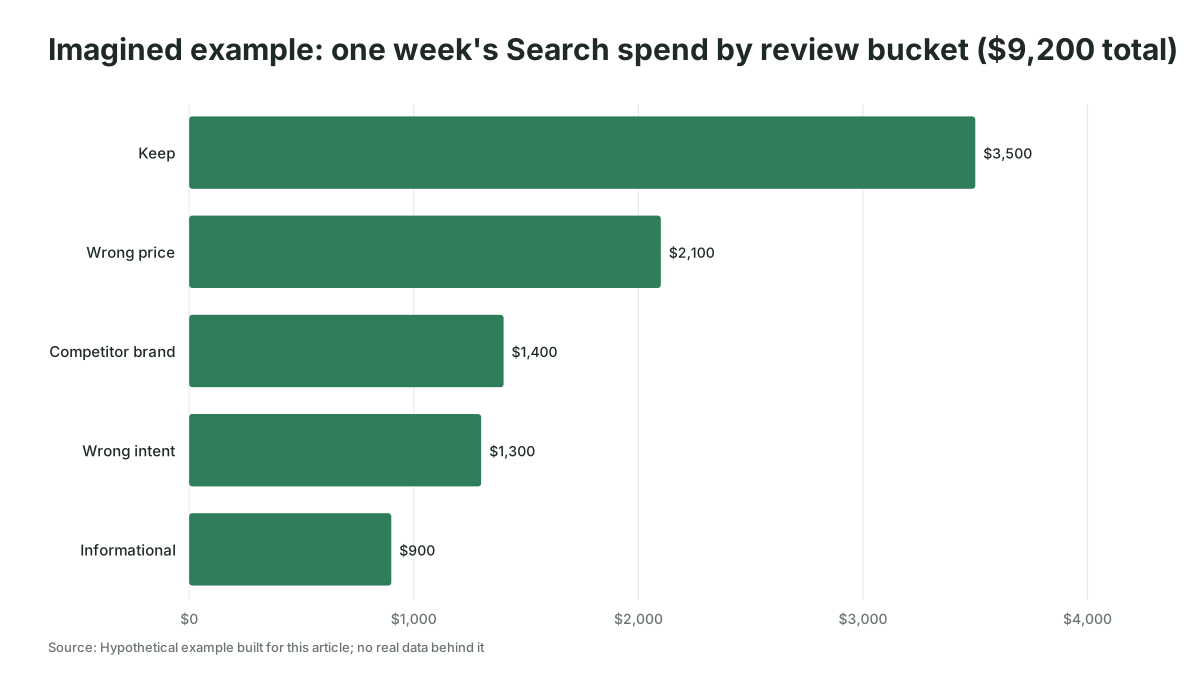
To show what the output looks like, imagine a B2B software company spending $40,000 a month on Search, a hypothetical built for this article. Its first weekly review sorts $9,200 of the week's spend into: $2,100 on terms containing "free", "open source" or "template", $1,300 on "careers", "salary" and "jobs", $900 on "how to" and "what is" queries with no conversions, $1,400 on two competitor brands with three conversions at $470 each against a $300 target, and the rest on terms that fit. The first two groups go straight to the account-level list as broad negatives. Informational queries get phrase negatives at campaign level, because the same words convert in a separate content campaign. And the competitor group is a judgment call about pipeline rather than a classification, so it goes to the weekly call with sales while the model is told to leave it in "keep" until someone decides.
Performance Max negatives follow their own rules as of November 2026
Performance Max campaigns accept campaign-level negative keywords and negative keyword lists, and they have their own search terms report, but the negatives only affect Search and Shopping inventory. The campaign-level limit has moved once since launch: as of November 2026, Google's Performance Max update note dated April 2025 says campaign-level negatives launched "with an initial limit of 100 negative keywords per Performance Max campaign" and that Google then "raised the limit to 10,000 negative keywords per campaign", which "is now available in all Performance Max campaigns." Ginny Marvin wrote in Search Engine Journal in March 2025 that "We had set a cap of 100 negative keywords per campaign" and that the team agreed to "align with the limits in Search campaigns and raise the threshold to 10,000 negative keywords per PMax campaign."
Five more rules matter for the weekly review:
- Negatives cover Search and Shopping only. Google's page on negative keywords in Performance Max campaigns says "Performance Max negative keywords are applicable to Search and Shopping inventory only." They do nothing on YouTube, Display, Gmail or Discover placements, where the control is excluded content keywords instead.
- Performance Max has a per-term search terms report. Google's page on the search terms report in Performance Max says it shows "the performance metrics associated with specific search terms", with data "available starting from March 2023", and you reach it by choosing "Search terms and landing pages for Performance Max" in the search terms report dropdown. Google's August 7, 2025 note added that "you can now access search terms reporting for all Performance Max campaigns and through the API." So the weekly routine above runs on Performance Max too, campaign by campaign.
- Negative keyword lists now attach to Performance Max. The same August 2025 note says "we're adding the ability to apply campaign-level negative keyword lists to your Performance Max campaigns", so the themed lists from the setup section cover Performance Max without a second copy.
- Google will estimate the damage before you add a negative. Its page on estimating the impact of negative keywords in Performance Max says "You can preview impact for up to 10 keywords at a time" and that the "Predicted impact is shown as a percentage and includes the projected impact to conversions or conversions value, depending on your bid strategy." Run the model's proposed Performance Max negatives through it in batches of ten before saving.
- Brand exclusions do what negatives can't. Google's brand settings page says applying brand exclusions "will also help block traffic from brand misspellings and brand searches in a foreign language", and the Performance Max release notes add that "Unlike negative keywords, these exclusions will help block traffic with clear misspellings or writing in foreign scripts." If you want your own brand or a competitor out of Performance Max, use a brand list rather than a negative keyword.
One more thing to know if you automate the export. The Google Ads API's search_term_view resource says in its v26 reference that "This view does not include Performance Max data. If you are looking for Performance Max search term data, use the CampaignSearchTermView instead." That second resource, campaign_search_term_view, "provides granular performance data, including cost metrics, for each individual search term" at campaign level, with one catch from the same page: "If keyword-related segments are used, Performance Max data will be excluded from the results." So a script or connector that pulls Performance Max terms queries campaign_search_term_view without the keyword segments, and keeps search_term_view for Search campaigns where the matched keyword matters.
The mistakes that cost more than the waste
The expensive mistake with negative keywords is blocking searches that were going to convert, and the evidence suggests advertisers do it more than they fear the opposite. Optmyzr's Performance Max study of October 2024, covering 9,199 accounts and 24,702 campaigns, found that "Most advertisers (58%) saw a slight improvement in performance when they had no exclusions, but it was ultimately flat", and its author Navah Hopkins called the finding "interesting, but not conclusive." That study covers Performance Max, where exclusions include placements and topics, so the lesson for Search is narrower: the benefit of blocking is smaller than most teams assume and the downside is real. Andrew Lolk, quoted in Optmyzr's negative keywords guide, puts it in one line: "We just see people are just overusing negative keywords."
The specific ways it goes wrong:
A broad negative on a word you also sell. A SaaS team adds "free" as a broad negative to stop freebie hunters, and from that day "free trial" and "free demo" searches, which are their best converting queries, can't trigger an ad. The prompt's conflict check (rule 4) exists for exactly this, but the list you paste in has to be complete.
Conflicts you never see. Google's own recommendation flags conflicting negatives, but the Adalysis keyword conflicts documentation notes that "due to how Google matches synonyms, it's still possible for keywords with conflicts to receive impressions", which means a blocked keyword can look alive in your reports while most of its traffic is gone. Check shared lists and account-level negatives against every campaign they're attached to, by hand or with a script. Nils Rooijmans publishes an adapted conflicts script that only checks campaigns still serving, so it stops flagging ended experiments.
Blocking on two clicks. A term with two clicks and no conversions is noise. Your click threshold in the prompt should scale with your conversion rate: at a 3% conversion rate you expect one conversion per 33 clicks, so a term with 10 clicks and nothing to show has told you very little.
Letting the model write to the account. An AI client connected through the API can add negatives directly, and the temptation is to let it. Don't, at least for the first quarter. Negative keywords are silent: a bad one produces no error, only a slow drop in impressions somewhere you aren't looking. The routine above puts the model's output in front of you for a reason.
Never pruning. Negative lists only grow, and the one you built when the product had three features is still blocking terms for the eight it has now. Once a quarter, give the model your full negative lists and your current keyword list and ask which negatives would block searches you now want.
Negative keyword tools and generators compared
A negative keywords tool is worth having when it reads your own search terms; a negative keywords generator that works from your industry alone produces a starter list and nothing more. There are five routes in practice, and as of November 2026 this is what each one does according to its own documentation.
| Route | What it does | Where its data comes from | Fits |
|---|---|---|---|
| Google Ads interface | Search terms report with "Add as negative keyword" (exact by default), "Remove conflicting negative keywords" recommendation, search terms insights for themes | Your account, above Google's privacy threshold | Every account, as the floor |
| Google Ads scripts | GAQL queries with AdsApp.report() or AdsApp.search(), scheduled, writing to a sheet | Your account: search_term_view for Search campaigns, campaign_search_term_view for Performance Max | Teams that want a weekly file without logging in |
| Third-party tools | Optmyzr's Negative Keyword Finder "breaks it down into single words, and aggregates data for them" across Google Ads, Microsoft Ads and Yahoo Japan Ads, default 90-day range; Karooya offers a negatives tool it says is free for accounts under $10,000 a month; Adalysis alerts on negatives at "ad group, campaign, or list-level" blocking a regular keyword | Your account through the API | Agencies and teams running many accounts |
| AI model with a CSV | The prompt above on an exported file; the model classifies and proposes, you apply | Your export | Any team, no setup, the route this article assumes |
| AI client connected through the API | A model reads search_term_view live and can write to shared sets (NEGATIVE_KEYWORDS, or the single ACCOUNT_LEVEL_NEGATIVE_KEYWORDS set per account) | Your account | Teams with a connector and an approval step in front of writes |
Vendor savings claims belong in their own column of skepticism. Karooya says its tool saves 10 to 20% of search spend, which is Karooya's claim with no sample published; Optmyzr reports a 2025 poll by its CEO in which 77% of PPC professionals said removing all negatives would hurt performance, which is a belief survey, not a measurement. The only multi-account measurement of waste we could find is Seer Interactive's 2019 analysis of 30 accounts, which put the average at 15% of budget "on irrelevant keywords." It's seven years old and 30 accounts, so treat it as a reference point for your own number rather than a benchmark.
The decision rule is short. Start with the interface and the CSV prompt, because they cost nothing and show you whether the routine finds money. Move to scripts when exporting by hand is the step that keeps getting skipped. Pay for a tool when you run more than a handful of accounts, and connect an AI client to the API when you've run the manual routine long enough to know what a bad suggestion looks like.
Signs the routine is working
A negative keyword routine is working when the share of Search spend on terms with zero conversions over 90 days falls week after week while cost per conversion holds. Measure it from the 90-day export: cost on terms with no conversions divided by total cost on the report, for the account and for each campaign. The hypothetical company above started with close to half of one week's spend in the three buckets that had no conversions; after six weekly reviews a healthy account would be far below that, and your own trajectory matters more than anyone's benchmark.
Three secondary signs back it up. The number of new negatives per week falls after the first month, because the broad and phrase negatives you placed early are catching the variations. The conflicts recommendation stays empty. And the cost in the "Other" row stays roughly stable as a share.
Where to start this week
Export the last seven and ninety days of search terms today, run the prompt once, and apply only the "block" rows you can defend against the 90-day file. If you'd like help setting the routine up around how your team already works, that is the kind of thing we do at Scalewell.
Frequently asked questions
How many negative keywords is too many in Google Ads?
Google allows 10,000 negative keywords per campaign, 5,000 per shared list with 20 lists per account, and 1,000 at the account level, and its help warns that "If you use too many negative keywords, your ads might reach fewer customers." Match type matters more than the count: a few hundred broad and phrase negatives beat thousands of exact ones.
Should negative keywords be broad, phrase or exact match?
Broad is Google's default and blocks any search containing all the words in any order, phrase blocks the words in that order with other words around them, and exact blocks only that query. Use exact when one query is bad and its neighbors convert, phrase when a word is bad in one position, and broad when a concept is wrong everywhere.
Do negative keywords work in Performance Max campaigns?
Yes, and with more control than a year ago. As of November 2026, Performance Max accepts up to 10,000 campaign-level negative keywords, raised from 100 in March 2025, plus negative keyword lists since August 2025 and account-level negatives. Google says they affect Search and Shopping inventory only, and brand exclusions are the control for your own or a competitor's brand.
Can an AI negative keywords generator build a list without my search terms?
It can draft a starter list of likely junk for your industry, such as jobs, free, template and login terms, and that is a reasonable first hour on a new account. It cannot tell you what your ads actually showed for or what converted, so it never replaces the weekly review of your own search terms report.
How often should you check the search terms report for negative keywords?
Weekly for Search accounts spending enough to generate a few hundred new terms a week, which covers most B2B accounts above a few thousand dollars a month. Daily reviews add little because most terms need several clicks before they tell you anything, and monthly reviews leave a bad broad match query running for four weeks.