Buyer enablement: what paid media should put in front of buyers who research with AI
Buyers now use AI to check a shortlist they formed early, so paid media's buyer enablement job is to fund the material each buying job needs and judge it on pipeline.

Buyer enablement means giving a B2B buying group the information it needs to finish each step of a purchase without waiting for a sales call. For paid media, it now means funding ads and pages that put your proof in front of the buying group early, before they ask an AI assistant to sort and check their shortlist.
You have probably heard a version of this from sales already. Imagine the exchange on a pipeline review: the head of sales says the last three prospects arrived with your pricing model, an integration question and a comparison table someone generated in a chatbot. Then the CMO asks which of those things paid media had put in front of them, and nobody in the room is sure.
So the leadership question is what paid media should actually fund when buyers do most of their homework alone and with AI. It covers what the research says about AI in B2B buying, which material each buying job needs, how LinkedIn's formats carry it, and how to judge the spend on pipeline.
Buyer enablement means helping the buying group finish its buying jobs
Gartner's sales research defines buyer enablement as "the provision of information that supports the completion of critical buying jobs," as CRM magazine reported in October 2018. The same piece reported Gartner's finding that buyers spend 17% of their time meeting potential suppliers, against 27% researching online and 18% researching offline.
The buying jobs are the useful part. Gartner named six of them in October 2018, as MarTech Series reported at the time: problem identification, solution exploration, requirements building, supplier selection, validation and consensus creation. Gartner called the last two "always on," running while buyers work through the other four. Its 2019 follow-up research, summarized in Insightly's March 2020 write-up, found 90% of buyers loop back to at least one job, which is why a single funnel stage never describes where an account really is.
For a paid team, the definition changes the question you ask of every campaign. The usual question is how many leads the ad produced. The buyer enablement question is which buying job the ad helped the group finish, and whether that showed up later as an opportunity that moved faster. It is harder to answer, and it is the one your CFO is really asking about the LinkedIn line.
AI-assisted buyers mostly check a shortlist they formed before the research started
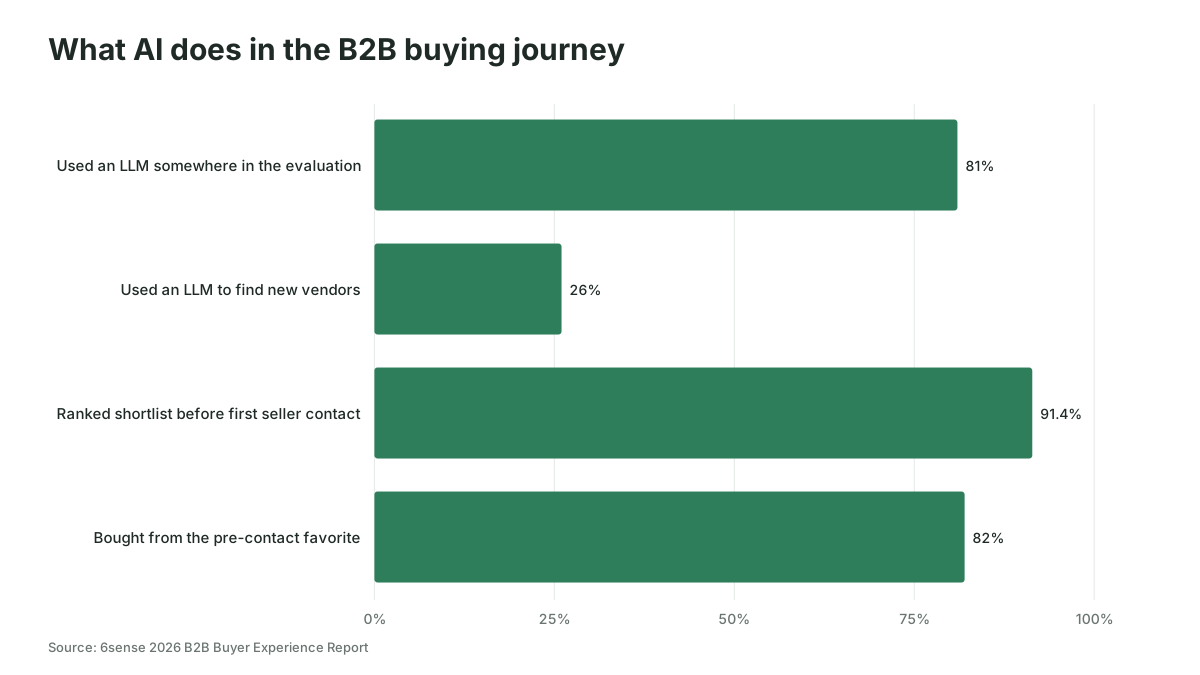
Most B2B buyers now use AI during a purchase, but they use it more to check vendors they already know than to find new ones. 6sense's 2026 B2B Buyer Experience Report, which assesses 3,596 completed purchases and 1,011 no-decision journeys, found 81% of buyers used an LLM somewhere in the evaluation, while only 26% used one to find new vendors.
The same 6sense study puts first seller contact roughly 59% of the way through an average 10.3-month cycle, after 91.4% of buyers have already ranked their shortlist, and the pre-contact favorite wins 82% of the time. In the press release for the report, 6sense's head of research Kerry Cunningham put it plainly: "The journey doesn't start when the evaluation starts." The release adds that buyers use LLMs "to sort, summarize, and validate what they already know."
Other studies point the same way on usage, with different numbers. Forrester's John Buten wrote in January 2026 that 94% of business buyers in its 2025 survey used AI in their buying process, and that buyers named generative AI or conversational search as their most meaningful information source more often than any other, including vendor websites and sales. Gartner's survey of 646 buyers, reported by Digital Commerce 360 in March 2026, found 67% prefer a rep-free experience and 45% used AI tools during a recent purchase.
G2, which sells review profiles and so has a stake in the answer, reported in April 2026 that 51% of 1,076 software buyers now start research with an AI chatbot more often than with Google, up from 29% a year earlier. That is a higher figure than 6sense's 26% for discovery, and the gap is partly definitions: starting research is wider than finding a new vendor.
Here is what the numbers change for you. If AI mostly validates a shortlist that forms early, paid media has two jobs. The first is getting your brand onto that shortlist before the evaluation starts. The second is making sure the material the buyer and their AI check against is clear, current and easy to find.
Judging each campaign on the opportunities it moves gets far easier once AI tags every ad with the buying job it serves, work Scalewell builds with paid and demand gen teams inside the tools they already run.
Paid media's job is to fund the material each buying job needs
Each of the six buying jobs needs a different kind of material, and paid media should fund the ones your deals actually stall on. A team that runs every ad toward a demo request is only serving supplier selection, and usually late. The table below maps what the group is trying to settle at each job to what paid can put in front of them.
| Buying job | What the group is trying to settle | What paid media can put in front of them | Where it runs | Pipeline signal to watch |
|---|---|---|---|---|
| Problem identification | Is this problem worth solving now? | Short diagnostic content, a cost-of-inaction view, a named problem | LinkedIn single image and video ads to the ICP | Target accounts reached that later open an opportunity |
| Solution exploration | What kinds of fixes exist? | Category explainers, approach comparisons, thought leader posts | LinkedIn document and thought leader ads, Google Search on category terms | Engaged accounts that move to a sales conversation |
| Requirements building | What must the fix do for us? | Requirements checklists, integration lists, security and compliance pages | LinkedIn document ads with an open preview, Google Search on "requirements" and "checklist" terms | Requirements content viewed by accounts with open opportunities |
| Supplier selection | Who fits best? | Honest comparison pages, pricing logic, implementation timelines | Google Search on competitor and comparison terms, LinkedIn retargeting | Opportunity rate from comparison page visitors |
| Validation | Is this vendor telling the truth? | Customer stories with named outcomes, review profiles, reference offers | LinkedIn retargeting to engaged accounts, thought leader ads from practitioners | Win rate where validation content was consumed |
| Consensus creation | Can we get finance, IT and the user team to agree? | Role-specific one-pagers, a business case template, a security summary for IT | LinkedIn matched audiences built from the buying committee | Cycle length on opportunities where several roles engaged |
Validation and consensus creation never really finish, so the retargeting that serves them is never a final-stage afterthought. And most rows lead to material that already exists somewhere in your company, sitting in a sales folder where neither buyers nor AI assistants can reach it.
Answer pricing, integration and AI questions on the page before a buyer asks a chatbot
Put the answers to the questions buyers bring to a first call on the landing pages your paid traffic reaches, without a form in front of them. When the page is vague, the buyer asks an AI assistant instead, and the assistant answers from whatever it can find, which may be a competitor's comparison page or a three-year-old forum thread.
Sales can usually name the questions in one meeting: how pricing scales, what it connects to, how long implementation takes, and, increasingly, what the AI in the product actually does. 6sense's 2025 report, summarized by CustomerThink in November 2025, found 58% of buyers said their need to evaluate how vendors were implementing AI made them engage earlier. Treat each of those early contacts as a question your pages could have answered first.
Gartner's buyer research also shows how split trust is. As CX Today reported in May 2026, 51% of buyers said they were more likely to meet misleading information from generative AI, while 49% said the same about sales reps, and 69% of the buyers Gartner surveyed still prefer to validate AI-generated insights with a sales rep. So buyers check what the chatbot said, and they check it against your pages and your people. If those two sources disagree, you lose credibility at the moment you most need it.
Our guide to B2B landing pages covers page structure by offer. For buyer enablement the rule is narrower: every page a paid ad points to should answer at least one of the questions sales hears on first calls, in plain words a buyer could quote to a colleague.
LinkedIn document ads let you show the material before asking for the form
LinkedIn document ads are the closest thing paid media has to a buyer enablement format, because the buyer can read part of the material in the feed before deciding whether to hand over details. As of November 2026, LinkedIn's document ad specifications accept PPT, PPTX, DOC, DOCX and PDF files up to 100 MB and 300 pages, and document ads with a lead generation objective accept PDFs only.
You build them in Campaign Manager. Create or edit an ad set, then on the "Ads in this ad set" page use "Upload or select" in the Document section, according to LinkedIn's setup guide. The ad set can run on brand awareness, engagement, website visits, website conversions or lead generation. With lead generation, website visits or website conversions, a slider sets how many pages buyers can preview, and the lead generation version attaches a Lead Gen Form behind the rest of the document.
The slider is the buyer enablement decision. Set it high enough that a requirements checklist or a comparison is useful on its own, and gate only the material that genuinely needs a conversation, such as a tailored business case.
Be careful with the form numbers when you report on this. LinkedIn's August 2025 blog says "the average LinkedIn Lead Gen Form conversion rate is 13%," against a 4.02% landing page average from an Unbounce study. That counts form fills, not pipeline, and a buyer who read eight open pages and never filled a form may still be the one who books the demo in four months.
Two other LinkedIn formats carry validation well. Thought leader ads put a practitioner's own post in front of the buying group, which reads as evidence rather than a pitch. And document engagement feeds retargeting: LinkedIn's retargeting guide lets you build matched audiences (Plan, then Audiences, then Create audience) from members who downloaded or interacted with a document ad over the last 30 to 365 days, with a floor of 300 member accounts before the audience can be used. Our B2B retargeting guide covers how to stage those audiences across the buying committee.
A hypothetical budget split by buying job instead of funnel stage
Splitting paid budget by buying job makes the trade-offs visible in a way a funnel split hides. Take a hypothetical software company spending $90,000 a quarter across LinkedIn and Google Ads, with deals that need sign-off from finance and IT. Today, Company A puts the whole $90,000 behind demo requests and a gated ebook.
Company B, also hypothetical, spends the same $90,000 this way. These shares are an illustration of the method, not a benchmark:
| Buying job served | Format | Share | Quarterly spend |
|---|---|---|---|
| Solution exploration and requirements building | LinkedIn document ads with open previews, thought leader ads | 40% | $36,000 |
| Supplier selection | Google Search on comparison and pricing terms, pointing to ungated pages | 30% | $27,000 |
| Validation and consensus creation | LinkedIn matched audience retargeting with role-specific proof | 20% | $18,000 |
| Demand capture | Demo request campaigns on high-intent search and retargeting | 10% | $9,000 |
The four lines add up to $90,000. In the first quarter, Company A will almost certainly report more form fills, because that is all its budget is buying. Company B should expect fewer forms and should be judged on a different scorecard: how many target accounts it reached opened an opportunity in the following two quarters, and whether those opportunities closed faster or more often than the rest.
That timing is the uncomfortable part. With a 10.3-month average cycle in the 6sense data, a quarter is too short to read the result, and a board that wants a number every 90 days will need leading signals in the meantime. A workable rhythm is to report engaged target accounts monthly and hold the pipeline verdict for two quarters.
Paid buyer content fails in four predictable ways
Paid buyer enablement fails most often because the material is wrong, not because the targeting is. These are the patterns to check before you scale spend.
- Everything sits behind a form. A gated checklist cannot help a buyer who needs it for a requirements meeting tomorrow, and an AI assistant cannot read what sits behind a form. Gate the conversation, not the facts.
- The material is a brochure with a new title. A "comparison" that compares you favorably with nobody in particular fails the validation job. Buyers spot it, and the chatbot they ask next will give a more balanced answer than you did.
- Paid and sales tell different stories. If the ad says implementation takes weeks and the rep says months, the buyer believes the rep and stops trusting the ads. Agreeing the facts with sales comes first, which our piece on sales and marketing alignment covers.
- The team reports downloads as the result. A report showing 600 document opens and leaving out what sales did with them has measured the reading, not the buying.
One more trap sits next to these. Being cited in AI answers is a related job with its own budget logic, which our guide to LLM visibility covers. Buyer enablement through paid media is the part you control directly: what the buying group sees from you, and what they find when they go to check.
How Scalewell helps you decide which buying job gets the next ad dollar
You get a clear order for buyer enablement work, so budget goes to the buying job your deals stall on and reporting shows pipeline. A free 30-minute call opens it, then an audit of your team's week lists recurring jobs, such as refreshing buyer content or committee audiences, and scores which ones AI should take on first.
The ranked roadmap is the core: each job in order, tied to the buying job it supports and the pipeline measure that judges it. Next comes a build sprint of usually 8 to 12 weeks, occasionally more, setting up the first jobs in the platforms and CRM your people already work in. Your team then learns to run and adjust it without Scalewell.
Judge the program on opportunity rate, cycle length and win rate
Measure buyer enablement through paid media on three numbers from your CRM: the opportunity rate of target accounts that engaged with the material, the cycle length of opportunities where several roles engaged, and the win rate where validation content was consumed. Each compares accounts that saw the material with accounts that did not, over at least two quarters.
To make that work, the engagement has to reach the CRM at account level. LinkedIn's company-level engagement (in Campaign Manager under Plan, then Companies), website visits by known accounts and document ad engagement all need to land against the account record, so the comparison is between accounts rather than between campaigns. When AI research hides more of that journey from attribution, our piece on the dark funnel covers how to make the budget call anyway.
Decide in advance what result counts as working. A reasonable test is that engaged target accounts open opportunities at a higher rate than unengaged ones in the same ICP tier, and that the difference holds for a second quarter. If it does not, change the material before you change the budget.
Where to start
Pull your last ten closed-won deals, ask the reps which question each buying group arrived with, and check whether any paid ad or landing page of yours answers it today. The gaps you find are your first buyer enablement brief. If you would like a hand turning that list into an ordered plan, Scalewell is glad to talk it through on a short call.
Frequently asked questions
What is the difference between buyer enablement and sales enablement?
Sales enablement equips your sellers with content, training and tools so they sell better. Buyer enablement equips the buying group to make its decision, often when no seller is present. The material can overlap, but buyer enablement content is written for the buyer's internal meetings, such as a requirements checklist or a business case, not for the rep's pitch.
Who should own buyer enablement, marketing or sales?
Marketing usually owns production and distribution, because buyer enablement content reaches buyers through the website and paid media before sales is involved. Sales should own accuracy, since reps hear the real questions on first calls. A workable split is that sales supplies the questions and checks the answers, and marketing writes, publishes and funds them.
Does buyer enablement replace lead generation?
Buyer enablement does not replace lead generation; it changes what the leads are worth. Form capture still has a place for buyers ready to talk. The shift is that most budget stops being judged on form volume, and part of it funds open material that helps buying groups decide, judged later on opportunities and win rate.
What is a buyer enablement platform?
A buyer enablement platform usually means software for shared deal spaces, often called digital sales rooms, where a rep and the buying group keep documents, timelines and next steps in one place. These tools serve the stage after first contact. Paid media works earlier, before the buyer has spoken to anyone, so the two complement rather than compete.
How do you create buyer enablement content without a big content team?
Start with the questions sales already answers by email every week. Each written answer is a candidate page or document: pricing logic, integrations, implementation steps and security answers. AI can turn call notes and email threads into first drafts quickly, but a subject expert should check every fact before the page goes live or into an ad.