How to run a PPC audit with AI
Export seven Google Ads reports, run a fixed checklist through a model, keep the four checks that need a person, and turn every finding into a dollar-priced plan.

A PPC audit with AI starts with exporting the account rather than connecting a chatbot to it. You download seven reports from Google Ads, give them to a model with a fixed checklist, and let it count: zero-conversion search terms, drifted settings, conversion actions nobody can explain. You then decide what each finding means and is worth in dollars.
You know the week this lands in. A new account has just been handed over, or the CFO has asked why cost per lead rose 30% since spring, and the honest answer is that nobody has read the whole account since the person who built it left. A full Google Ads audit is usually quoted at two or three days of a senior person's time, which is why so many teams put it off.
This guide is for the paid media lead who has to produce an audit by Friday. It gives you the full PPC audit checklist, marks each check as one a model can run from exported data or one that needs a person, and ends with a way to turn findings into a plan your finance team will read.
Export seven reports before you open an AI tool
Every AI-assisted Google Ads account audit runs on exports, so the first hour is spent in Google Ads, not in the model. Exports give you a fixed snapshot two people can check against each other, and they keep the model away from the account's write access while you decide whether to trust its reading. The connection routes are covered in Google Ads MCP: how to connect Claude or ChatGPT to your Google Ads account; for an audit, exports are enough.
| Report | Where to get it | Date range | What it answers |
|---|---|---|---|
| Whole account structure | Google Ads Editor, Account menu, Export, Export whole account (CSV) | Current | Campaign settings, ad groups, keywords, match types, negatives, ads, assets in one file |
| Search terms report | Campaigns, Insights and reports, Search terms, download icon | Last 90 days | Where spend went and which queries converted nothing |
| Campaign performance | Campaigns table with columns for cost, conversions, conversion value, Search lost IS (budget) and Search lost IS (rank), download icon | Last 90 days plus the same 90 days a year earlier | Trend, budget starvation, rank loss |
| Conversion actions summary | Goals menu, Summary (the conversions summary page), download icon | Current | How many primary actions exist, their status, their counting setting |
| Change history | Campaigns, Change history | Last 12 months | Who changed what, including who switched on auto-apply |
| Auction insights | Campaigns table, tick the campaigns, Auction insights (campaign, ad group or keyword level) | Last 90 days | Impression share, overlap rate, outranking share against named rivals |
| Recommendations and auto-apply settings | Campaigns, Recommendations, Auto-apply settings | Current | Which changes Google is allowed to make on its own |
Two documentation points shape the date ranges. Google's change history covers the past two years in the interface, though the help page says not every account-level settings change or change made by a Google representative is listed. The API's change_event resource reaches back only 30 days, so an audit run through a connector sees far less history than one run on a download. Google's download control above each statistics table offers Excel CSV, TSV, PDF, XLSX, XML and Google Sheets.
Then choose where the files go. Use a business plan whose terms exclude your data from training, and read the wording yourself. Anthropic's privacy center states that it "does not use the data you share when using our commercial products to train our models", with a named exception for its Development Partner Program, and its upload limits allow 500MB per file and 20 files per chat, with CSV supported as of November 2026. ChatGPT and Gemini publish their own business terms and file limits, and the same two checks apply: no training on your data, and a file cap your search terms export fits under. Scalewell helps paid teams make this audit something AI runs every week, so the team spends its time fixing what it finds rather than pulling exports.

The PPC audit checklist, split by who does each check
The checklist below covers the areas every serious Google Ads audit covers, and adds the column the ranking guides leave out: who runs the check. "AI" means a model can produce the finding from the exports alone. "Person" means the finding depends on knowledge that is not in the account. "Both" means the model drafts and you confirm.
| Area | Check | Who runs it | Export it needs |
|---|---|---|---|
| Tracking | Count primary conversion actions and list what each one measures | AI, then person decides which should drive bidding | Conversion actions summary |
| Tracking | Flag conversion actions with status Unverified, Tag inactive or No recent conversions | AI | Conversion actions summary |
| Tracking | Judge whether the counted conversions are real pipeline (CRM match) | Person | CRM export, outside Google Ads |
| Settings | Auto-apply recommendations on or off, and who enrolled the account | AI | Auto-apply settings, change history |
| Settings | Location option per campaign (Presence or interest versus Presence) | AI | Whole account export |
| Settings | Search partners on or off per campaign | AI | Whole account export |
| Settings | Bid strategy per campaign, target set, days since the last structural change | AI | Whole account export, change history |
| Settings | Whether those targets match the business's CAC ceiling | Person | Finance figures |
| Structure | Campaigns that share keywords and compete for the same query | AI | Whole account export, search terms report |
| Structure | Brand and non-brand mixed in one campaign | AI | Whole account export |
| Structure | Whether the structure matches how budget is actually approved | Person | None |
| Keywords | Keywords blocked by a negative in the same campaign | AI | Whole account export |
| Keywords | Duplicate keywords across ad groups | AI | Whole account export |
| Keywords | Keywords with Quality Score of 1 to 4 that carry meaningful spend | AI | Campaign or keyword table with Quality Score columns |
| Search terms | Zero-conversion search terms ranked by cost | AI | Search terms report |
| Search terms | Converting search terms not yet present as keywords | AI | Search terms report, whole account export |
| Search terms | Whether a zero-conversion term is irrelevant or just slow to convert | Person | Sales cycle knowledge |
| Negatives | Shared negative lists exist and are applied to every search campaign | AI | Whole account export |
| Ads | Ad groups with one active ad, or with disapproved ads | AI | Whole account export |
| Ads | Responsive search ads with pinned headlines that contradict the search terms | Both | Whole account export, search terms report |
| Landing pages | Final URLs that return errors or redirect | AI with a URL checker, person confirms in a browser | Whole account export |
| Landing pages | Message match between ad and page | Person | Browser |
| Budget | Campaigns with high Search lost IS (budget) and a CPA under target | AI | Campaign performance |
| Budget | Campaigns with high Search lost IS (rank) | AI | Campaign performance |
| Performance Max | Final URL expansion on, and which pages it served | AI for the setting, person for the pages | Whole account export, landing page report |
| Competition | Rivals whose overlap rate or outranking share rose quarter on quarter | AI | Auction insights, two periods |
| Automation | Scripts and rules still running and what they change (see Writing Google Ads scripts with AI) | Both | Scripts page, rules page, change history |
Count the rows and you see the shape of the job. Roughly two thirds of the checks are counting and matching work a model does well from CSVs, and the remaining third need somebody who knows the business. The model takes the reading and leaves you the deciding.
The structure and keyword rows share one prompt, because both run on the whole-account export and the Search keywords table. Two rules from Google's documentation go into it so the model judges duplicates the way the auction does: an exact match keyword identical to the search term is prioritized over phrase and broad copies, and where keywords share equal priority "the ad or asset group that generates the ad with the highest Ad Rank will be prioritized". Negative keywords won't match close variants, though they do account for misspellings, so the model should test each negative against a keyword word for word by its match type: a broad negative blocks it when the keyword holds all of the negative's words in any order, a phrase negative when it holds them in the same order, and an exact negative only when the two are the same. A dash in the Quality Score column means too few searches matched the keyword exactly to score it, so those keywords go on a separate list rather than being treated as weak.
Attached are the whole-account export from Google Ads Editor and the Search
keywords table for the last 90 days with the Quality Score, Exp. CTR, Ad
relevance and Landing page exp. columns. Step 1: list every keyword text
that appears in more than one ad group or campaign, with its match types,
and mark which copy an identical search would be served from: the exact
match copy first; where there is none, say that Ad Rank decides, which the
export does not show, and do not pick a winner.
Step 2: treat any keyword containing the company or product names I list
at the end of this message as brand, and list campaigns that mix brand and
non-brand keywords, with spend on each side. Step 3: list every keyword
that a negative keyword in the same campaign, or in a list applied to it,
would block, matching each negative word for word by its match type.
Step 4: list keywords with Quality Score 1 to 4 and cost above $100, naming
the component rated below average; put keywords scored as a dash on a
separate list as not yet scored. Give counts for each step and name the
campaigns no finding touched.
Start with conversion tracking, because every other check depends on it
Conversion tracking is checked first because a wrong conversion definition makes every later finding wrong too. If the account counts a page view as a conversion, the "wasted spend" list will be the wrong list and the bid strategy will have been chasing the wrong thing for months.
The first thing to ask the model is how many primary conversion actions exist and what each one is. In a read of 100 accounts in August 2026, PPC.io found the median account had 9 primary conversion actions, and as the author notes, Smart Bidding bids toward all of them. Nine primary actions usually means nobody has decided which outcome the account is for, so the bidding system has decided for them.
The status column is the second check. Google's help page defines Unverified as a conversion action whose tag "has not yet fired", and describes Tag inactive or No recent conversions as no conversions attributed to ad clicks for roughly the last 7 to 14 days. A model reads those statuses off the export in seconds. What it cannot tell you is whether the 40 form fills a month are the same 40 that reached your CRM, or whether half were students and vendors. That match is a person's job, and it decides whether the account is doing well or merely busy.
Give the model this prompt with the conversion summary attached:
You are auditing a Google Ads account. Attached is the conversion actions
summary export. For each conversion action list: name, category, primary or
secondary, counting setting (one or every), status, and conversions in the
period. Then answer: how many primary actions exist, which of them look like
the same event counted twice, and which have a status other than recording
conversions. Do not recommend changes yet; describe what you see.
AI finds the wasted spend in the search terms report in minutes
Zero-conversion search terms are the part of a PPC audit where a model earns its keep, because the job is sorting a long file by cost and grouping what it finds. A person doing this by hand samples the top of the list and stops.
The scale of the problem is better documented than it used to be. Igor Ivitskiy at Doctor Ads published an open dataset of 84 advertisers with at least $500 of tracked search term spend between 2023 and 2025, and found that the median advertiser spent 39.4% of tracked search-term cost on terms with no attributed conversion, with a spend-weighted share of 22.3%. His companion study of 32 managed accounts found the top 10% of zero-conversion terms by cost held a median 48.8% of the wasted spend, and his October 2026 re-run on six newer accounts found 35.7%. So most of the money you can recover sits in a shortlist the model can produce in one pass, and the long tail is not worth a week of your time.
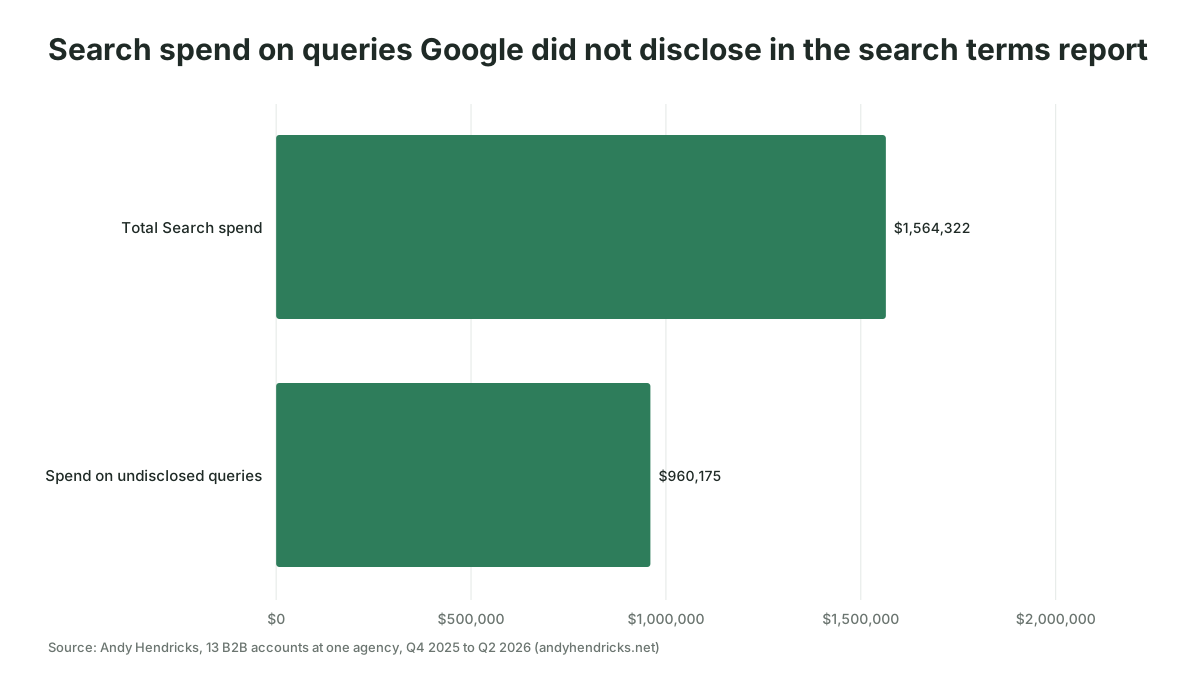
Two caveats before you act on that list, and both are the person's job. First, a zero-conversion term is an upper bound on waste rather than a confirmed loss: Ivitskiy notes the figure overstates waste when conversion tracking is incomplete, and a B2B account with a 60-day sales cycle will show terms that converted after the window closed. Second, the export is smaller than the account. Andy Hendricks measured 13 B2B accounts at one agency from Q4 2025 to Q2 2026 and found that $960,175 of $1,564,322 in Search spend, or 61%, went to queries Google did not disclose in the search terms report. Google's own documentation says low-volume terms are omitted for privacy. Whatever the model finds in the visible terms, say in the audit what share of spend it could not see.
The prompt for this step:
Attached is a Google Ads search terms report for the last 90 days and the
account's keyword export. Step 1: list every search term with cost above $50
and zero conversions, sorted by cost, with campaign and ad group. Step 2:
group those terms into themes (job seekers, free or DIY intent, competitor
names, unrelated products, locations we do not serve) and give the total cost
per theme. Step 3: list converting search terms that do not exist as
keywords, with their cost per conversion. Step 4: state the total cost in the
file and the share with zero conversions. Do not propose negatives yet.
The weekly version of this check, with the negatives decision built in, is in Using AI to review search terms and find negative keywords every week. The audit does the once-a-quarter sweep; the weekly review keeps it from piling up again.
Settings checks are the fastest wins and the easiest to miss
Settings drift is the audit finding that costs nothing to fix and that almost nobody looks for, because a setting that was right in 2024 does not announce that it is wrong now. A model with the whole-account export and the change history lists every setting per campaign and every change in the period in minutes.
The PPC.io read of 100 accounts gives a sense of how common the drift is: 32 of the 100 had auto-applied recommendations switched on, and in the Performance Max campaigns, 42 of 84 had served at least one page the advertiser never picked. Google's Performance Max documentation is plain that with final URL expansion on, "Google may replace your Final URL with a more relevant landing page", so that second number is the setting working as designed, on pages nobody chose.
Auto-apply deserves its own line in the audit. Google's help page explains how to turn each recommendation type off under Campaigns, Recommendations, Auto-apply settings, and adds that you can "confirm the user ID that opted into the recommendations" in change history. Ask the model to pull that user and date, because the answer can be a Google representative's suggestion accepted on a call two years ago.
Bid strategy changes are the other settings finding with a hidden cost. Google's learning period page says the Learning status "never lasts more than 7 days" and is triggered by structural changes such as creating or reactivating a strategy, adding or removing campaigns or keywords from it, or significantly changing the conversion goals; budget, target, creative and targeting changes never trigger it. A model reading the change history can count how many times a campaign re-entered learning in the quarter, and three resets in 90 days can explain a CPA chart better than any keyword does.
Four Google defaults belong in the prompt, because a model that does not know them will list them without comment. Google's advanced location options describe Presence or interest as the "default and recommended option", so a campaign targeting three cities with that option on is also reaching people anywhere who have shown interest in those cities. Search partners are "included by default" on every new Search campaign. The broad match keywords campaign setting, when on, converts "all existing phrase and exact match keywords into broad match", which rewrites the keyword list in one click. And as of November 2026, Enhanced CPC has been gone from Search and Display since the week of March 31, 2025, with campaigns that were never moved "now effectively using Manual CPC", so a Manual CPC campaign with no bid change in the change history may be a former Enhanced CPC campaign whose bids nobody has touched since.
The prompt for the settings check, with the whole-account export and the change history attached:
Attached are the whole-account export from Google Ads Editor and the change
history for the last 12 months. Step 1: for every enabled Search campaign
list: networks (search partners on or off, Display Network on or off),
targeted locations and the location option (Presence or interest, or
Presence), languages, bid strategy and its target, the broad match keywords
setting, conversion goals (account default or campaign-specific), and the
daily budget. If a setting is not in the export, say so rather than guess.
Step 2: flag campaigns where the location option is Presence or interest
while the locations are smaller than a country, where search partners or
the Display Network are on, where the broad match keywords setting is on,
and where a Manual CPC campaign has had no bid change in the period.
Step 3: from the change history, list every change to a bid strategy, a
conversion goal or a campaign or keyword status, with its date, user and
tool, and count per campaign how many of
them could have restarted Learning. Step 4: list the auto-apply
recommendation types that are on, with the user and date that enabled them.
Describe what you see; do not recommend changes yet.
Quality Score and optimization score answer different questions
Quality Score is a keyword-level diagnostic on a 1 to 10 scale, and optimization score is Google's 0 to 100% estimate of how well the account is set to perform. Audits often mix them up, so tell the model which one you mean before it reports.
Google's Quality Score page gives the three components, expected clickthrough rate, ad relevance and landing page experience, each rated above average, average or below average. A model can rank your highest-spending keywords by Quality Score and name the weak component in each, which tells you whether to fix the ad, the keyword grouping or the page.
Optimization score measures something else entirely. Google's documentation says "applying or dismissing these recommendations changes the overall optimization score of your account" and that the score "is not used by your Quality Score". A score of 62% tells you how many of Google's suggestions you have not acted on. It does not tell you how healthy the account is. Tell the model to leave optimization score out of its findings, and to treat each recommendation as a hypothesis to test against the search terms and performance exports rather than as a defect.
Four checks still need a person
The model's limits in an audit are the limits of the exports, so the checks below stay with you however good the tooling gets. Michael Dunlop at PPC.io puts it plainly after running audits both ways: "it tells you what to look at. You still decide what it means."
- Conversion quality. Nothing in Google Ads says whether a lead paid you. Match the period's conversions to the CRM and decide which actions deserve to drive bidding. One primary action per real business outcome is the usual answer.
- Business context. A CPA spike in May might be the pricing change, the sales team's hiring freeze or the competitor's launch. The model will see the spike in the export and offer a plausible story. You know which story is true.
- Landing pages in a browser. A URL checker finds the 404s. Only a person loads the page on a phone, reads the headline against the ad that sent them there, and notices that the form asks for eleven fields.
- The CAC ceiling. Every target CPA and target ROAS in the account should trace back to a number finance agreed. If you cannot produce that number, the audit's first action item is to agree it, before any bid change.
There is a fifth, quieter one. Dunlop also found that rephrasing the same question produced meaningfully different answers, so run the checklist as a fixed list of prompts, keep them in a shared document, and run the same prompts next quarter so the two audits can be compared.
Turn findings into a plan priced in dollars
An audit finding becomes a task only when it carries a dollar figure, an owner and a date. Most audit documents stop at the list of problems, which is why so many are read once and filed. The plan table below is the part finance will read.
| Finding | Monthly spend touched | Estimated monthly effect | Effort | Owner | By when |
|---|---|---|---|---|---|
| 9 primary conversion actions, 6 are page views | All of it | Unknown until fixed, listed first | Half a day | PPC lead | Week 1 |
| 310 zero-conversion terms above $50, 4 themes | $8,400 | $6,000 to $8,000 saved if negatives hold | 2 hours | PPC lead | Week 1 |
| Auto-apply on for 7 recommendation types since March 2025 | Indirect | Stops unplanned changes | 15 minutes | PPC lead | Week 1 |
| Two campaigns both bidding on the same 40 queries | $5,200 | Lower CPC on overlap, size unknown | 1 day | PPC lead | Week 3 |
| Brand campaign at 34% lost impression share (budget) | $2,100 | More brand conversions at a known CPA | 1 hour | Head of paid | Week 2 |
| Final URL expansion sent 18% of PMax clicks to the careers page | $1,900 | Reclaims that spend for product pages | 30 minutes | PPC lead | Week 1 |
The numbers in that table are a hypothetical built to show the format, and come from no real account. The method is simple: the model computes "monthly spend touched" from the exports for every finding, you supply the estimate of what fixing it does, and the plan sorts by estimate divided by effort. Tracking fixes go first regardless of the sort, because every other row's estimate depends on them.
A prompt for drafting the plan once the findings exist:
Attached are the findings from the checklist, with the row each came from, and the campaign
performance export. For each finding, calculate the monthly spend it touches
from the export and state the calculation. Put every tracking finding first.
Then propose a table with columns: finding, monthly spend touched, estimated
monthly effect (write "unknown" where the data cannot support a number),
effort in hours, owner, by when. Flag any estimate that assumes the
conversion data is correct.
Once the plan exists, two neighboring routines keep it honest. Automating weekly PPC reporting with AI is where each action item's effect gets checked the following week, and Automating PPC budget pacing checks with AI picks up the budget findings so a campaign capped by budget does not stay capped for another quarter.
Don't let the audit reset the bid strategy
One more failure belongs here because the audit itself can cause it.
Each structural change can put the campaign back into Learning for up to 7 days, and Google advises judging performance over two conversion cycles or a two-week window. Batch the bid strategy changes, make them once, and leave them alone.
Where to start this week
Export the seven reports this week and run the tracking check first, because the rest of the audit depends on what it finds. If you would rather have the checklist, prompts and plan format set up as a repeatable routine for your team, that is the kind of work Scalewell does with paid media teams.
Frequently asked questions
How often should you run a PPC audit?
Run the full audit quarterly and the search terms and settings checks weekly. Optmyzr reports that Melissa Mackey of Compound Growth Marketing recommends auditing at least every quarter, and in a 2021 Databox roundup Chris Riley of USA Rx said he audits every three months to get a workable amount of data. Also audit on any handover or unexplained drop.
Can AI run a Google Ads audit on its own?
As of November 2026, a model can run the counting and matching checks from exports but cannot judge conversion quality, business context or landing page fit. Google's MCP server lets an agent query the account, and Ask Advisor, in beta for English-language accounts since May 2026, answers questions across Ads, Analytics and Merchant Center. Neither replaces the person's checks.
How long does a PPC audit take with AI?
Budget about half a day for a mid-sized Google Ads account; that is our working estimate, not a measured figure. It splits into an hour of exports, an hour of model runs, and two to three hours of review. PPC.io reported a model finding three issues in about 90 seconds versus 20 minutes by hand. Treat that as one data point.
Do I need the Google Ads API or an MCP server to audit with AI?
No, exports from Google Ads Editor and the Google Ads interface cover every check in the list. Developer tokens were retired on September 9, 2026, per Google's documentation, and access is now granted through a Google Cloud project, which makes connectors easier to set up, but an export-based audit needs none of it.
What is the difference between a PPC audit and a Google Ads account audit?
A Google Ads account audit covers one platform; a PPC audit covers every paid search account, usually Google Ads and Microsoft Advertising together. This checklist is written for Google Ads; most rows carry over to Microsoft Advertising, but check its reports first. Run both audits in the same week so the plan can move budget between them.