AI agents for B2B PPC: a practical setup for Google and Microsoft Ads when conversions are few
In a B2B account with single-digit conversions, an AI agent should start on jobs it can judge without volume, and this guide sets one up in five days.

An AI agent for PPC in a B2B account should start on jobs it can judge without conversion volume: search term triage, budget pacing, broken links and disapprovals, and report drafts. Leave bids to platform bidding, judge everything against CRM-qualified stages, and set up one job in the first week with written inputs, rules, an approval step and a log.
You've probably seen the demo. An agent rebalances bids every hour across forty campaigns, and the vendor's chart goes up and to the right. Then you open your own Google Ads account, where the main non-brand campaign produced nine demo requests last month and three of them became opportunities, and you wonder what exactly that agent would be learning from.
This guide is for the PPC lead who wants a working agent on Google Ads and Microsoft Advertising by next Friday, in an account where conversions arrive in single digits. Definitions and the sorting of agent tasks by risk are in our guides to AI agents for marketing and agentic marketing for paid teams. This one is the setup: the job, the data, the permissions and the first five days.
A B2B account has too few conversions for an agent to judge bids
A campaign with 12 conversions a month gives an agent too little evidence to tell a good bid from a bad one. Treat those conversions as a Poisson count, which is the standard way to model rare events, and the exact 95% range for a true monthly rate behind an observed 12 runs from about 6.2 to 21.0, by our calculation. The same campaign could plausibly be worth half or nearly double what last month suggested.
So an agent that "optimizes" bids on that data is mostly reacting to luck, and the platforms' own rules say as much. Microsoft's bid strategy guide says that if a campaign "falls below 30 conversions over any 30-day period, Target CPA will stop optimizing your bids", with the same line for Maximize Conversions and Target ROAS (Microsoft Advertising API, budget and bid strategies). Google requires "at least 15 conversions in the past 30 days" before a Search campaign can use Target ROAS, and after a target changes it advises giving the bidder "1-2 conversion cycles" (Google Ads Help, about Target ROAS bidding).
If the platforms' own bidders won't act below those numbers, a model reading a weekly export shouldn't either. Our guide to AI bidding covers choosing bid strategies; for the agent, the rule is no bid or budget-shift job until the stage it judges on clears the platform's floor.
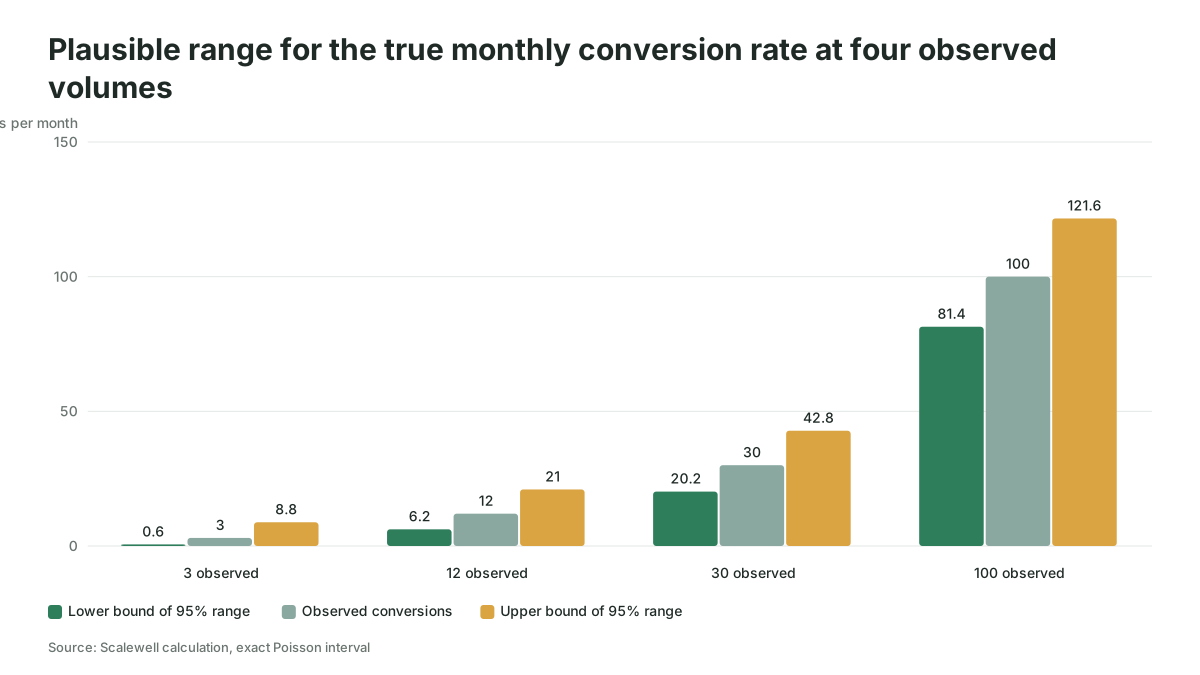
That still leaves plenty of work an agent can judge without a conversion count. Handing those jobs to an agent means the PPC lead spends the morning approving a short list rather than assembling it, and Scalewell's job with paid and demand gen teams is setting agents up on exactly this low-data work.
Five agent jobs that are safe with little conversion data
The safe jobs are the ones where the agent checks its answer against a fact it can see today: the words in a search term, the calendar, a page's status code, a policy label or a number in a report.
| Job | What the agent judges against | Needs conversion volume | Approval step | Where it reads the data |
|---|---|---|---|---|
| Search term triage | Your ICP, product list and exclusion rules | No | Person approves each negative | Search terms report, or the search_term_view resource in the Google Ads API |
| Budget pacing | Month-to-date spend against the monthly budget and the calendar | No | Person approves any budget change | Campaign spend and budget fields |
| Broken links and disapprovals | HTTP status of each final URL and each ad's policy approval status | No | Person approves fixes; alerts need none | final_urls and policy_summary.approval_status on ad_group_ad |
| Report drafting | Last week's numbers and the CRM stage counts | No | Person edits before it goes out | Platform reports plus a CRM export |
| Change log watch | Yesterday's changes against the agreed plan | No | Alert only | Google's change_event resource, Microsoft's change history report |
| Bid and target changes | Conversions at the qualified stage | Yes | Stays with platform bidding and a person | Not an agent job below the floor |
Search term triage is the one we'd start with in most B2B accounts, because it reads text rather than outcomes. A term like "free crm template" is low intent whether or not it has converted yet. The manual routine is in our weekly AI review of Google Ads negative keywords; the agent version runs it on a schedule and hands you the shortlist.
Pacing comes second because the inputs are arithmetic, and our PPC budget pacing guide has the seven morning checks an agent can run.
B2B AI agents should judge on CRM stages, not form fills
An agent only knows what you feed it, and in B2B the platform's conversion column often counts form fills rather than pipeline. If the agent reads "conversions" and the column holds every gated ebook download, it will praise the campaign filling the funnel with students.
Give the agent the CRM stage counts by campaign as a separate input. Imagine a hypothetical account where Campaign A reports 40 conversions and Campaign B reports 11. The CRM export shows Campaign A produced 2 sales-accepted leads and Campaign B produced 6. An agent told to judge by the platform column flags B as the weak campaign; an agent told to judge by sales-accepted leads flags A. The data is identical and the advice is the opposite.
Sending those stages back to the platforms is the longer fix, and Google's help page says that "Starting June 15, 2026, offline conversions import and enhanced conversions for leads uploads will be migrated to the Data Manager API and blocked in the Google Ads API" (Google Ads Help, about enhanced conversions for leads), so any agent still uploading through the old route needs moving. On Microsoft, the ApplyOfflineConversions operation takes up to 1,000 offline conversions per request, matched on the Microsoft Click Id, and Microsoft says to wait two hours after creating an offline conversion goal before sending any (Microsoft Advertising API, ApplyOfflineConversions).
Google's agent changes settings with your approval, while Microsoft's tools read and suggest
The platforms' own agents, as of November 2026, are the cheapest place to start, because they need no setup beyond eligibility.
Google's Ask Advisor, which Google's help page calls "an agentic conversational experience built within Gemini capabilities", sits in the top-right navigation bar of Google Ads under an "Ask Advisor" icon with a Beta badge, if your account is eligible. Its example requests include "Update daily budget of campaign C to $10", "Pause my campaign", "Update targeted location to Mexico", "Please update my final URL" and "Please appeal the disapproved ads", and it can "implement the suggested changes with your approval." It "isn't available in MCC accounts", and it is still in beta (Google Ads Help, Ask Advisor in Google Ads). It's useful on disapprovals and quick diagnostics, but it sees only Google's data, so it can't judge a campaign by your CRM stages.
Copilot in Microsoft Advertising Platform, per Microsoft's product page, covers "asset creation, quality assurance, troubleshooting, and reporting", including performance analysis that looks for "the root causes behind spikes and drops", and the page describes no step where Copilot changes a live campaign on its own (Microsoft Advertising, Copilot).
Microsoft's Advertising MCP server, which lets an AI client such as Claude, ChatGPT or Microsoft 365 Copilot query your account, moved to "open pilot with read-only access" on June 17, 2026 (Microsoft Advertising blog, June 2026). Microsoft's page says it is "free to connect", though you may need a paid AI subscription, and it covers campaigns, ad groups, ads, keywords and performance metrics (Microsoft Advertising, MCP server). Its use-case guide adds change history for the last 180 days (Microsoft Learn, MCP server use cases), which suits report drafting and change log watch.
On Microsoft, LinkedIn profile targeting by company, industry and job function (Microsoft Learn, LinkedIn profile targeting) gives an agent one more check: whether ICP-restricted ad groups still carry those targets.
A Google Ads AI agent of your own runs through the API or Google's MCP server
Google's open-source MCP server is the shortest route to an agent of your own on the Google Ads API. As of November 2026, Google's developer page lists its mode as "Read and partial mutate (asset creation, video uploads, and label management with propose-and-confirm validation, or configurable read-only mode)" and says it "cannot create, modify, pause, or enable campaigns, ad groups, ads, budgets, or bids" (Google Ads API, MCP server). The GitHub README for version 0.0.6, released on November 2, 2026, puts all four write tools (create_asset, upload_video_asset, manage_labels and manage_label_associations) behind a "Propose & Confirm" step: each write is validated without committing first, and commits only with a checksum "after explicit user approval" (googleads/google-ads-mcp on GitHub). Neither page offers a way to skip that step, but the write tools themselves switch off: set labels: false and assets: false in tools_config.yaml for a strictly read-only deployment. Negative keywords aren't among the write tools either. Our Google Ads MCP setup guide covers the connection step by step.
Labels are more useful than they look. An agent that writes only labels can tag every ad with a broken URL, and the PPC lead filters by that label and decides, which is a write permission with almost no blast radius.
An agent that adds negatives or changes budgets needs the API directly and a developer token; Google's access levels allow an Explorer token "2,880 operations / day for production accounts", Basic 15,000 and Standard unlimited (Google Ads API, access levels), plenty for one account's daily checks.
On Microsoft, the Bing Ads API needs a developer token plus an OAuth access token for a user, with separate sandbox credentials (Microsoft Advertising API, get started). The same page makes the point that matters for safety: a developer token "does not grant additional permissions to any Microsoft Advertising accounts", so the agent can do only what its user role allows. Microsoft's Viewer role "has read-only permissions" (Microsoft Advertising API, account hierarchy and user permissions), and Google's Read-only access level can view campaigns and run reports but can't edit campaigns (Google Ads Help, about access levels).
Anthropic's engineering team gives the right default: "we recommend finding the simplest solution possible, and only increasing complexity when needed. This might mean not building agentic systems at all" (Anthropic, Building effective agents). If a job is a fixed rule, such as a URL returning an error, a Google Ads script or Microsoft Advertising script does it more cheaply, and the model earns its place on judgment, such as reading intent.
The first-week setup: one job, its inputs, rules, approval and log
The first week should end with one agent job running read-only on one account, reviewed by a named person. The example is search term triage on Google Ads; the same five days work for pacing or broken links.
- Monday: pick the job and give the agent its own user. In Google Ads, open the Admin menu, then Access and security, and invite a dedicated account for the agent with Read-only access. In Microsoft Advertising, add a user with the Viewer role. A separate user keeps the agent's actions apart from your team's in every change log, and the day ends with a named job, a named reviewer and a read-only login.
- Tuesday: assemble the inputs. Export the last 7 days of search terms (in Google Ads, Search terms sits within the Insights and reports sub-menu) and a 90-day export for context. Add your current negative keyword lists, a one-page ICP note, your product and competitor names, and the list of search terms that produced a CRM opportunity in the last 12 months. That last file stops the agent from blocking the term sales loves.
- Wednesday: write the rules. Use the job sheet below. Write the terms you would never want blocked, when the agent must say "unsure", and the output format, so the day ends with a written spec rather than a chat prompt.
- Thursday: run it against last week. Have the agent triage the week your PPC lead already reviewed by hand, count where they agree and disagree, and fix the rules for every disagreement where the agent was wrong.
- Friday: set the approval routine and the log. Schedule the run for Monday mornings, put a 20-minute review in the reviewer's calendar, and start the log. The agent writes proposals; the person applies the approved ones, or, if you later grant labels only, the agent labels and the person acts on the label.
Here is the job sheet we'd write; copy it and replace the bracketed parts.
JOB: Weekly search term triage, Google Ads account [ID], non-brand Search campaigns only
OWNER: [PPC lead name]. Reviews every Monday by 11:00.
INPUTS:
  - search_terms_last_7_days.csv (search term, campaign, ad group, matched keyword,
    match type, added/excluded status, impressions, clicks, cost, conversions)
  - search_terms_last_90_days.csv (same columns)
  - negative_lists.csv (current shared and campaign-level negatives)
  - icp_note.md (who we sell to, company size, roles, use cases we don't serve)
  - protected_terms.csv (terms that produced a CRM opportunity in the last 12 months)
RULES:
  1. Never propose a negative that matches or contains a protected term.
  2. Never propose account-level negatives. Ad-group or campaign level only.
  3. Flag as "block" only terms that are clearly outside the ICP note
     (jobs, students, free templates, consumer use, unrelated products).
  4. Mark anything you are less than sure about as "unsure" with one line of reason.
  5. Propose phrase or exact match, and say which.
  6. Do not judge a term by its conversion count alone. Fewer than 3 conversions is not evidence.
OUTPUT: one table, sorted by cost: search term | proposal (block / keep / unsure) |
  level | match type | reason in one line | cost last 7 days
LIMITS: read-only. You do not add negatives. A person applies approved rows.
LOG: append every proposal and the reviewer's decision to triage_log.csv with the date.
The log is what later justifies wider permissions: one row per proposal with the date, term, proposal, decision and, for overruled rows, a reason. For changes in the account itself, Google's change_event resource returns changes from the past 30 days with the user and client type (Google Ads API, change event). Microsoft's change history report shows "which user made the changes", about one hour after the change (Microsoft Advertising API, change history report).

The agent has earned more permissions when the log says so
After four weekly runs, the log should show three things. The reviewer overrules fewer than 1 in 10 of its "block" proposals, which is our rule of thumb rather than a published benchmark. No approved negative matches a protected term. And the review takes less time than the manual triage did, timed in week one and week four.
When all three hold, widen one step: let the agent apply ad-group-level negatives on its own while campaign-level ones still wait for a person. Keep budgets, bids and account-level negatives with people for good, because a wrong call on those costs you weeks of pipeline.
Where a PPC agent setup goes wrong in a thin account
Most failures in low-volume accounts come from the setup around the agent rather than the model.
The agent gets a job that needs volume. Someone asks it to "pause what isn't converting", and in an account where the median ad group converts once a month, it pauses half the account on noise. Below the platform floors, pausing on conversions is a person's call with the CRM open.
The agent's user gets Standard or Admin access "just for now", and six months later the only thing between the agent and your budget is the prompt. Keep it on Read-only and Viewer until the log earns it more.
The review becomes a rubber stamp. A 200-row table approved in four minutes is the illusion of oversight, so cap the output at what one person can read properly, sorted by cost.
And the report says hours saved and nothing else. Put cost per sales-accepted lead in the same weekly note, because moving waste to campaigns that create opportunities is the reason to run the agent.
Where to start
Pick search term triage on your largest non-brand Google Ads campaign, create a Read-only user for the agent this week, and run the job sheet above against last week's terms before you trust it with this week's. Scalewell's part, if you want it, is choosing that first job with you and building the routine around it, so the agent keeps doing real work after the first month.
Frequently asked questions
Can an AI agent manage Microsoft Ads campaigns?
Not with Microsoft's own tools as of November 2026: its MCP server is a read-only pilot, and Copilot's page describes no step where it changes a live campaign alone. A custom agent can write through the Bing Ads API, limited to what its user role allows.
What is agentic AI advertising?
Agentic AI advertising is software that pursues a goal you set in an ad account and decides its own steps, such as reading reports, proposing negatives or drafting assets, rather than following a fixed rule. In B2B paid search today, it mostly means supervised agents that propose changes for a person to approve. Our guide to agentic marketing covers the wider definition.
How much does it cost to run an AI agent on Google Ads?
The software can cost very little. Google's MCP server is open source, Microsoft says its MCP server is free to connect, and Ask Advisor is built into Google Ads. The costs are the AI client subscription or model usage, any cloud hosting you choose, and the reviewer's time each week, which is the one worth budgeting.
Can one agent work across several Google Ads accounts?
Yes, through the API or Google's MCP server, which accepts a manager account's login customer ID for each call. Ask Advisor works one account at a time, because Google says it isn't available in MCC accounts. Run the same job sheet per account, because each account's protected terms and ICP notes differ, and keep one log per account.