The Google Ads AI tools paid teams actually use, sorted by job
A plain survey of the AI tools PPC teams use with Google Ads, grouped by the job each does, who approves changes, and what it costs as of November 2026.

Google Ads AI tools fall into five groups: general assistants such as ChatGPT, Claude and Gemini, Google's own Ask Advisor inside the account, third-party optimizers such as Optmyzr, Adalysis and Opteo, AI-written Google Ads scripts, and MCP connectors that link an assistant to your account. Pick by the job you need done and by who approves changes.
You've probably sat through this one. A vendor demo shows an agent rebuilding a campaign in four minutes, someone forwards it with "should we be using this?", and you spend Thursday working out what it can see, what it can change and what it costs per seat. Meanwhile the search terms report from last week still hasn't been reviewed.
This guide is for the PPC lead or head of paid media who has to choose. It sorts the tools by the job they do, says what we judged them on, gives prices checked in November 2026, and ends with a rule for deciding what to add first. If you want prompts to paste, our ChatGPT prompts for Google Ads library covers that separately.
Most PPC teams run on free tools and one chat assistant
The biggest practitioner survey on the topic says the typical stack is smaller than the vendor lists suggest. In the Global State of PPC 2026 report from PPCsurvey.com and TrueClicks, 1,306 practitioners answered between November 17 and December 24, 2025, and 62% of the individual contributors and freelancers who manage Google campaigns said they use no paid PPC management tool at all. Among in-house teams the figure was 77%.
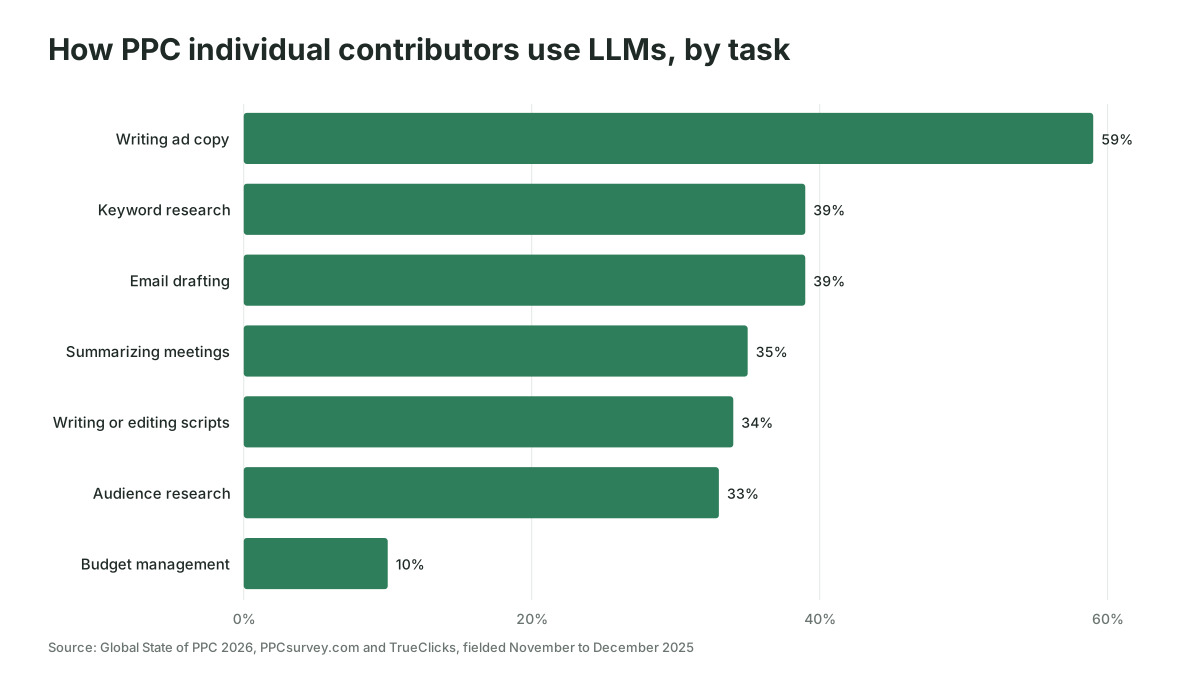
That doesn't mean people avoid AI. The same report found ChatGPT was the most used large language model, with Gemini second, and that individual contributors used LLMs for writing ad copy (59%), keyword research and email drafting (39% each), summarizing meetings (35%), writing or editing scripts (34%) and audience research (33%). Use for budget management sat at 10%. The authors are open that Optmyzr and TrueClicks sponsor the survey, which if anything overstates tool use.
So the honest starting point for most teams is Google's free features, Google Ads Editor, a handful of scripts and a chat assistant. Everything else on this list has to earn its place against that. Whichever of these you keep, the payoff comes from using it every week, and that weekly use is what Scalewell builds with paid teams, so account hours go to decisions instead of exports.
We judged each tool on four questions
Feature lists all look the same after a while, so we compared the groups on the four things that decide whether a tool helps or creates a clean-up job:
- What it can see. A pasted export, the live account, or several platforms at once.
- What it can change. Nothing, staged suggestions, or direct edits.
- Where approval happens. In the chat, in the vendor's own interface, or in Google Ads.
- What it costs as of November 2026, taken from each vendor's own pricing page or documentation.
The third question matters more than it looks. A "yes, go ahead" typed into a chat window is a weak control when the change is a bid or a keyword. Tools that make you approve the exact change somewhere outside the chat are slower, and that's the point.
We haven't ranked the tools against each other, because the right answer depends on spend, team size and who on the team will own the setup.
General assistants handle the thinking work around the account
ChatGPT, Claude and Gemini are where most of the AI work in Google Ads actually happens: drafting responsive search ad copy, clustering keywords, reading a search terms export, explaining a performance drop, writing a script brief. They see only what you paste or connect, and on their own they change nothing.
That limit is also their safety. An assistant that can only read a CSV can't pause your best campaign by mistake. The weakness is the copy-paste loop: exports go stale, nobody remembers which date range they pulled, and the answer is only as good as the file.
Pricing differs by vendor and changes often. As of November 2026, Claude's pricing page lists a free plan, Pro at $20 a month billed monthly ($17 a month billed annually), and Team at $25 per standard seat billed monthly. ChatGPT and Gemini also sell individual and business plans; check their current pricing pages before you budget seats. For connecting an assistant to outside tools, note that Adalysis's setup guide says ChatGPT needs a paid plan and Developer mode for custom connectors, while Claude allows one custom connector even on the free plan.
Use it for: copy, analysis of exports, script briefs, explaining changes to stakeholders. Skip it for: anything that needs live data every day, unless you connect it.
Google's Ask Advisor works inside a single account
Ask Advisor is Google's Gemini-powered assistant built into Google Ads. It started life as Ads Advisor, which Google announced on November 12, 2025 for English-language accounts, and Google presented the broader Ask Advisor at Google Marketing Live on May 20, 2026, according to PPC Land, spanning Google Ads and Google Analytics, with Merchant Center to follow.
According to the Google Ads Help Center as of November 2026, Ask Advisor answers account questions, explains performance changes, helps troubleshoot performance and policy issues, suggests text and image creatives, and can "implement the suggested changes with your approval." Its example requests include pausing a campaign, changing its location targeting and updating a daily budget. It is in beta, and the same page states that it "isn't available in MCC accounts."
That MCC line is the catch for agencies and for any in-house team that works from a manager account. The other limit is perspective. Ask Advisor sees Google's data and Google's goals, so it's good at "why did my ad get disapproved" and less useful for "should this budget move to LinkedIn". We cover where Google's built-in AI ends and your own begins in AI in Google Ads: Google's built-in AI vs your own.
Use it for: policy fixes, quick performance questions, creative suggestions in a single account. Skip it for: cross-channel decisions and anything run from a manager account.
Third-party optimizers add rules, audits and an approval queue
Optmyzr, Adalysis and Opteo are three established third-party tools. They began as rule engines, audit tools and recommendation feeds; Optmyzr and Adalysis have since added AI assistants and MCP connections, while Opteo's homepage names neither. Their value is the deterministic part: the same check run the same way every day, with a log.
| Tool | Platforms (vendor's own pages) | AI features as of November 2026 | Pricing as of November 2026 |
|---|---|---|---|
| Optmyzr | Google Ads, plus Meta and LinkedIn Ads tools | Sidekick assistant; MCP for Claude, ChatGPT, Gemini and others; changes staged as change requests for a person to review and apply | Priced by monthly ad spend (amounts not shown in page text); 14-day free trial; 30% off annual prepaid |
| Adalysis | Google Ads and Microsoft Ads | MCP server, read-only by default; optional writes previewed and approved inside Adalysis, previews expire after 10 minutes | Priced by maximum monthly ad spend; 30-day free trial on the first tier; 15% off annual plans |
| Opteo | Google Ads | Recommendations from continuous monitoring; no AI or MCP features named on its homepage | Basic $129, Professional $249, Agency $499 a month, with account and spend caps; Enterprise on request |
The approval designs are worth reading closely. Optmyzr's MCP guide says changes made through the connector "aren't applied to your account immediately"; they go to a Change Requests page, are checked against your policy guardrails, and wait for a person. Adalysis's documentation says a change applies only after you approve it in Adalysis, that saying "yes" in the chat "is not an approval", and that budgets, bid strategies, negative keywords and extensions can't be changed through the connector at all.
Opteo's pricing page caps Basic at 10 accounts and $25,000 of monthly spend, Professional at 25 accounts and $100,000, and Agency at 75 accounts and $250,000. If you need LinkedIn in the same tool, of the three only Optmyzr lists LinkedIn Ads tools, including budget alerts that combine platforms.
Use them for: daily monitoring, audits, rule-based changes across many accounts. Skip them for: a single small account, where the subscription can cost more than the hours it saves.
AI-written scripts cover the gaps nobody sells a tool for
Google Ads scripts are JavaScript that runs inside your account on a schedule, and Google's documentation says they run "at no additional cost." The AI part is the authoring: you describe the check in plain words and ChatGPT or Claude drafts the code.
Scripts are popular for good reason. The State of PPC report found the average number of scripts per Google Ads account rose from 3.8 to 5.4 since its 2024 edition. A pacing alert, a broken-URL check or a weekly search term sweep into a sheet costs nothing to run and does exactly one job.
The risk is that AI drafts confident code for things scripts can't do, or does what you literally asked rather than what you meant. Our guide to writing Google Ads scripts with AI has the brief format, three starter scripts and the four-stage test we'd run before any script makes changes.
Use them for: narrow, repeatable checks and alerts. Skip them for: one-off questions, which an assistant answers faster.
MCP connectors let an assistant read the live account
An MCP connector links ChatGPT, Claude or another assistant directly to Google Ads, so it queries current data instead of a stale export. As of November 2026 there are three routes: Google's own server, hosted connector services, and open-source community servers.
Google's own server is free and open source, and as of November 2026 its two official pages agree: it reads the account and writes only assets, video uploads and labels. The developer documentation now lists its mode as "Read and partial mutate", with a "configurable read-only mode", and read tools to list accessible accounts, run Google Ads Query Language searches and describe resources. The GitHub README for version 0.0.6, released November 2, 2026, adds tools that create assets and manage labels, each behind a "Propose & Confirm" step that commits only after explicit user approval, and says to switch those tools off "for strictly read-only deployments." None of the listed tools touch bids, budgets or campaign status. It needs a Google Cloud project with Google Ads API access and OAuth credentials, and no longer needs a developer token; if you host it for the team, you pay the hosting.
Hosted services such as Windsor.ai, Pipeboard and Composio, along with the optimizer connectors above, add write actions and handle the authentication for you, at the price of a vendor holding a token to your accounts. We compared each route's read and write limits and prices in our Google Ads MCP guide, and B2B teams who also want LinkedIn in the same assistant can follow the LinkedIn Ads MCP guide.
Use them for: weekly analysis, account questions, cross-checking a report. Skip them for: unattended changes.
Add tools in the order your bottleneck dictates
The decision gets simpler if you ask what's slowing the team down this month rather than which tool is most impressive. Here is the rule we'd use:
- If the bottleneck is writing (copy, briefs, stakeholder notes), a general assistant is enough. Spend nothing else yet.
- If it's knowing what changed, connect an assistant to the account through Google's free server with its write tools switched off, or use Ask Advisor if you work in single accounts.
- If it's the same check across many accounts, write scripts first. Buy an optimizer when you have more checks than anyone can maintain, or when you need an audit trail for changes.
- If you want AI to make changes, choose a route where approval happens outside the chat, on a preview of the exact change.
Take a hypothetical in-house team spending $40,000 a month on Google Ads across three accounts. Opteo's Professional plan would cost $249 a month, about 0.6% of spend. If the team's real problem is that nobody has time to explain performance to the CMO, that money does less than a connected assistant and a weekly prompt. If the problem is missed budget overruns, a free pacing script can catch them.

AI tools fail on quality before they fail on access
The State of PPC report found quality and accuracy were the biggest challenges teams face with AI and automation, ahead of access, privacy and tooling. That matches what goes wrong in practice:
- Confident wrong answers. An assistant reading a partial export will happily explain a drop that is really a date-range mismatch. Ask it to state the date range and row count before it concludes anything.
- Approvals that aren't approvals. A connector that writes on a chat "yes" puts one tired Friday between you and a broken account.
- Tool sprawl. Three tools each sending a weekly summary means nobody reads any of them.
- Measuring the wrong win. Most respondents in the survey reported saving one to five hours a week with AI, and the authors noted almost nobody saves 20 or more. A tool that saves four hours but optimizes toward cheap leads is a bad trade if sales never speaks to them.
Who should skip most of this list? A single account under a few thousand dollars a month is usually better served by Google's free features and one assistant. The subscriptions start to pay back when there are more accounts, more checks or more people asking questions than one person can answer.
Start with the bottleneck, then add one tool
Write down the one Google Ads job that ate the most hours last month, match it to a group above, and trial one tool for that job before adding a second. If you'd like help setting up the assistant, connector or scripts around how your team already works, that's the kind of work Scalewell does with paid media teams.
Frequently asked questions
Can ChatGPT manage my Google Ads account on its own?
ChatGPT can't run the account on its own, but it can analyze exports, write copy and draft scripts, and with a connector it can read live data. Optmyzr and Adalysis stage changes for a person to approve, some general connector services write without an approval step, and Google's own MCP server limits writes to assets and labels behind a confirm step. Treat ChatGPT as an analyst, and keep campaign decisions with your team.
Can Ask Advisor change my campaigns?
It can, once you approve the change. Google's help page lists example requests such as "Pause my campaign", "Rename campaign A to B" and "Update daily budget of campaign C to $10", alongside reports, keyword suggestions and new text and image creatives. It works in individual accounts only, since manager (MCC) accounts are excluded, and its view stops at Google's own data.
Which is better for Google Ads, ChatGPT or Claude?
Both handle copy, analysis and script drafting well, and both connect to Google Ads through MCP. The State of PPC 2026 survey found ChatGPT more widely used, while freelancers gave Claude a larger share of their LLM time. Pick the one your team already pays for, then judge it on your own account data.
Do I need a developer token to connect AI to Google Ads?
Not for Google's own MCP server. Its documentation says the latest version ties API access to a Google Cloud project and no longer needs a developer token. You still need a Cloud project with Google Ads API access and OAuth credentials. Hosted connector services handle that setup for you in exchange for holding a token.
Do Google Ads AI tools work for LinkedIn Ads too?
Some do. As of November 2026, Optmyzr lists LinkedIn Ads tools such as budget alerts and Sidekick questions, Adalysis covers Google Ads and Microsoft Ads, and Opteo's site describes Google Ads only. Ask Advisor is Google-only. For a B2B team, a general assistant with separate Google and LinkedIn connectors is often the simplest way to see both.