AI marketing workflows: how to map your paid team's week before you automate anything
Before you automate anything, list what your paid team repeats each week, score each task on frequency, rules, risk and data access, and apply a build, buy or leave rule; this guide gives the method and a worked inventory.

AI marketing workflows pay off when you start from an inventory of what your paid team repeats every week, score each task on frequency, rules, risk and data access, then decide what to build, what to buy and what to leave alone. This guide gives you that inventory method, the scoring scale and a worked example.
You have probably sat through the meeting where someone shows a list of "12 AI workflows every marketer needs", the room nods, and nothing changes on Monday. The list was about marketing in general. Your week is about pacing three accounts, a search term review that always slips to Thursday, and a report that eats a morning.
This article is for the head of paid media or PPC lead who runs the accounts. Its sibling post, which paid media tasks to automate first, ranks the tasks; this one gives you the method for producing your own ranking, including the awkward finding that the task eating most of your hours is often the one AI should touch last.
Most AI marketing workflow lists skip the inventory
The pages that rank for AI marketing workflows describe workflows in the abstract and rarely tell you how to pick yours. Dropbox defines an AI workflow for marketing as "a repeatable series of steps that uses AI to help marketing teams" and then lists six steps for content work. Wrike's guide gets closer, with the advice to map the current process first and fix the handoff that causes the most re-entry, but it still assumes the work is content rather than ad accounts.
The missing piece is that tasks which look alike can sit on opposite sides of what AI does well. A field experiment published in 2023, led by Harvard Business School researchers with colleagues at BCG, Wharton, MIT Sloan and Warwick and run with 758 BCG consultants, found that consultants using AI on tasks inside the model's capability finished 12% more work, 25% faster, with results 40% higher in quality, while on a more complex task outside that capability they were 19 percentage points less likely to produce the right answer. The authors called this the "jagged technological frontier", and co-author Edward McFowland III said finding where it runs requires "studying it with your people, deeply in your context". You can read the summary on HBS Working Knowledge.
For a paid team, "deeply in your context" means a list of your own tasks rather than a vendor's. The inventory is how you find your frontier before you spend money crossing it in the wrong place.
Have three things in place before you score anything
A task inventory only works if it records what the team does, with minutes attached, and if you know which systems the team can reach by machine. Set these up in the week before you score.
First, ask every person on the paid team to log their repeated tasks for one full week, with the minutes each run took. Log the real thing, including the "quick look" at pacing that happens four times a day. Process documents describe the intended week, and you need the actual one.
Second, write an access list. For each system the team touches (Google Ads, Meta Ads Manager, LinkedIn Campaign Manager, the CRM, GA4, the media plan spreadsheet), note whether the data is reachable through an API, a connector or an MCP server, exportable by hand, or only visible on a screen. This column decides more of your outcomes than any model choice. When that column is filled in, AI can take real jobs off the team's plate, and Scalewell makes those systems reachable for the team alongside the inventory.
Third, name the owner of the inventory and write one sentence on who may approve a change to a live campaign, so that later debates about letting AI touch budgets have a rule to refer to.
Step 1: list every task the team repeats, with eight fields
The inventory is a table with one row per repeated task and eight columns; budget about two hours to compile it from the week of logs. The columns are:
- Task, named as a verb and an object, such as "review search terms and add negatives".
- Owner, by role.
- Frequency, as runs per month.
- Minutes per run, from the log, not from memory.
- Inputs, listing the system each input comes from.
- Output, meaning the file, change or message the task produces.
- Reader, meaning who looks at the output and what they do with it.
- Cost of a wrong run, in plain words: "an email with a wrong number", "a paused campaign nobody notices until Monday", "$4,000 moved to the wrong campaign".
Column eight is the one people skip and the one that matters most. If you cannot describe what a bad run costs, you cannot decide how much supervision the task needs. Plan for 15 to 30 rows for a team of two to four people; if you have 60, you are logging sub-steps, so merge them back to the level a new hire would recognize as "a job".
Step 2: score each task on frequency, rules, risk and data access
Each task gets four scores on a short scale, and the total out of nine tells you which decision rule applies. Every paid team already weighs these four things in its head; the table just writes them down.
| Dimension | Score 0 | Score 1 | Score 2 or 3 |
|---|---|---|---|
| Frequency (max 3) | Less than monthly: 0 | Monthly: 1 | Weekly: 2. Daily or more: 3 |
| Rules (max 2) | Judgment: a senior person decides case by case | Partly written: there are rules, with exceptions nobody has listed | Fully written: a new hire could follow the instructions without asking |
| Risk (max 2) | Spends money or changes a live campaign, and a mistake could go unnoticed for a day or more | Changes something live, but the change is reversible the same day and visible | Produces something a person reads before anything happens |
| Data access (max 2) | Inputs live in someone's head, in screenshots or behind a login nobody can automate | Inputs are exportable by hand | Inputs are reachable through an API, a connector, an MCP server or a shared sheet |
Frequency is capped at 3 and the rest at 2 on purpose. A daily task scores high even when it is tiny, which is right: a five-minute check done every working day is about 22 hours a year, and the interruption costs more than the minutes suggest.
Rules is where most teams are too generous with themselves. "We know a bad search term when we see one" is a score of 0, however experienced the person is. Write down the rules you apply for one week and count the exceptions you add; if the list stabilizes, the score becomes 2 and the task becomes a candidate.
Risk scores highest for the safest task, and it uses two ideas that Search Atlas calls reversibility and blast radius: how quickly an action can be undone and how many dollars or assets one action touches. Their three tiers (draft only, recommend only, auto-deploy with a synchronous approval and an audit trail) map directly onto scores 2, 1 and 0.
Data access is the honest column. Chris Fitkin at Metacto puts the same point in his workflow mapping worksheet: "Build when the trigger is observable, the context is accessible, the judgment point is repeatable, and the metric is worth moving", and "Pause when the workflow depends on undocumented heroics that no one can explain." A task whose inputs arrive as a screenshot in Slack depends on heroics.
Step 3: apply the build, buy or leave rule
The decision rule reads the four scores in a fixed order, and the order matters more than the total.
- If data access is 0, leave it, with a note on what would raise the score. Fix the data path first; no amount of prompting reads a screenshot reliably at scale.
- If rules is 0, leave the decision with a person and at most let AI prepare the options. Budget reallocation and bid strategy changes usually land here, whatever their hours.
- If the total is 7 or more and risk is 2, run it unattended with a weekly sample review. The output is a draft or a notification, so a bad run costs a few minutes of reading.
- If the total is 7 or more and risk is 1, run it as recommend only: AI prepares the full change and a named person approves it in the tool where it runs, the same day.
- If the total is 7 or more and risk is 0, which happens when a spend-changing task has fully written rules, hand it to a platform rule with a hard cap, or run it as recommend only with every approval recorded.
- If the total is 5 or 6, let AI assist: the model drafts or proposes, and a person approves every output before it goes anywhere. If a platform-native tool already covers the task, switch that on instead.
- If the total is 4 or under, leave it. Some work is just work.
Within "do it", build or buy comes down to specificity. Buy, or rather switch on what you already pay for, when the task is identical in every account on earth. As of November 2026, Google Ads automated rules can change ad status, budgets and bids and send email alerts on a schedule; Google Ads scripts run for up to 30 minutes per execution on an advertiser account, with 250 authorized scripts per account; and Meta's Ad Rules Engine, the service behind Automated Rules in Ads Manager, evaluates rules either on a set time interval or as soon as an ad's metadata or insights data change. A disapproved-ad alert or a "pause if daily spend exceeds X" rule does not need a language model.
Build when the task carries your team's own definitions: your negative keyword rules, your pacing commentary in the format your finance partner reads, your definition of a qualified lead. The building blocks, as of November 2026, are an MCP server, which the Model Context Protocol site defines as the "open-source standard for connecting AI applications to external systems", and a skill, which Anthropic's Agent Skills documentation describes as a folder with a SKILL.md file that packages "instructions, metadata, and optional resources" that the model loads when the task matches its description. The same documentation notes that skills on the Claude API run with no network access, so an account-reading skill belongs in Claude Code or in claude.ai with a connector. Our posts on Claude skills for paid media teams and what AI agents can realistically run in a paid media team cover the building in detail.
Leave is a real outcome; in the worked example below a third of the rows land there, and yours may too. A row marked leave with a reason ("rules 0, revisit when the reallocation policy is written") beats a half-built agent nobody trusts.
A worked inventory for a hypothetical three-person paid team
Imagine a B2B software company with a paid team of three managing about $150,000 a month across Google Ads, Meta and LinkedIn, reporting to a VP of Marketing who answers to the CFO. Every number and every cost in this table is invented to show the method; your inventory will look different. The cost column is what sets the Risk score: a wrong number in something a person reads scores 2, a live change that is visible and can be undone the same day scores 1, and a change to live spend that could go unnoticed for a day or more scores 0.
| Task | Runs per month | Minutes per run | Hours per year | Cost of a wrong run | Frequency | Rules | Risk | Data | Total | Decision |
|---|---|---|---|---|---|---|---|---|---|---|
| Check pacing per account against the monthly plan | 20 | 15 | 60 | A summary with a wrong pacing figure, caught at the next morning's run | 3 | 2 | 2 | 2 | 9 | Build: unattended daily summary |
| Catch disapproved ads and policy flags | 20 | 10 | 40 | A missed flag, so an ad that cannot run until it is fixed and reviewed again stays dark a day longer | 3 | 2 | 2 | 2 | 9 | Buy: platform rules and scripts |
| Check landing pages for errors and broken forms | 20 | 10 | 40 | A missed alert, so clicks land on a broken form for a day | 3 | 2 | 2 | 2 | 9 | Buy: a script that alerts |
| Produce the Monday performance report | 4 | 180 | 144 | A wrong number in front of the VP, corrected by email the same day | 2 | 2 | 2 | 2 | 8 | Build: AI fills your template, you write the two lines of judgment |
| Review search terms and add negatives | 4 | 60 | 48 | A good query blocked by a wrong negative, visible in Google Ads change history and undone the same day | 2 | 2 | 1 | 2 | 7 | Recommend only: AI proposes, a person approves in Google Ads |
| QA conversion tracking across the three platforms | 4 | 45 | 36 | A false alarm that sends someone into the tag setup, or a broken tag missed until the next weekly run | 2 | 2 | 2 | 1 | 7 | Build: unattended check, widen it once GA4 and the CRM are connected |
| Draft new ad copy variants from what won | 4 | 90 | 72 | A weak or off-brand variant that a person rejects before it runs | 2 | 1 | 2 | 1 | 6 | AI assists; park the automation |
| Check what competitors launched | 4 | 45 | 36 | A launch missed or misread, picked up at the next week's review | 2 | 1 | 2 | 1 | 6 | AI assists; park the automation |
| Reallocate budget between campaigns | 4 | 120 | 96 | $15,000 of the month's budget moved to the wrong campaign, unnoticed for days because total spend still paces to plan | 2 | 0 | 0 | 2 | 4 | Leave the decision with a person; AI prepares the options |
| Change bid strategies and targets | 1 | 90 | 18 | A target set too loose, overpaying on every click for a week or more before anyone reads the results | 1 | 0 | 0 | 2 | 3 | Leave |
| Refresh target account lists from the CRM | 1 | 120 | 24 | The wrong account list live on LinkedIn until someone swaps it back, usually the same day | 1 | 1 | 1 | 1 | 4 | Leave until the CRM export is automated |
| Update the media plan for next month | 1 | 240 | 48 | A channel budget set wrong in next month's plan, visible in the first day's pacing summary and fixed the same day | 1 | 0 | 1 | 1 | 3 | Leave |
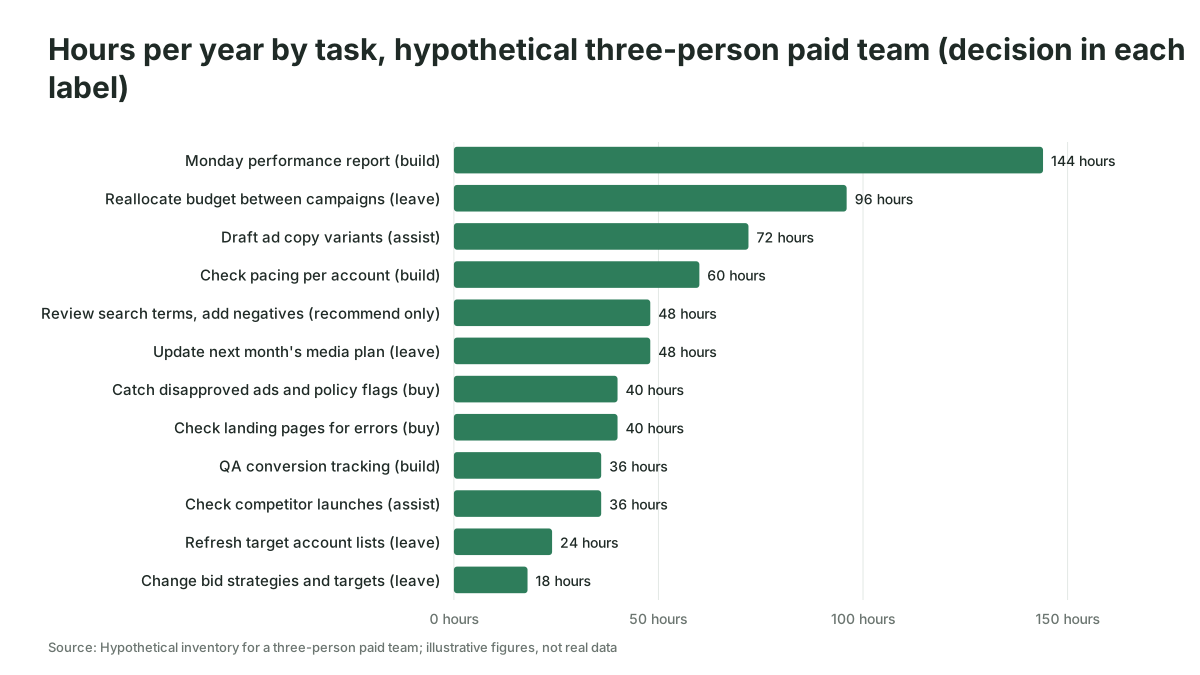
The report is the biggest win and the safest one. At 144 hours a year it is the largest single row, it has written rules, it produces a document a person reads, and every input is reachable by connector. The AI fills the template; you add the two sentences the VP actually reads.
Budget reallocation is the second-biggest row and the one you leave. Ninety-six hours a year is tempting, and it is exactly the task the HBS experiment warns about: it looks routine, and a confident wrong answer moves real money to the wrong place. Let AI assemble the options with the numbers behind each one, and keep the decision with the person whose name is on the budget. Where that line sits in general is the subject of where humans must stay in the loop on ad spend.
Ranked by hours alone, this team would have started with the report and then the reallocation. Ranked by the score, it starts with the report, a daily pacing summary, two platform rules and a gated search term review, and it leaves roughly 190 hours of judgment work with people, where it belongs.
An agent fits the rows where the rules are written but the steps change
An AI agent belongs on a row that scores 2 on rules and 2 on data access but whose steps differ from one run to the next, while a row that runs the same steps every time is better served by a fixed automation. That split is the practical answer to how to use agentic AI in marketing workflows. Agentic marketing means software that picks its own steps toward a goal you set, and your scores already show where picking steps helps and where it only adds another way to go wrong.
Look at the worked inventory again. The disapproved-ad alert, the landing page check and the pacing summary follow the same path every day, so a platform rule, a script or a scheduled skill does the job more cheaply and more predictably. The search term review is different: one week the agent reads the terms and proposes two obvious negatives, the next it has to open a landing page and check the CRM before deciding whether "free template" queries ever turned into an opportunity. Conversion tracking QA would join it once GA4 and the CRM are connected and its data score reaches 2, because when a tag breaks the cause has to be traced. Rows that score 0 on rules get no agent at all, because an agent cannot follow a policy nobody has written down.
The risk score sets the approval step. On a risk 2 row the agent's output is a draft a person reads; on a risk 1 row the agent prepares the change and a named person approves it in the platform. Some tools build that gate in. As of November 2026, Google's Google Ads MCP server runs its few write tools through a two-step propose-and-confirm workflow and "cannot create, modify, pause, or enable campaigns, ad groups, ads, budgets, or bids", so an agent built on it can read your search terms but leaves the negatives for a person to add.
Logging is what lets you loosen a gate later. Have every run write one line: the inputs it read, the tools it called, the change it proposed, and who approved or edited it, and when. That log feeds the override rate in the measures below, and Google Ads change history covers anything that went live.
Start with one agent on one row. In the hypothetical team that is the search term review, which scores 7 with risk 1: run it recommend only for a month, read the log every week, and add a second row only after that. Our guide to AI agents for B2B PPC walks through that first week in Google and Microsoft Ads.
Skipping the scoring puts the riskiest task first
A team that ranks by hours saved rather than by score will usually put the risky task first, lean on the vendor's time saving figure, and automate a process that was already broken.
Published time-saving numbers are self-reported and do not describe paid media. HubSpot's 2026 State of Marketing survey of more than 1,500 marketers found that about one-third say AI saves their team 10 to 14 hours a week and another third say over 15 hours. Salesforce's tenth State of Marketing report, from a survey of 4,450 marketers published in February 2026, says marketers "expect to reclaim roughly eight hours per week" with AI agents, and that only 13% use agentic AI today. Both are survey answers about expectation and perception across all of marketing. We could find no independent study of how many hours a PPC specialist spends on reporting or optimization; the figures that circulate, such as Dataslayer's "3 to 5 hours weekly" for manual reporting, come from vendors with no stated method. Your own week of logs is the only credible baseline you will get.
Automating a broken process makes it break faster. If the Monday report currently shows 400 leads and leaves out what sales did with them, an AI that fills the same template every Monday at 7am has industrialized the problem. Fix the template, then automate the filling. And over-gating kills adoption as surely as under-gating causes incidents: Search Atlas makes the point that reviewers asked to approve everything start rubber-stamping out of fatigue, so a recommend-only task that takes two days to approve has the wrong gate.
Data access is where plans die quietly. A team scores twelve tasks, finds that nine have a data access score of 1 or 0, and concludes that AI does not work for them. The right conclusion is that the first project is a connector rather than a workflow, and for a paid team whose biggest account is Google Ads, that means a Google Ads connector.
The mapping worked when hours move to judgment tasks
The mapping worked when, 90 days later, a second week of logs shows hours moving from written-rule tasks to judgment tasks and the approval records show the gates set at the right level. Four measures tell you whether that happened.
- Hours per task, from a second week of logging, compared with the first. You want the report and the daily checks to shrink and the time on reallocation, planning and creative judgment to grow or at least hold.
- Runs completed without a person touching them, for the unattended rows. A pacing summary that ran every working day for a quarter is a workflow; one that ran half of them is a hobby.
- Override rate, for the recommend-only rows. We would treat more than one change in five to the AI's search term proposals as a sign that the rules column was scored too generously and needs another week of writing down exceptions. If a person changes nothing for a quarter, the row may be ready for a lighter gate.
- Anything in the inventory that moved. A row that went from leave to build because someone finally automated the CRM export is the method paying for itself.
None of this is pipeline yet, and you should say so to your VP. What you can promise at 90 days is a team spending its hours on the decisions that move pipeline, and a log that proves it.
How Scalewell turns your inventory into AI jobs that run every week
Scalewell's audit follows the same logic as this inventory, so the scoring you just did is a head start. It maps the recurring jobs in your paid team and ranks which one AI should take first, and that ranking becomes the roadmap.
In the build sprint, the top tasks turn into workflows, agents or skills inside the tools and AI your team already uses, with new systems only where a task needs one. The aim is the test this guide sets, with hours moving from pulling and logging to judgment work. A project runs typically 8 to 12 weeks, and the roadmap of next jobs stays with you.
Start with the week of logs
Ask your team to log their repeated tasks for one week, with minutes, and book two hours the following Monday to score the table together. If you would like help setting up the inventory, the scoring and the first builds around how your team already works, that is what we do at Scalewell.
Frequently asked questions
What is an AI marketing workflow?
An AI marketing workflow is a repeated marketing task, or a chain of them, in which an AI model performs defined steps such as pulling data, drafting or proposing changes, while people keep the steps that need judgment or approval. For a paid team, examples are a daily pacing summary or a gated weekly search term review.
How is marketing workflow automation with AI different from automated rules?
Automated rules in Google Ads or Meta act on fixed conditions you set, such as pausing an ad when spend passes a threshold, and need no language model. AI workflow automation adds a model that reads unstructured inputs, writes commentary or proposes changes by your written method. Use rules for fixed conditions and AI for your own definitions.
Should a paid media team let AI change budgets on its own?
We would keep budget reallocation with a person for now and let AI prepare the options and the numbers behind each one. In the scoring method here, a task that changes live spend with judgment involved scores 0 on both rules and risk, which puts it in "leave" regardless of hours saved, until the reallocation policy is written down.
Do we need a developer to build AI workflows for a marketing team?
For the "buy" rows, no: automated rules and the connectors you already pay for cover them. For "build" rows, as of November 2026 a skill is a folder with a SKILL.md text file of instructions, and the ad account is reached separately through an MCP server. A technical marketer can set both up; a developer helps with authentication and testing.